
How to create AI Beach Name image for free (2 Methods)

Mike Huddlesman
Meet Mike Huddlesman, the brilliant mind behind CopyRocket AI

Welcome to the exciting world of AI-generated art! 🌟 Have you ever dreamed of seeing your name etched on the soft sands of a sun-kissed beach, looking as though it’s been there for ages?
Well, guess what—you can make that dream a reality, and the best part is, it won’t cost you a penny! With the magic of artificial intelligence, you’re about to transform a simple idea into an eye-popping 3D image that might go viral.
I’m going to walk you through the whole process using our inhouse Free AI image generator and a super cool tool called Microsoft Copilot. It’s like having a genius artist friend who can paint whatever you describe, but it’s all online and easy to use.
So, are you ready to dive in and make a splash with your very own 3D AI beach name image? Let’s hit the beach – digitally, of course! 🏖️✨
Steps to Create AI Beach Name Images
Using Copyrocket’s Free AI Image Generator Tool
First things first, sign up for a free account here and navigate to the AI image option from the sidebar;
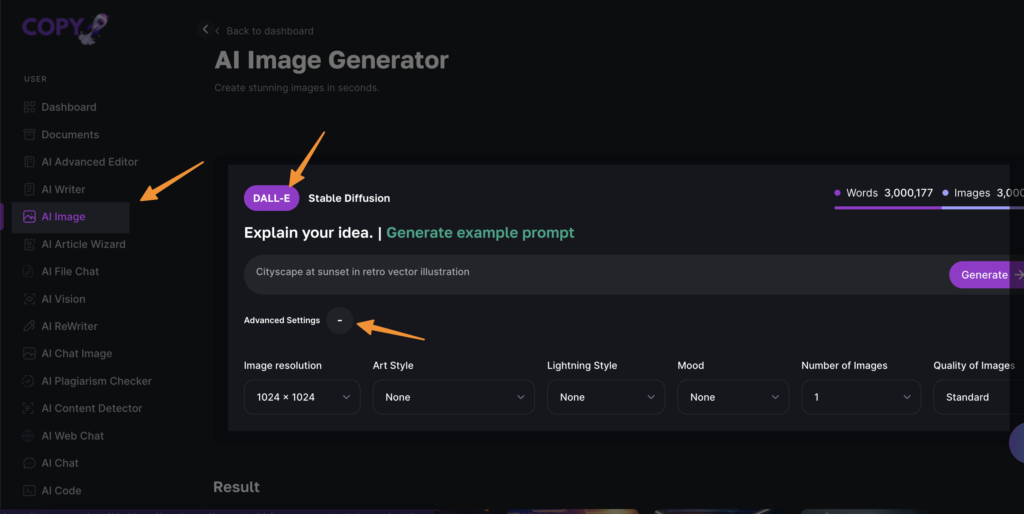
Next, Choose the Dall-E option and enable the advanced settings.
Now, it’s time to craft our perfect prompt, which we have discussed here already. You can start with;
“Beautifull Korean girl, sitting on sand near the beach under full moon night and shooting stars, writing her name “Mandy” in bright, sparkling yellow light, use creative font, 3d style image, girl posing to camera pointing to her name written on sand with both hands, white skin tone, long black hair, blue eyes, hyper-realistic 8k octane render.”
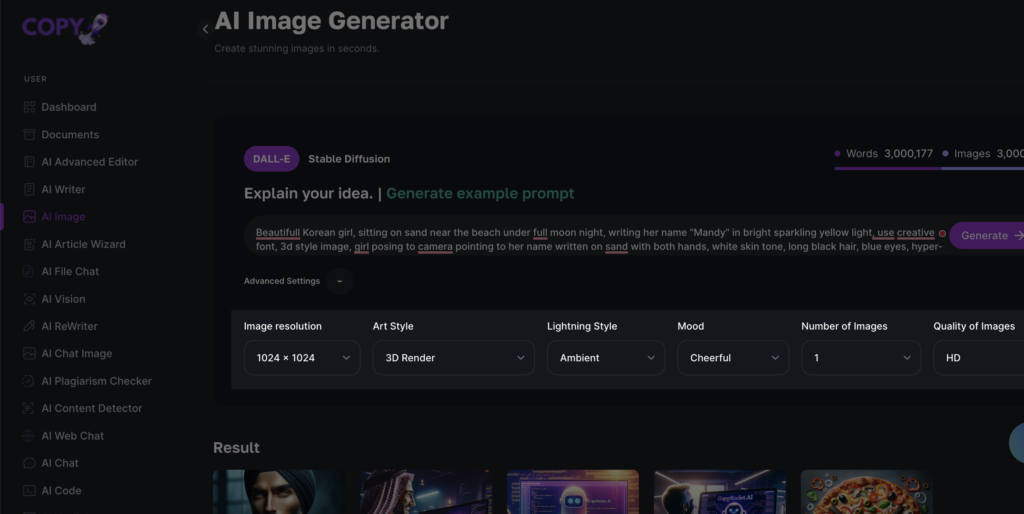
Next choose Dimensions, Art style to 3D render, Lightning style to “Ambient”, Mood to chearfull and quality of images to HD.
When you’re ready, click on “Generate”;
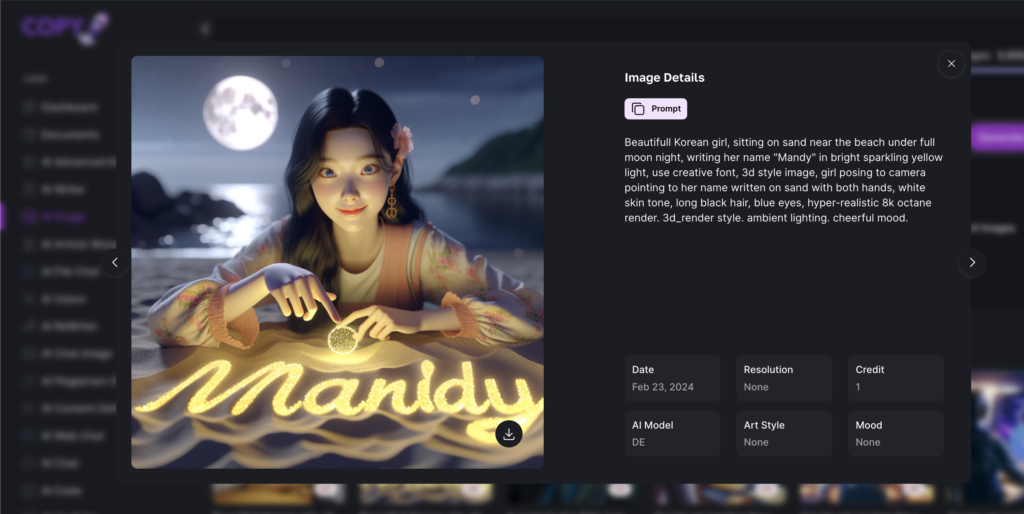
Alternatively, you can use our Free AI image generator tool to generate without signing up here;

Using Microsoft’s CoPilot
Alright, beach dreamers, it’s time to take your image crafting skills to the next level with Microsoft CoPilot! 🌌⭐
Are you all set to see your name glittering in the moonlit shore?
Follow these super simple steps and voilà, your masterpiece will be ready in no time. Holding hands with innovation has never been this fun!
Here’s how to spin the magic:
Saunter over to Bing Image Creator and log in with your Microsoft account.
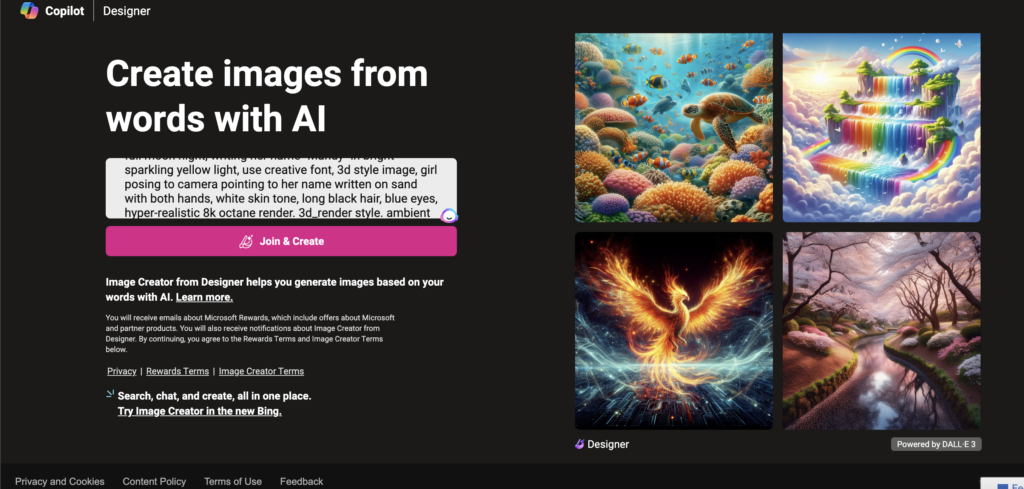
Pop your creative prompt, which we have created above, into the search box.
Hit that shiny “Create” button and sit tight while CoPilot’s AI gets busy painting your vision into virtual life.
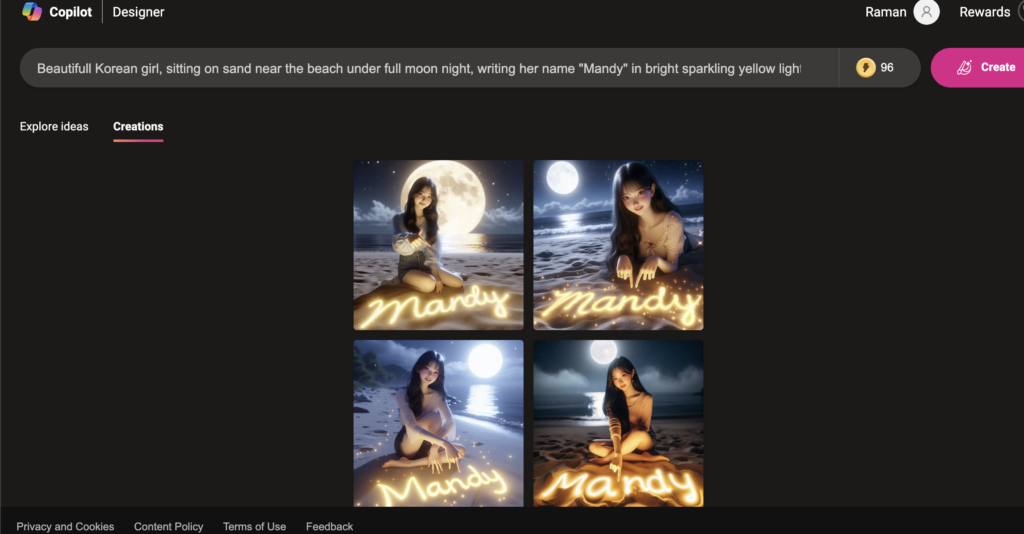
When it’s showtime, and your image is ready to rock, either download it to show off to your friends or share it on social media right away by clicking “Share” – just imagine the likes you’ll rake in!
Ready to tell the world a story with your name?
Microsoft CoPilot is your new BFF to make it happen – no art classes needed, just your brilliant imagination and a few clicks. Get ready to light up someone’s timeline with your stunning, starlit beach name masterpiece! 🎉📸
How to Use AI Face Generator for Free (5 Ways)
Frequently Asked Questions
Can I really create an AI Beach Name image for free?
You betcha! With Copyrocket’s Free AI Image Generator Tool and Microsoft’s CoPilot, you don’t have to spend a dime. Just sign up, follow the super simple steps, and start making beachy art with your name!
Do I need to be a tech whiz to use these tools?
Nope, you don’t need to be a tech guru at all. If you can click a mouse, you can make some digital waves. We’ve made sure everything is easy as pie, and I’ll be here to walk you through every click.
What if I can’t think of a good prompt for my image?
No worries! We’ve got a bunch of example prompts to get your creativity flowing. Think about your dream beach scene, toss in some sparkle and personal flair, and you’ve got it. You’re the artist here – go wild!
Conclusion
Congratulations, beach art enthusiasts! 🌊🎨 You’ve just learned how to create your very own AI beach name image for free with Copyrocket’s Free AI Image Generator Tool and Microsoft CoPilot. With these tools at your fingertips, the sky’s the limit – or should we say, the sea? Get ready to make a splash on social media with your unique, personalized beach art. So, what are you waiting for? Dive in and make a statement with your name on the beach today! 🌴🌅
Looking for more AI-generated fun? Keep an eye out for our future tutorials and releases to keep expanding your artistic horizons. And don’t forget to share your masterpieces with us using #AIBeachNameImage on Instagram and tag us @copywithrocket.
Frequently Asked Questions

Written by
Mike Huddlesman
Meet Mike Huddlesman, the brilliant mind behind CopyRocket AI. As the founder of this innovative company, Mike brings a wealth of experience in machine learning, PHP, and Next JS to the table. With h
View all postsYour AI Marketing Agents
Are Ready to Work
Stop spending hours on copywriting. Let AI craft high-converting ads, emails, blog posts & social media content in seconds.
Start Creating for FreeNo credit card required. 50+ AI tools included.
Related Articles
 General
NotebookLM For Coders: Turn Docs Into Faster Code
Code work often fails for a simple reason. You do not have the right context at the right time. You read docs in one tab, skim tickets in another tab, and then...

 General
How to Optimize for AI Search in 2026: The Complete Guide
AI search has shifted from experimental feature to primary search method for millions of users. ChatGPT Search, Google AI Overviews, Perplexity, Claude, and Gem...
 General
Claude Opus 4.6 Review: Here's What New!
Claude Opus 4.6 from Anthropic draws attention because teams want an AI model that writes better code, follows instructions, and stays consistent across long se...