
NotebookLM For Coders: Turn Docs Into Faster Code

Raman Singh
Raman Singh is a highly skilled marketing professional who serves as the head of marketing at Copyrocket AI

Code work often fails for a simple reason. You do not have the right context at the right time. You read docs in one tab, skim tickets in another tab, and then guess how a module works. NotebookLM For Coders fixes that pattern by keeping your work grounded in sources you provide. You load project docs, tickets, ADRs, and code snippets.
Then you ask questions that stay tied to those sources. You get answers with citations, so you can verify fast and avoid hallucinated detail.
This post explains how to use NotebookLM as a coder in daily work. It covers setup, source choices, prompt patterns, and repeatable workflows for onboarding, debugging, refactors, tests, and code reviews. It also covers limits and safety checks, so you keep quality high.
Key Takeaways
- NotebookLM For Coders works best when you upload the right sources: READMEs, ADRs, tickets, API docs, and key code files.
- Use citation-first prompts to force grounded answers and reduce wrong assumptions.
- Create repeatable notebooks for onboarding, incident response, refactors, and release notes.
- Pair NotebookLM with your IDE by copying small, relevant code slices instead of dumping everything.
- Use it for planning, explanation, and verification steps, then implement in your editor with tests.
- Protect secrets and comply with policy by scrubbing sensitive data and using least-privilege sources.
What NotebookLM For Coders Is (And What It Is Not)
You need a clear mental model before you rely on any AI tool. NotebookLM is a source-grounded assistant. You give it sources. It answers using those sources. It can summarize, compare, outline, and explain based on what you uploaded. This makes it useful for coding work that depends on project context.
What it does well for developers
- Explains project behavior by referencing your docs, tickets, and code excerpts.
- Finds relationships across sources, like “Which services call this endpoint?”
- Creates structured outputs like implementation plans, checklists, and test matrices.
- Speeds up onboarding by turning scattered docs into Q&A you can trust.
- Supports code review prep by summarizing changes and listing risk areas from your notes.
What it does not replace
- Your build and test tools. It cannot run code inside your repo.
- Your debugger. It cannot inspect runtime state.
- Your security process. It cannot decide what data you can upload.
- Your judgment. It can still miss details if your sources miss details.
How NotebookLM Fits Into a Modern Coding Workflow
NotebookLM works best as a context layer. You use it before you code, while you debug, and after you ship.
You ask it to explain, compare, and plan. Then you do the actual edits in your IDE. This section shows common workflow points where it saves time.
Before you code: turn reading into decisions
- Summarize a feature request into acceptance criteria.
- Extract constraints from ADRs and compliance notes.
- List impacted modules and integration points.
- Draft an implementation plan with steps and risks.
While you code: keep context close
- Ask for the exact behavior of an API based on your internal docs.
- Ask for edge cases already mentioned in tickets or postmortems.
- Ask for a test checklist based on known failures.
After you code: ship with fewer surprises
- Generate release notes from merged PR descriptions and tickets.
- Draft a rollout plan and monitoring checklist.
- Write a short “what changed” note for support and QA.
Getting Started: Set Up NotebookLM For Coders in 20 Minutes
Most value comes from a clean notebook setup. You need the right sources and a consistent structure. Use the steps below to create a notebook that stays useful for weeks, not hours.
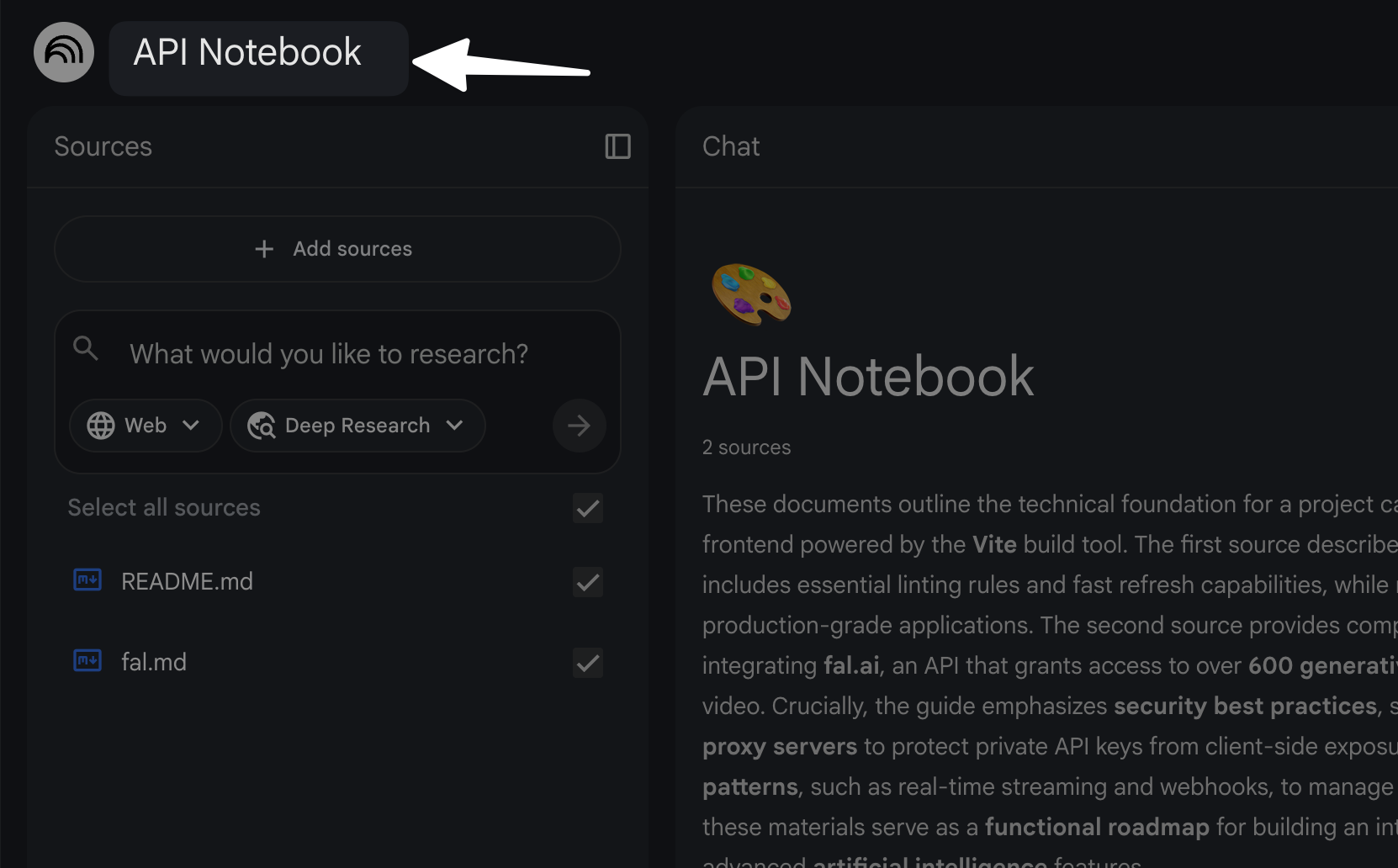
Step 1: Create one notebook per purpose
- Onboarding notebook for a repo or service.
- Feature notebook for one epic or large ticket.
- Incident notebook for an outage or performance issue.
- API notebook for an integration you maintain.
Step 2: Add sources that answer real questions
Pick sources that reduce guesswork. Start small. Add more only when you hit a gap.
- README.md and CONTRIBUTING.md
- Architecture diagram notes or ADRs
- Key module docs and API specs
- Recent tickets for the same area
- Postmortems and incident reports
- Code excerpts for the exact modules you touch
Step 2 (optional): Use Deep research to scrape web for docs
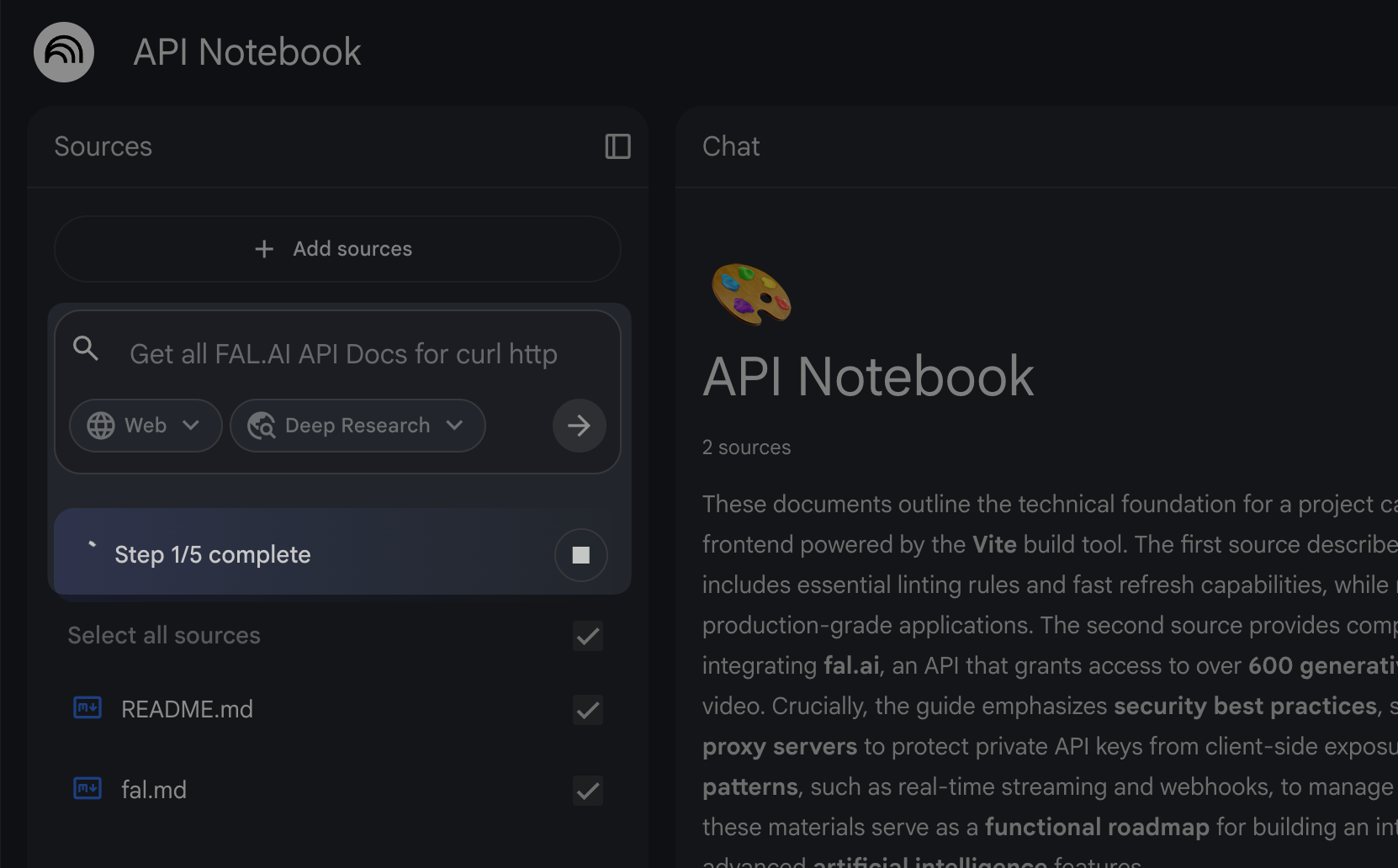
You can also use NotebookLM's deep research to scrape internet for feature docs like API.
- Scrape Context Docs.
- Research API Docs.
- Research Tech specific docs i.e. reactJS, nextJS etc.
Step 3: Use a “source index” note
Create a short note that lists what you uploaded and why. This makes future queries easier.
- Source name
- What it covers
- What it does not cover
- Last updated date
Step 4: Add a “definitions” note
Projects use local terms. You need a shared glossary.
- Service names and owners
- Domain terms and abbreviations
- Event names and payload names
- Error codes and their meanings
What Sources to Upload for the Best Coding Results
NotebookLM answers only as well as your sources. Coders often upload too much or too little. Use this section to choose sources that produce clear, cited answers.
High-signal sources for most repos
- Architecture Decision Records (ADRs) for constraints and tradeoffs.
- API specifications for request and response rules.
- Database schema docs for data shapes and constraints.
- Runbooks for operational steps and alerts.
- Postmortems for known failure modes.
High-signal sources for code changes
- PR descriptions and review notes for recent changes.
- Design docs for the feature you touch.
- Unit test files for expected behavior.
- Interface definitions and public method docs.
What to avoid uploading
- Secrets like API keys, tokens, and private certificates.
- Customer data unless policy allows it and you sanitize it.
- Huge dumps of the full repo if you only need one module.
- Outdated docs that conflict with current code.
Prompt Patterns That Work for NotebookLM For Coders
Good prompts force grounded output. They also force structure. Use the patterns below as copy-paste templates. Replace bracket text with your details.
Citation-first question
- Prompt: “Answer using only the provided sources. Quote the exact lines that support your answer. If the sources do not say, reply ‘Not in sources.’ Question: [your question].”
Explain a module like a teammate
- Prompt: “Explain how [module/file/class] works. Use a step-by-step flow. List inputs, outputs, side effects, and error paths. Add citations for each claim.”
Find edge cases and failure modes
- Prompt: “List edge cases for [feature]. Use sources to justify each edge case. Group by: validation, auth, concurrency, retries, and data consistency.”
Create a test plan from sources
- Prompt: “Create a test matrix for [feature]. Use rows for scenarios and columns for unit, integration, and e2e. Include expected results and citations.”
Generate a safe refactor plan
- Prompt: “Propose a refactor plan for [module]. Keep behavior the same. List steps, risks, and rollback plan. Cite sources for current behavior.”
Ask for a decision summary
- Prompt: “Summarize the decisions in these ADRs. For each decision, list: context, decision, consequences, and ‘do not do’ items. Use citations.”
Onboarding Workflow: Use NotebookLM to Learn a Codebase Faster
Onboarding fails when you read too much and retain too little. NotebookLM helps because you can ask targeted questions and verify answers with citations. Use this workflow for a new repo or service.
Build an onboarding notebook
- Add README, setup docs, and local dev steps.
- Add architecture docs, ADRs, and service ownership notes.
- Add 3 to 5 recent tickets and PR summaries for the same service.
- Add one “happy path” request trace if you have it.
Ask these onboarding questions
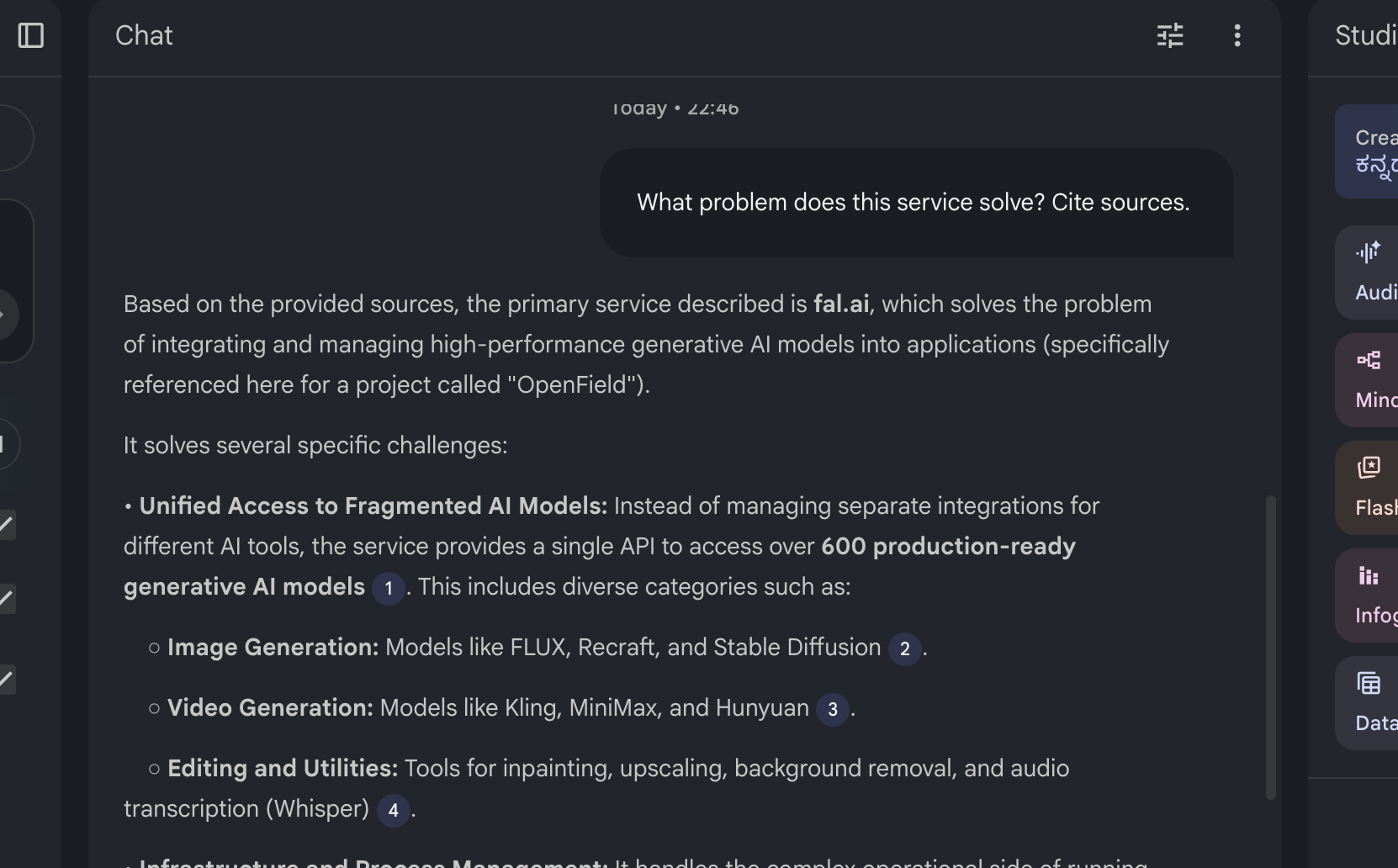
- “What problem does this service solve? Cite sources.”
- “What are the main entry points and routes?”
- “What data stores does it use and why?”
- “What background jobs run and what triggers them?”
- “What are the top 10 errors and their causes?”
Turn answers into a personal runbook
- Create a checklist for local setup.
- Create a list of “files to read first.”
- Create a list of “commands I run weekly.”
- Create a short glossary for domain terms.
Debugging Workflow: Use NotebookLM to Reduce Search Time
Debugging often means you search logs, scan code, and guess root cause. NotebookLM helps you connect symptoms to known behavior in your sources. You still confirm with logs and tests, but you start with better hypotheses.
Create a debugging notebook for an incident
- Add the alert description and timeline.
- Add log samples with sensitive fields removed.
- Add runbook steps and known fixes.
- Add relevant code excerpts for the failing path.
- Add recent deploy notes and config changes.
Use a root-cause question format
- Prompt: “Given these logs and docs, list 5 plausible root causes. For each cause, cite evidence, list a validation step, and list a fix step.”
Ask for a “what changed” diff summary
- Prompt: “From the deploy notes and PR summaries, list changes that can affect [metric/endpoint]. Rank by risk. Cite sources.”
Generate a verification checklist
- Confirm assumptions with a reproduction step.
- Confirm data shape and schema constraints.
- Confirm retry behavior and timeout values.
- Confirm feature flags and config overrides.
API and SDK Work: Use NotebookLM to Keep Integrations Correct
API work breaks when docs drift or when edge cases hide in tickets. NotebookLM helps you keep one place for API truth, as long as you upload current specs and internal notes.
Build an API notebook
- Add OpenAPI or internal API docs.
- Add auth docs and token rules.
- Add rate limit and retry guidance.
- Add example requests and responses.
- Add known issues from tickets and support notes.
Ask for contract-level answers
- “List required fields and validation rules for [endpoint]. Cite sources.”
- “List error codes for [endpoint] and what each means.”
- “List idempotency rules and safe retry guidance.”
Generate integration tests and mocks
- Prompt: “Create a set of integration test cases for [endpoint]. Include success and failure cases. Use the examples in sources. Output as a checklist.”
- Prompt: “Create mock responses for [endpoint] for these scenarios: [list]. Use fields exactly as in sources.”
Refactors and Migrations: Use NotebookLM to Keep Behavior Stable
Refactors fail when you change behavior without noticing. NotebookLM helps you pin current behavior to citations from tests, docs, and code excerpts. Then you refactor with a clear target.
Start with a behavior inventory
- Prompt: “List the observable behaviors of [module]. Include inputs, outputs, side effects, and error cases. Cite sources for each item.”
Create a migration plan with checkpoints
- Define “done” in measurable terms.
- List steps with small PR boundaries.
- List backward compatibility needs.
- List data migration steps and rollback steps.
- List monitoring signals to watch after deploy.
Ask for risk hotspots
- Prompt: “Identify risk hotspots for refactoring [module]. Use sources to justify. Focus on concurrency, caching, and data consistency.”
Testing Workflow: Use NotebookLM to Improve Coverage With Less Guessing
Testing gets easier when you start from known requirements and known failures. NotebookLM helps you extract those from sources and turn them into test cases.
Turn tickets into test scenarios
- Prompt: “From these tickets, extract test scenarios. For each scenario, list preconditions, steps, and expected result. Cite the ticket text.”
Turn postmortems into regression tests
- Prompt: “From this postmortem, list regression tests that would catch the failure earlier. Group by unit, integration, and e2e. Cite sources.”
Create boundary tests from validation rules
- Minimum and maximum values
- Empty and null handling
- Invalid enum values
- Unicode and encoding cases
- Time zone and date parsing cases
Code Reviews: Use NotebookLM to Review Changes With Better Context
Review quality drops when the reviewer lacks context. NotebookLM helps you build a review brief from PR notes, design docs, and key code excerpts. You still read the diff, but you start with a clear map.
Create a PR review notebook
- Add the PR description and linked tickets.
- Add the design doc section that matches the change.
- Add relevant module docs and API contracts.
- Add code excerpts for the changed functions and callers.
Ask for a review checklist
- Prompt: “Create a code review checklist for this change. Include correctness, security, performance, and backward compatibility. Cite sources for expected behavior.”
Ask for “what can break” analysis
- Prompt: “List ways this change can break production. For each item, list a detection signal and a mitigation. Base answers on sources.”
Pairing NotebookLM With VS Code and Your Terminal
NotebookLM does not need a deep IDE integration to help you. You can pair it with VS Code by moving small, relevant context between tools. The key is to keep the context tight and current.
A simple loop that works
- Copy a small code slice from VS Code (one function or one file section).
- Paste it into a note as a source excerpt.
- Ask a focused question with a citation requirement.
- Apply the change in VS Code.
- Run tests in your terminal.
- Update the notebook with the final decision and why.
What to paste from the terminal
- Build errors and stack traces (scrub secrets).
- Failing test output.
- Performance metrics and timings.
- Key log lines around the failure window.
Using NotebookLM For Coders to Write Better Docs and Release Notes
Docs often lag because writing feels slow. NotebookLM makes doc updates faster because it can draft from your sources. You still edit for accuracy, but you start from a strong outline.
Update a README after a change
- Prompt: “Draft README updates for this change. Include setup, config, and usage. Use only the provided sources and cite each new claim.”
Create release notes from tickets and PRs
- Prompt: “Create release notes for version [x]. Group by features, fixes, and breaking changes. Use ticket titles and PR notes as sources. Keep each bullet under 20 words.”
Create a support handoff note
- What changed
- Who is affected
- New error messages
- New dashboards or alerts
- Rollback steps
Quality Control: How to Verify NotebookLM Output
You should treat AI output as a draft. Verification keeps your code safe. NotebookLM helps because it can cite sources, but you still need checks.
Use a three-check rule
- Citation check: Every key claim should point to a source.
- Diff check: Confirm the claim matches current code, not old docs.
- Test check: Add or run tests that validate the behavior.
Force “unknown” answers
- Prompt: “If you cannot find support in sources, say ‘Not in sources’ and ask me what source to add.”
Watch for common failure patterns
- Sources conflict and the answer picks one without stating the conflict.
- Sources mention a rule in one place but list an exception elsewhere.
- Code excerpts are partial and miss a key caller or guard clause.
Security and Privacy: Safe Use Rules for Developers
Security rules matter more than speed. Use NotebookLM in a way that protects users and your company. If your org has a policy, follow it first. If you do not have a policy, use the rules below.
Do not upload these items
- Production secrets and private keys
- Session tokens and auth headers
- Customer PII and payment data
- Internal security findings and exploit steps
Scrub sensitive fields before you paste
- Replace emails with
user@example.com - Replace IDs with
USER_ID_123 - Replace tokens with
TOKEN_REDACTED - Replace hostnames with
host-redacted
Use least-privilege sources
- Upload only the files you need for the task.
- Prefer public interfaces over internal dumps.
- Prefer docs and tests over raw production data.
Notebook Templates You Can Copy Today
Templates save time because they standardize your sources and questions. Use these as starting points. Keep each notebook small and focused.
Template: New service onboarding
- Sources: README, setup guide, ADRs, runbook, 3 recent PRs, 3 recent incidents
- Questions:
- “What are the top 5 user flows?”
- “What are the top 5 dependencies and why?”
- “What is the deploy process and rollback process?”
- “What alerts fire most often and what do they mean?”
Template: Feature implementation
- Sources: ticket, acceptance criteria, design doc, API spec, relevant code excerpts, existing tests
- Outputs:
- Implementation steps as a checklist
- Test matrix
- Risk list and mitigations
- Rollout plan
Template: Incident response
- Sources: alert text, timeline, logs, dashboards notes, runbook, recent deploy notes
- Outputs:
- Root cause hypotheses with validation steps
- Immediate mitigation checklist
- Follow-up tasks and owners
- Postmortem draft outline
Common Mistakes Coders Make With NotebookLM
Most failures come from setup and prompting. Fix these mistakes and you will get better results fast.
Mistake 1: Uploading the whole repo at once
- Problem: You drown the notebook in noise.
- Fix: Upload only the modules you touch and the docs that define behavior.
Mistake 2: Asking vague questions
- Problem: You get generic answers.
- Fix: Ask for step-by-step flows, lists, and citations.
Mistake 3: Trusting answers without citations
- Problem: You ship wrong assumptions.
- Fix: Require citations or require “Not in sources.”
Mistake 4: Using outdated sources
- Problem: You follow old behavior.
- Fix: Add latest PR notes, latest tests, and latest config docs.
Frequently Asked Questions (FAQs)
Is NotebookLM good for coding?
Yes. NotebookLM For Coders is good for understanding code, planning changes, and extracting rules from docs and tickets. You still write and test code in your IDE.
Can I feed my entire codebase into NotebookLM?
You can add large sources, but you should start with the files and docs that match your task. Smaller, focused sources produce clearer answers and better citations.
How is NotebookLM different from a general AI chatbot?
NotebookLM answers based on the sources you upload and shows citations. A general chatbot often answers from broad training data without your project context.
What should I upload first as a developer?
Upload your README, setup docs, ADRs, API specs, and the key code files for the module you will change. Then add tickets and postmortems for known issues.
Can NotebookLM help with debugging?
Yes. Add scrubbed logs, runbooks, and relevant code excerpts. Then ask for root cause hypotheses with validation steps and citations.
How do I keep NotebookLM output accurate?
Require citations, check for conflicts, and confirm with tests. If a claim has no source support, treat it as unknown until you add the right source.
Final Thoughts
NotebookLM For Coders helps you move faster because it keeps answers tied to your project sources. You spend less time searching and more time implementing and testing. Start with one notebook for one real task, add only high-signal sources, and use citation-first prompts. If you want a quick win today, create a feature notebook for your next ticket, generate a test matrix from the sources, and use that matrix to guide your PR and review.
Frequently Asked Questions

Written by
Raman Singh
Raman Singh is a highly skilled marketing professional who serves as the head of marketing at Copyrocket AI. With years of experience in the field, Raman has developed a deep understanding of all asp
View all postsYour AI Marketing Agents
Are Ready to Work
Stop spending hours on copywriting. Let AI craft high-converting ads, emails, blog posts & social media content in seconds.
Start Creating for FreeNo credit card required. 50+ AI tools included.
Related Articles
 General
How to Optimize for AI Search in 2026: The Complete Guide
AI search has shifted from experimental feature to primary search method for millions of users. ChatGPT Search, Google AI Overviews, Perplexity, Claude, and Gem...

 General
Claude Opus 4.6 Review: Here's What New!
Claude Opus 4.6 from Anthropic draws attention because teams want an AI model that writes better code, follows instructions, and stays consistent across long se...
 General
OpenAI Prism: How to use AI Latex Editor (Detailed Guide)
OpenAI Prism gives you a free, LaTeX-native workspace for scientific writing. You can write research papers in LaTeX without fighting setup steps or switching t...
