
OpenAI Prism: How to use AI Latex Editor (Detailed Guide)
Vincci Ren
Vincci Ren, CEO of CopyRocket
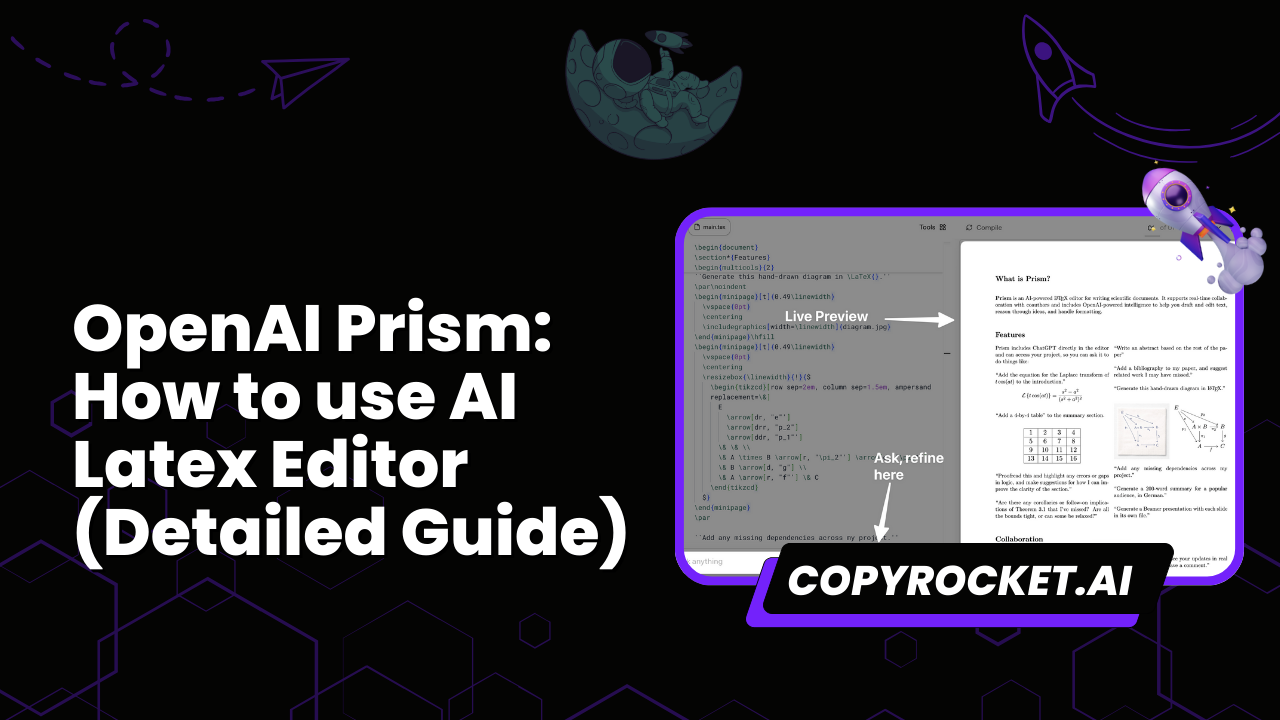
OpenAI Prism gives you a free, LaTeX-native workspace for scientific writing. You can write research papers in LaTeX without fighting setup steps or switching tools. Prism supports scientists who want fast drafting, clean formatting, and reliable document compilation.
Many researchers lose time on LaTeX setup, formatting overhead, and slow iteration. Teams also struggle with collaboration across co-authors, version conflicts, and review cycles that mix proofreading, editing, and repeated requests to revise prose.
A cloud-based workspace that can compile LaTeX and keep writing and feedback in one place reduces this friction.
This guide explains what Prism is, who should use it, and how OpenAI Prism works as a LaTeX editor and LaTeX-native workspace.
You will learn the key benefits, the main limitations, how to start, and best practices for collaboration, document compilation, and revision.
Key Takeaways
- OpenAI Prism is a free, LaTeX-native workspace for scientific writing. You write research papers with equations, figures, and references in one place.
- Prism speeds up writing and document compilation. You compile LaTeX as you write, so you catch errors early and reduce time on formatting.
- Prism improves clarity through focused revision. Prism helps you revise prose, run proofreading, and do editing while you keep symbols, variable names, and claims stable.
- Prism supports collaboration with co-authors in a cloud-based workspace. Co-authors add comments in one project, and the team resolves edits with fewer file copies.
- Prism exports submission files for journals and arXiv. You export a PDF and LaTeX source files after you compile LaTeX and confirm venue rules.
- Prism fits teams that write in LaTeX and iterate often. Prism reduces tool switching versus local LaTeX setups and general writing tools that lack full LaTeX editor and citation workflows.
Next, we will walk through Prism as a modern scientific writing workspace and show how to use it step by step.
What Is OpenAI Prism?
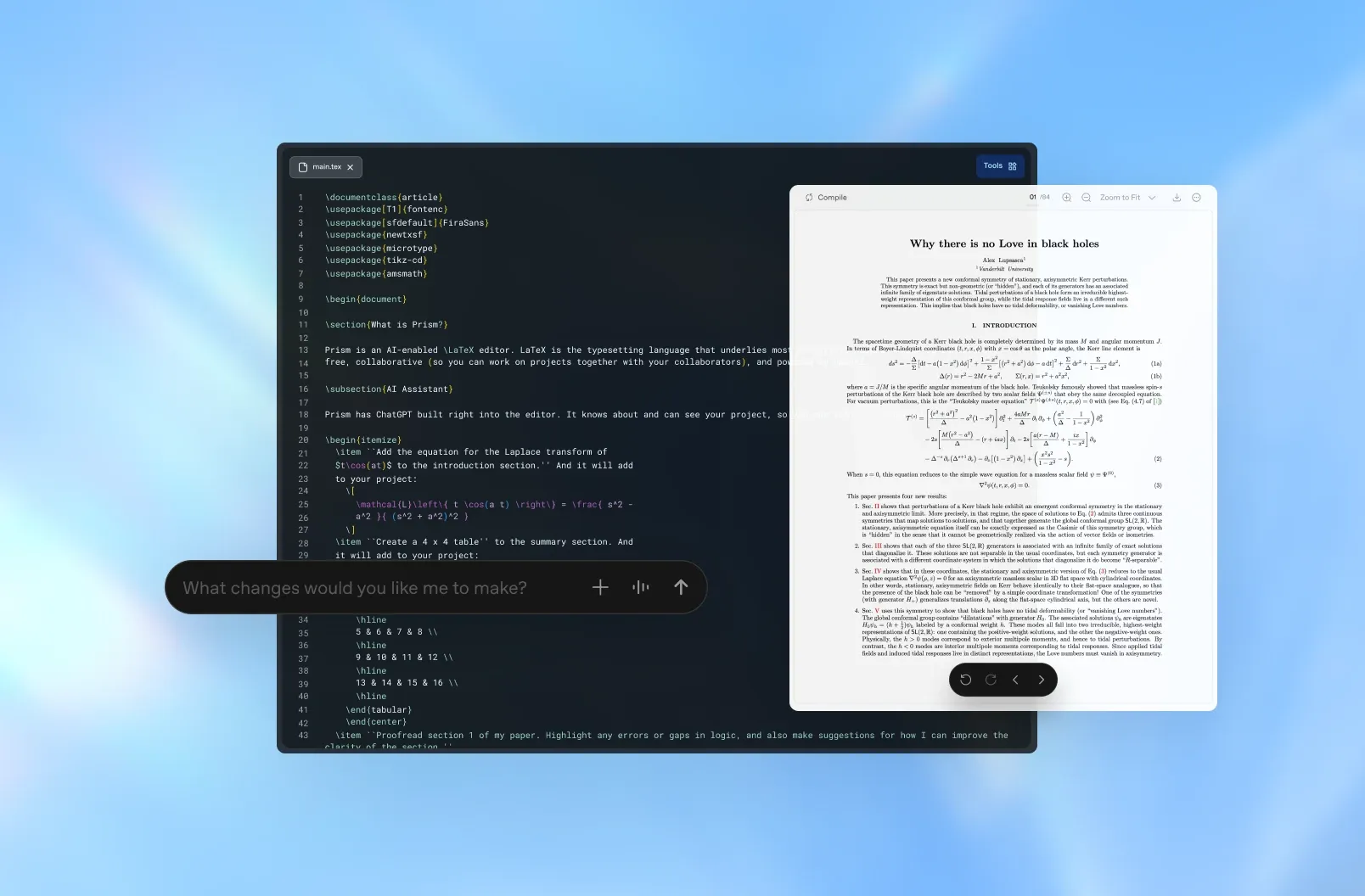
OpenAI Prism is a free, LaTeX-native workspace for scientific writing. It helps you draft, revise, and compile LaTeX in one place. You can write research papers with equations, figures, and references without switching tools.
Why OpenAI Prism matters
OpenAI Prism reduces time you spend on formatting and tool setup. It keeps your focus on the paper content. It also helps you move faster from draft to submission because you can write, compile, and revise in the same workspace.
- You spend less time fixing LaTeX errors across multiple tools.
- You get faster feedback because you can compile LaTeX as you write.
- You improve clarity because you can revise prose in context, next to equations and figures.
- LaTeX is widely used in STEM publishing, especially in mathematics, physics, and computer science.
- arXiv receives a large volume of LaTeX submissions for preprints in physics, math, and CS.
- Many major journals and conferences in math, physics, and CS accept or prefer LaTeX source files for submission.
Real-world example
A PhD student writes a preprint with dense equations and many citations. The student uses OpenAI Prism as a LaTeX editor inside a cloud-based workspace. The student drafts the introduction, adds figures, and compiles a PDF after each change. The student then asks Prism to revise prose in the abstract for clarity while keeping the technical meaning. The student shares the draft with co-authors, resolves comments, and exports a submission-ready PDF and source files.
Key components
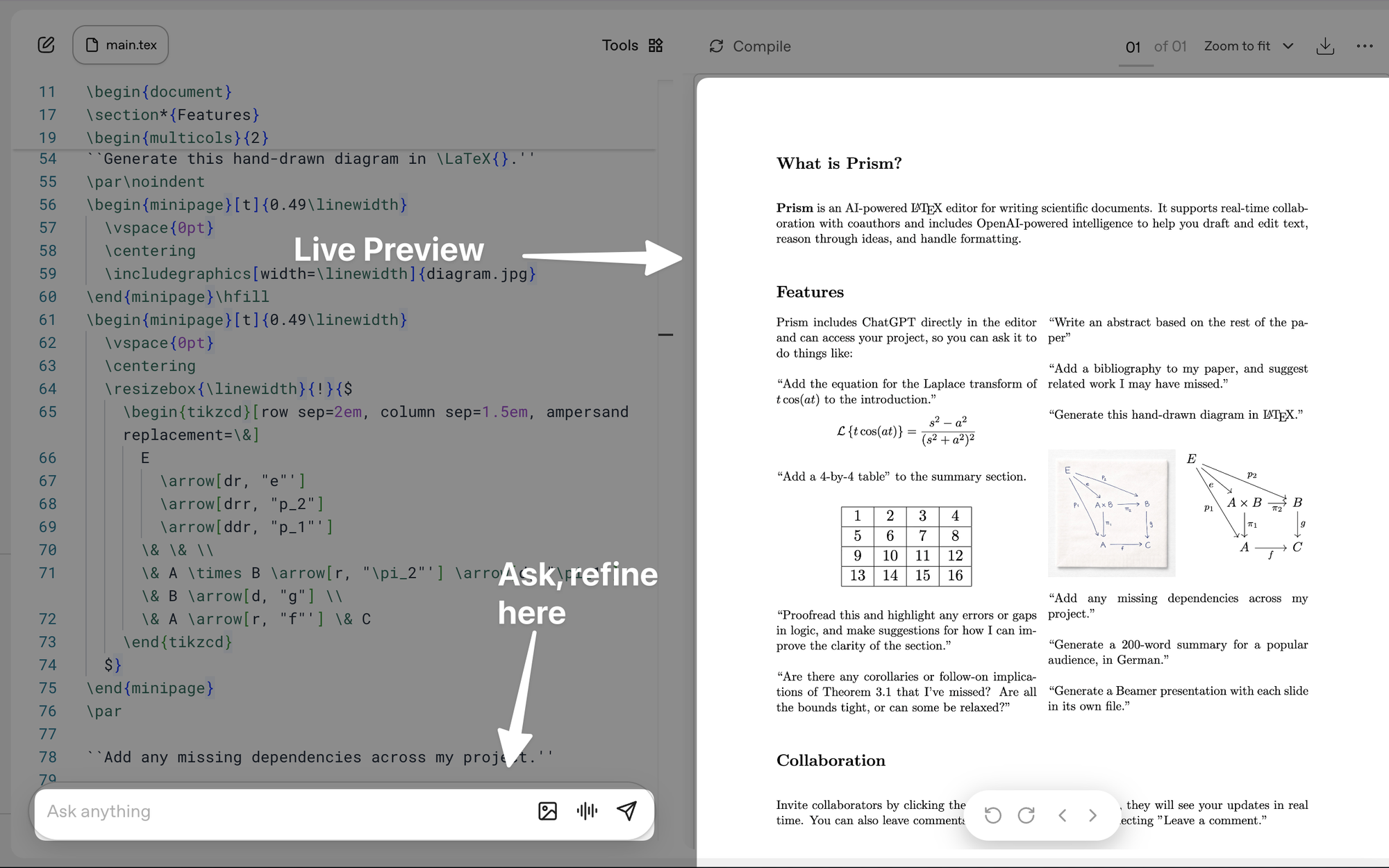
- LaTeX-native editor
- You write LaTeX directly, including equations, environments, and packages.
- Practical example: You write an aligned derivation and compile LaTeX without leaving the editor.
- Structured scientific document workflow
- You organize sections, references, and figures in a predictable layout.
- Practical example: You build an IMRaD outline and fill each section with placeholders, then replace them with final text.
- Document compilation
- The workspace compiles LaTeX and shows output so you can catch errors early.
- Practical example: You add a bibliography entry and compile again to confirm citations render correctly.
- AI-assisted drafting and revision
- Prism helps you draft text and revise prose with clear intent.
- Practical example: You rewrite an abstract for clarity, and you keep symbols, variable names, and claims unchanged.
- Collaboration with co-authors
- You share drafts and manage review cycles in one place.
- Practical example: A co-author leaves comments on a methods section, and you apply edits and mark each comment as resolved.
- Export and output options
- You generate files for submission and sharing.
- Practical example: You export a submission-ready PDF and LaTeX source files for a journal portal.
OpenAI Prism vs Other Scientific Writing Tools
OpenAI Prism targets scientific writing in a LaTeX-native workspace. It combines a LaTeX editor with AI help for drafting, proofreading, editing, and revise prose.
Many tools can produce a PDF. Prism aims to reduce steps between writing, compiling, and revision.
Quick comparison: Prism and common alternatives
- Overleaf
- Overleaf supports LaTeX writing and cloud collaboration.
- Prism can overlap on LaTeX and PDF output, but it can differ on AI workflow and friction in editing and document compilation.
- TeXstudio + local LaTeX
- TeXstudio gives strong offline control and local compile LaTeX.
- Prism focuses on a cloud-based workspace and faster iteration with AI help.
- Word + MathType
- Word works well for prose and track changes.
- Word can add equations with MathType, but it does not match LaTeX-native writing for research papers with heavy math and citations.
- Google Docs
- Google Docs supports fast collaboration and comments.
- Google Docs does not offer full LaTeX support or a standard LaTeX citation workflow.
- Notion
- Notion supports notes, tasks, and lightweight docs.
- Notion does not fit document compilation needs for journals and conferences.
- Typst
- Typst offers a modern markup approach and fast compile.
- Typst can reduce LaTeX pain, but it may not match LaTeX compatibility for existing templates and co-author workflows.
Key differentiators to check
- LaTeX-native + AI workflow
- Prism can keep the source in LaTeX while it applies AI help to text and structure.
- The AI can support proofreading, editing, and consistency checks across sections.
- Speed and friction reduction
- Prism can reduce context switching between writing, compiling, and fixing errors.
- Prism can shorten the loop between draft, compile, and revise prose.
- Cost and “free” positioning
- Prism may offer a free tier or free access for core features. You should confirm current limits and pricing.
Comparison table
| Feature | Prism / OpenAI Prism | Overleaf | TeXstudio + local LaTeX | Word + MathType | Google Docs | Notion |
|---|---|---|---|---|---|---|
| LaTeX support | LaTeX-native workspace (cloud), with compiled paper preview. (OpenAI) | Full LaTeX editor in the browser. (Overleaf) | Full LaTeX editor (TeXstudio) with local LaTeX toolchain (TeX Live/MiKTeX). (texstudio.org) | Not a full LaTeX doc editor, but MathType can insert LaTeX for equations (best for math, not full papers). (docs.wiris.com) | No native full LaTeX document workflow, equations via equation tool, or LaTeX via add-ons (renders as images). (Google Help) | Partial LaTeX for equations via KaTeX (subset of LaTeX). (Notion) |
| Collaboration | Real-time collaboration, unlimited collaborators. (OpenAI) | Real-time coauthoring, comments, track changes, sharing. (Overleaf Docs) | No native real-time collaboration (local editor), typically via Git/shared folders. | Real-time coauthoring possible (Microsoft 365 + OneDrive/SharePoint). (Microsoft Support) | Real-time collaboration and sharing, comments, version history. (Google Workspace) | Strong team collaboration (comments, sharing), not aimed at LaTeX-style paper coauthoring. |
| AI help | GPT-5.2 integrated into writing workflow (draft, revise, reason over equations and citations). (OpenAI) | Not natively core to Overleaf in the editor experience (AI is typically via add-ons/integrations, plan-dependent). | None built-in (you can use external AI separately). | Copilot in Word (draft, rewrite, summarize), MathType is for equations. (Microsoft Support) | Gemini in Docs (“Help me write”, generate/refine text), plan-dependent. (Google Help) | Notion AI for writing and workspace assistance. (Notion) |
| Offline support | Cloud-based, no local install, so offline is not the intended mode. (OpenAI) | Web app, generally requires internet. (Overleaf) | Yes (fully offline if LaTeX is installed locally). (texstudio.org) | Yes for desktop Word, collaboration features need internet. | Yes (optional offline mode). (Google Help) | Limited (Notion is primarily online, offline is not a full reliable mode). |
| Export formats | Compiled paper preview (PDF-like) plus LaTeX project structure in the workspace. (OpenAI) | Compiled output produced automatically (commonly PDF), plus project source. (Overleaf) | Compile to PDF (and other TeX outputs depending on toolchain). (SourceForge) | DOCX native, export/save to PDF. (Microsoft Support) | Download as .docx, .odt, .rtf, .pdf, .txt, .html (zipped), .epub. (IT@UMN) | Export PDF, HTML, Markdown & CSV. (Notion) |
| Citation workflow | LaTeX citations and references, with AI able to reason over citations in-context. (OpenAI) | Standard BibTeX/biblatex workflow, plus reference search inside projects. (Overleaf) | BibTeX/biber supported, with citation/reference checking. (SourceForge) | Word has built-in citation/bibliography tools, plus Zotero/EndNote integrations (MathType focuses on equations). | Built-in citations tool (MLA, APA, Chicago Author-Date) and bibliography. (Google Help) | No dedicated academic citation manager, typically manual citations or integrations via embeds/links. |
| Cost | Free to use, no subscriptions or seat limits mentioned (at launch). (OpenAI) | Free tier available, paid plans for premium features. (Overleaf) | Free and open-source (LaTeX distros are generally free). (texstudio.org) | Word usually via Microsoft license/subscription, MathType is a paid yearly subscription. (Microsoft Marketplace) | Free for personal use, paid Google Workspace tiers for organizations (and Gemini features require eligible plans). (Google Help) | Free plan plus paid plans (Plus/Business/Enterprise). (Notion) |
Who should choose what (decision guide)
- Graduate student writing research papers in LaTeX with frequent revisions
- Choose Prism if you want AI help for drafting, proofreading, and editing inside a LaTeX-native workspace.
- Choose Overleaf if your main need is stable cloud collaboration with standard LaTeX templates.
- Lab team with many co-authors and strict journal templates
- Choose Overleaf if your team already uses its collaboration model and template library.
- Choose Prism if you want AI-assisted revision and faster prose cleanup while staying in LaTeX.
- Solo researcher who needs full offline control
- Choose TeXstudio + local LaTeX if you need offline work and local toolchains.
- Choose Prism if you accept a cloud-based workspace and want faster iteration with AI.
- Writer who prioritizes track changes and simple review
- Choose Word + MathType if your reviewers demand Word comments and tracked edits.
- Choose Prism if you will submit LaTeX and you want AI help to revise prose and improve clarity.
- Team that needs quick comments on a non-LaTeX draft
- Choose Google Docs for fast feedback and simple collaboration.
- Choose Prism when you move to LaTeX submission and need document compilation.
- Research manager who needs notes, tasks, and light documentation
- Choose Notion for planning and knowledge capture.
- Choose Prism for the final paper draft and LaTeX compilation.
- Author who wants a modern markup system and fast builds
- Choose Typst if your venue accepts it and your team can adopt it.
- Choose Prism or Overleaf if you need LaTeX compatibility with existing templates.
Core Benefits and Advantages of OpenAI Prism
Faster drafting and revision cycles
OpenAI Prism reduces time spent on formatting. You write in a LaTeX-native workspace. You keep your focus on results and arguments. You revise prose and compile LaTeX in the same workspace. You produce a clean PDF sooner. You submit research papers sooner.
Clearer scientific writing for reviewers and co-authors
OpenAI Prism improves clarity in scientific writing. It rewrites sentences in a direct subject-verb-object order. It aligns terms across sections. It removes repeated phrasing. It improves paragraph flow. Reviewers and co-authors read the draft with less effort. Teams spend less time on repeated editing and proofreading.
Higher accuracy for LaTeX equations, citations, and cross-references
OpenAI Prism keeps math, citations, and cross-references inside the LaTeX editor. You avoid copy-paste errors. You keep one source of truth from draft to PDF. You reduce broken references after edits. You keep equation numbering stable across revisions.
Less setup work in a cloud-based workspace
OpenAI Prism can run as a cloud-based workspace. You start writing without local TeX setup. You avoid manual updates for a local TeX install. You run document compilation in the browser when Prism supports it. You confirm package support and policy limits with your institution.
Smoother collaboration and fewer merge conflicts
OpenAI Prism can support collaboration in shared projects. Co-authors review text in one place. Co-authors add comments and suggested edits. The team tracks changes with fewer file copies. The team reduces merge conflicts and email threads. The team closes review loops faster.
Faster onboarding for new LaTeX users
OpenAI Prism helps beginners learn LaTeX through working examples. It provides a clear structure for research papers. Users edit sections instead of starting from a blank file.
- You generate a paper outline with standard sections.
- You format equations with correct LaTeX syntax.
- You keep numbering consistent for figures and equations.
- You compile LaTeX and check the PDF output in the same workspace when Prism supports compilation.
- You improve abstracts with focused proofreading, editing, and direct rewrite options.
More consistent drafts across projects
OpenAI Prism enforces consistent wording and structure. It keeps section style stable across revisions. It helps teams reuse patterns across papers. It reduces last-minute cleanup before submission.
How OpenAI Prism Works: The Workflow From Idea to Submission
OpenAI Prism supports a clear writing flow. You move from a new project to a submission-ready PDF. You keep control of the technical content.
End-to-end workflow
- Create a project
- You start a new project in Prism.
- You pick a paper template or you start from scratch.
- Draft sections
- You write the title and abstract.
- You add section headings.
- You fill each section with text and key claims.
- Add equations and figures
- You write equations in LaTeX.
- You add tables and figures with captions.
- You compile LaTeX to check layout and errors.
- Manage citations
- You add references with BibTeX.
- You cite sources in the text.
- You check that every citation matches a real source.
- Revise and proofread
- You revise prose for clarity and accuracy.
- You run editing passes for consistency.
- You check that terms and symbols stay consistent.
- Export and submit
- You export a PDF and the source files.
- You confirm that the output matches the venue rules.
Where AI helps in the workflow
OpenAI Prism can assist at several points in scientific writing.
- Brainstorming
- AI suggests research questions and paper angles.
- AI lists possible contributions and claims.
- Outlining
- AI proposes a section plan for research papers.
- AI suggests what to include in each section.
- Rewriting and editing
- AI rewrites paragraphs for clarity and concision.
- AI fixes grammar and improves flow.
- AI helps you revise prose while you keep the meaning.
- Consistency checks
- AI flags term drift, symbol drift, and style drift.
- AI checks that definitions match later usage.
- Summarizing related work
- AI summarizes papers you provide.
- AI helps you draft a related work structure.
What you still must do yourself
You must keep ownership of correctness and compliance.
- You must ensure technical correctness
- You must validate equations, proofs, and results.
- You must confirm that claims match your data.
- You must verify citations
- You must confirm that each citation exists.
- You must confirm author names, titles, venues, and years.
- You must confirm that each citation supports the claim.
- You must generate figures
- You must produce plots, diagrams, and images.
- You must confirm resolution and readability.
- You must follow journal or conference rules
- You must follow page limits and formatting rules.
- You must follow anonymization rules if required.
- You must follow ethics and disclosure rules.
Mini example workflow: Turn lab notes into a 4-page workshop paper
- You create a Prism project named [WORKSHOP-2026-01].
- You paste lab notes into a scratch section.
- You ask AI to extract a 4-page outline with sections and bullets.
- You write the method and results in LaTeX.
- You add one table and two figures from your experiments.
- You add BibTeX entries for the main related work.
- You ask AI to tighten the abstract and improve transitions.
- You compile LaTeX and fix errors.
- You export PDF and source, then you submit.
Step-by-Step Guide: Getting Started With OpenAI Prism
1) Access Prism and create a workspace or project
- You sign in with an account that Prism supports.
- You create a new cloud-based workspace and a new project.
Tip: Name projects by venue and date, like [VENUE-YYYY-MM]. This naming supports clean version tracking.
Warning: You must confirm what account type Prism requires before you plan team access.
2) Choose a template or start from scratch
- You select a template for a paper, report, or notes.
- You confirm that the template matches your target venue.
Tip: Start with the target venue format early. This choice reduces late layout changes.
Warning: You must confirm which templates Prism provides before you depend on a specific format.
3) Set up the document structure
- You add the title and author block.
- You draft the abstract.
- You create sections like Introduction, Methods, Results, and Discussion.
- You add an appendix if you need it.
Tip: Write short section goals as bullets before you write full paragraphs.
Warning: Do not over-optimize formatting before content is stable. Early formatting changes waste time.
4) Write core content in LaTeX
- You write text in a LaTeX-native workspace.
- You add equations, theorems, and tables.
- You compile LaTeX often to catch errors early.
Tip: Keep macros minimal and documented. Use clear names and add short comments.
Warning: Large macro sets can hide errors and slow debugging during document compilation.
5) Add citations and references
- You store references in a BibTeX file.
- You cite sources in the text.
- You compile and check that references render correctly.
Tip: Add citations as you write. This habit prevents missing sources near the end.
Warning: Always verify AI-suggested citations. AI can invent titles or mix authors.
6) Insert figures and tables
- You upload figure files that Prism supports. You must confirm supported formats.
- You place figures near the first mention.
- You write clear captions that state what the figure shows.
Tip: Standardize figure naming and resolution, like fig-01-setup.png and fig-02-results.pdf.
Warning: Do not use unreadable text in figures. Small labels fail in PDF export.
7) Use AI for revision passes
- You ask AI to proofread for grammar and clarity.
- You ask AI to tighten paragraphs and remove repetition.
- You ask AI to check term and symbol consistency across sections.
- You review every change and keep the correct meaning.
Tip: Run one goal per pass, like “reduce word count” or “improve clarity in Methods.”
Warning: Protect technical meaning. AI can change claims, conditions, or units.
8) Export for submission
- You export a PDF for reviewers.
- You export source files for the submission system if required.
- You run a final compile LaTeX pass and confirm no warnings remain.
Tip: Run a final submission checklist. Check page count, fonts, figure placement, and reference completeness.
LaTeX-Native Writing in Prism: Practical Tips for Scientists
Prism gives you a LaTeX-native workspace for scientific writing. Use these tips to write faster, keep structure consistent, and reduce compile errors during document compilation.
Write common scientific elements with clear structure
Equations
- Use one equation for one idea.
- Use equation numbering for any equation you cite later.
- Use consistent symbols across the full paper.
- Define each symbol the first time you use it.
- Add a short sentence before or after the equation that states what it does.
Cross-reference rule:
- You should label every numbered equation.
- You should reference it in text by label, not by hard-coded numbers.
Theorem and proof
- Use a standard theorem environment for each result.
- You should state assumptions before the theorem statement.
- You should keep proofs linear and explicit.
- You should end each proof with a clear closing marker if your template expects it.
Cross-reference rule:
- You should label each theorem, lemma, proposition, and corollary.
- You should reference results by label.
Algorithms
- Use one algorithm block for one procedure.
- You should list inputs and outputs at the top.
- You should keep step text short and action-based.
- You should define all symbols used in the algorithm.
Cross-reference rule:
- You should label each algorithm.
- You should cite the algorithm in the text where you discuss it.
Tables
- Use tables for exact values and comparisons.
- You should write a caption that states what the table shows.
- You should align decimals and units.
- You should keep column headers short and specific.
- You should avoid vertical rules unless the venue requires them.
Cross-reference rule:
- You should label every table.
- You should reference tables by label.
Figures
- Use figures for trends, diagrams, and qualitative comparisons.
- You should export images at print-ready resolution.
- You should use vector formats for plots when possible.
- You should keep text inside figures large enough to read in a PDF.
- You should write captions that explain the figure without forcing the reader to search the main text.
Cross-reference rule:
- You should label every figure.
- You should reference figures by label.
Cross-references in general
- You should label sections, subsections, equations, figures, tables, and algorithms.
- You should use one label naming scheme across the project.
- You should avoid manual numbering.
Recommended label prefixes:
- sec:
- subsec:
- eq:
- fig:
- tab:
- alg:
- thm:
- lem:
Checklist: LaTeX elements to standardize early
Use this checklist before you invite co-authors or start heavy editing.
Macros
- You should define macros in one file.
- You should use macros for repeated symbols and names.
- You should avoid redefining standard LaTeX commands unless the template requires it.
- You should keep macro names descriptive and stable.
Labels
- You should use one naming convention for all labels.
- You should keep labels close to the item they label.
- You should avoid duplicate labels.
Bibliography style
- You should pick one bibliography backend and one style.
- You should keep citation commands consistent across the paper.
- You should confirm venue rules for author lists, titles, and capitalization.
Packages
- You should keep the package list short.
- You should add packages only when you need them.
- You should avoid packages that conflict with the venue class file.
- You should pin down package choices before final formatting.
Readability rules that improve review outcomes
Equation numbering
- You should number equations that you reference.
- You should avoid numbering equations you never cite.
- You should group related equations in a consistent way if the venue allows it.
Consistent notation
- You should use one symbol for one concept.
- You should avoid reusing a symbol for a different meaning.
- You should keep vector, matrix, and scalar styles consistent.
- You should keep units consistent and explicit.
Symbol glossary
- You should add a short notation table or glossary if the paper uses many symbols.
- You should define symbols in the text even if you include a glossary.
- You should update the glossary during proofreading and editing.
Venue readiness notes you can apply before submission
Page limits
- You should check the page limit early.
- You should confirm what counts toward the limit (references, appendix, acknowledgments).
- You should avoid last-minute layout hacks that break spacing rules.
Anonymization
- You should remove author names and affiliations if the venue requires double-blind review.
- You should anonymize self-citations when required.
- You should remove identifying metadata from PDFs and figures.
- You should check acknowledgments and file paths for names.
Supplementary materials
- You should confirm what the venue allows in supplements.
- You should keep the main paper self-contained.
- You should label supplemental figures and tables clearly.
- You should include a short pointer in the main text for each supplement item.
Templates, styles, and journal or conference compatibility
Prism can help you keep a clean LaTeX project while you adapt templates. You should still verify what Prism supports for your target class file and build flow before you commit to a format.
Align with common venues
You can often start from a venue template and then write content with minimal formatting changes.
Common targets:
- IEEE
- ACM
- NeurIPS
- arXiv
- Nature-style
You should confirm these points in Prism before you finalize the project:
- Prism can compile LaTeX with the venue class file.
- Prism can run the bibliography tool your template uses.
- Prism can include all required assets during document compilation.
Adapt templates responsibly
- You should avoid editing the class file.
- You should keep changes in your main .tex file or a small style file if the venue allows it.
- You should avoid manual spacing commands to force layout.
- You should test compile LaTeX after each change.
- You should keep a clean diff so co-authors can review changes.
Compatibility questions to answer before you write the final draft
- Which bibliography style does the venue require?
- Which citation format does the venue require (numeric, author-year)?
- Does the venue restrict packages?
- Does the venue enforce figure placement rules?
- Does the venue require specific caption formatting?
- Does the venue require anonymization?
- Does the venue restrict supplementary materials?
- Does the venue require a specific PDF build target (fonts, embedded figures, PDF version)?
- Does the venue require line numbers or review mode options?
Collaboration workflow tips for Prism projects
- You should agree on macros, labels, and bibliography rules before co-authors start writing.
- You should assign one person to manage template updates.
- You should use comments to request specific changes during revise prose cycles.
- You should run proofreading and editing passes after major merges.
- You should compile LaTeX before you mark a section as final.
Quick pre-submit checklist
- All figures and tables have labels and captions.
- All referenced equations have numbers and labels.
- All citations resolve and match the required style.
- All symbols have definitions, and the glossary matches the text.
- The paper meets page limits without layout hacks.
- The anonymization rules match the venue.
- The supplement matches venue rules and file limits.
- Prism builds the final PDF without warnings you can fix.
Pro Tips for Getting the Most Out of OpenAI Prism
- Start with an outline and lock section goals before you polish prose.
An outline sets the order of ideas. Clear section goals keep each paragraph on one job. This step reduces rewrites and helps co-authors agree on scope early in the collaboration. - Keep a notation and acronym list in your LaTeX-native workspace.
A shared list prevents symbol drift and acronym reuse. This habit improves scientific writing because readers can track variables and terms without guessing. It also reduces proofreading time during editing. - Use AI for clarity passes, not for inventing content or citations.
OpenAI Prism can help you revise prose for structure, grammar, and flow. You should supply the facts, results, and references. This rule protects research papers from false claims and bad citations. - Export early and often to catch LaTeX issues.
Frequent document compilation helps you spot package conflicts, missing files, and layout problems while changes stay small. If you compile LaTeX often, you avoid late-stage formatting surprises near submission. - Keep figures reproducible with scripted plots and consistent styling.
Scripts let you regenerate figures from the same data and settings. Consistent fonts, sizes, and colors make the paper easier to read. This practice also helps co-authors verify results and update plots fast. - Run a reviewer simulation pass before you submit.
You should test assumptions, state limitations, and compare against strong baselines. You should also include ablations when they apply. This pass makes your argument harder to dismiss and improves the logic of the paper. - Create a final submission checklist and follow it every time.
A checklist reduces missed steps like figure resolution, anonymization, and appendix links. It also standardizes teamwork in a cloud-based workspace, so each co-author knows what “done” means.
Common Mistakes to Avoid When Using OpenAI Prism
1) You trust OpenAI Prism output without verification
You may accept AI text and math without checking details. This can hide technical errors in LaTeX, equations, and claims in research papers.
- Consequence: You submit incorrect results or broken document compilation. Reviewers and co-authors lose trust in the draft.
- Solution: Use a verification checklist in your LaTeX-native workspace.
- Check equations against your notes or source derivations.
- Compile LaTeX after each major change.
- Run proofreading and editing passes for units, symbols, and variable names.
- Ask co-authors to review key sections before you finalize.
2) You let macros and labels become inconsistent
You may create macros and labels with mixed styles. You may reuse names across sections. This can break references during collaboration.
- Consequence: You get wrong cross-references, missing citations, and confusing figure links. You waste time during revise prose cycles.
- Solution: Set naming rules early and enforce them.
- Use one naming convention for labels, such as fig:, tab:, eq:, sec:.
- Use one naming convention for macros, such as \vecX, \matA, \probP.
- Add a linting habit. You can scan for duplicate labels and unused macros before you share the draft.
- Keep macro definitions in one file that all co-authors use.
3) You accept citation hallucinations
You may let the model suggest papers that do not exist. You may paste citations without opening the sources.
- Consequence: You include false references. Editors and reviewers flag the paper. Your credibility drops.
- Solution: Cite only papers you can open and verify.
- Check DOI and arXiv IDs before you add a reference.
- Confirm title, authors, year, and venue from the source page.
- Keep a short “verified sources” list for the team in the cloud-based workspace.
4) You switch templates late
You may draft in one format and switch to a venue template near submission. This can break layout and LaTeX editor settings.
- Consequence: You spend days fixing formatting instead of improving scientific writing. You risk missing deadlines.
- Solution: Choose the venue template on day one.
- Start the project in the target class file and bibliography style.
- Keep formatting changes minimal during drafting.
- Test document compilation after each template update.
5) You ignore figure and table standards
You may add figures with mixed fonts, low resolution, or unclear captions. You may change styles across sections.
- Consequence: Figures look inconsistent. Tables overflow. Reviewers struggle to read results.
- Solution: Set figure and table rules from day one.
- Set resolution targets and export settings for plots.
- Use one font family and one size range across figures.
- Write captions that state what the reader should learn.
- Run a final compile LaTeX check to confirm placement and spacing.
Use Cases: What You Can Create With OpenAI Prism
Preprints and arXiv-ready manuscripts
You can draft and format research papers in a LaTeX-native workspace and export clean LaTeX for arXiv submission. You can use editing and proofreading to revise prose and tighten structure before you compile LaTeX.
- Best fit vs not ideal: Best fit for LaTeX-first preprints with frequent revisions; not ideal if your target venue requires a Word-only workflow.
Conference submissions (short and long papers)
You can write short papers and full papers with consistent section structure, citations, and figures in a cloud-based workspace. You can run document compilation to check page limits and formatting before final upload.
- Best fit vs not ideal: Best fit for venues with strict LaTeX templates; not ideal for conferences that require camera-ready edits in a publisher portal only.
Journal articles with co-authors
You can support collaboration with co-authors by keeping one shared source of truth and tracking edits across sections. You can use OpenAI Prism to help revise prose for clarity and to align tone across authors.
- Best fit vs not ideal: Best fit for teams that write in LaTeX and iterate often; not ideal for teams that cannot share drafts in a cloud-based workspace.
Lab reports and internal technical memos
You can produce clear lab reports with equations, tables, and method steps in a LaTeX editor. You can standardize headings and results summaries across projects and compile LaTeX for PDF distribution.
- Best fit vs not ideal: Best fit for labs that reuse LaTeX report formats; not ideal for quick one-page updates where plain text is enough.
Grant and proposal technical sections (LaTeX required)
You can write technical sections with precise claims, defined terms, and consistent notation in LaTeX. You can use proofreading and editing to remove vague language and to keep the narrative aligned with the call.
- Best fit vs not ideal: Best fit for agencies that require LaTeX or strict formatting; not ideal for proposals that require web-form entry with no LaTeX support.
Lecture notes and problem sets
You can create lecture notes with clean math layout, examples, and numbered exercises in a LaTeX-native workspace. You can compile LaTeX to verify spacing, page breaks, and solution formatting.
- Best fit vs not ideal: Best fit for instructors who publish PDFs with equations; not ideal for classes that require interactive web-only content.
Reproducibility appendices and supplementary materials
You can write reproducibility appendices with clear experiment settings, dataset notes, and evaluation details. You can keep supplementary figures, tables, and extra proofs consistent with the main paper through shared LaTeX sources.
- Best fit vs not ideal: Best fit for papers that need detailed supplements in LaTeX; not ideal if the venue limits supplements to a fixed web upload format.
Thesis and dissertation chapters
You can draft chapters as separate LaTeX files and merge them into one compiled document. You can revise prose for consistent terminology and use collaboration features for advisor feedback.
- Best fit vs not ideal: Best fit for long-form scientific writing with heavy math; not ideal if your institution mandates a proprietary word processor template.
Frequently Asked Questions (FAQs)
What is OpenAI Prism used for?
OpenAI Prism is a LaTeX-native workspace for scientific writing. You can write research papers in LaTeX, compile LaTeX, and manage document compilation in one cloud-based workspace. You can also revise prose, run proofreading, and do editing with co-authors during collaboration.
Is OpenAI Prism really free?
OpenAI Prism has a free option, but the exact limits can change. Check the official pricing page for current details: [PLACEHOLDER: Official OpenAI Prism pricing link]. Confirm any caps on usage, document compilation, and collaboration before you start a long project.
Can I export my Prism project to submit to a journal or arXiv?
You can export your Prism project as LaTeX files for submission. Before you submit, you should verify the journal or arXiv format rules, required class files, bibliography style, and figure settings. You should also compile LaTeX locally or in Prism and confirm that the PDF matches the submission checklist.
How does Prism compare to Overleaf?
Prism focuses on AI-assisted scientific writing, proofreading, and editing inside a LaTeX editor. Overleaf focuses on a mature LaTeX editor with strong templates and broad community support. Choose Prism if you want help to revise prose and coordinate writing with co-authors. Choose Overleaf if you want a familiar LaTeX editor with many templates and integrations.
Should I trust AI-generated text and citations in Prism?
You should verify AI-generated text and citations before you submit research papers. You should check each claim against your sources, confirm each citation exists, and confirm each quote matches the paper. You should also review equations, units, and references after document compilation.
Final Thoughts
Prism is a cloud-based workspace that gives you a LaTeX-native workspace for scientific writing, editing, and document compilation. OpenAI Prism fits researchers, students, and teams who write research papers and work with co-authors who need clear collaboration and reliable compile LaTeX output. Start fast by picking a small project, writing in the LaTeX editor, compiling often, and then running a structured pass to revise prose with proofreading and editing.
You get faster, cleaner scientific writing because Prism keeps your LaTeX workflow in one place and reduces time spent on formatting and rework. Try Prism on a short draft, export a PDF, and do one focused revision pass before you expand the project. Spend more time on ideas and results than on formatting.
Frequently Asked Questions
Written by
Vincci Ren
Vincci Ren, CEO of CopyRocket.ai, blends 6 years of leadership with a passion for AI. She drives operations and marketing, crafting smart, results-driven solutions that empower users to shine.
View all postsYour AI Marketing Agents
Are Ready to Work
Stop spending hours on copywriting. Let AI craft high-converting ads, emails, blog posts & social media content in seconds.
Start Creating for FreeNo credit card required. 50+ AI tools included.
Related Articles
 General
NotebookLM For Coders: Turn Docs Into Faster Code
Code work often fails for a simple reason. You do not have the right context at the right time. You read docs in one tab, skim tickets in another tab, and then...

 General
How to Optimize for AI Search in 2026: The Complete Guide
AI search has shifted from experimental feature to primary search method for millions of users. ChatGPT Search, Google AI Overviews, Perplexity, Claude, and Gem...
 General
Claude Opus 4.6 Review: Here's What New!
Claude Opus 4.6 from Anthropic draws attention because teams want an AI model that writes better code, follows instructions, and stays consistent across long se...