
How to Get Ahead of Trends in Your Niche: 11 Simple Tricks

Raman Singh
Raman Singh is a highly skilled marketing professional who serves as the head of marketing at Copyrocket AI

Trends do not “happen” overnight. People create them in small steps, in small groups, and in public places you can watch.
If you learn where to look and how to track signals, you can spot a shift early, test it fast, and publish or ship before your competitors react.
This guide shows How to get ahead of Trends in your Niche (10 Tricks) with a clear system you can repeat each week.
Key Takeaways
- Track signals, not headlines. Watch questions, complaints, and new habits before articles appear.
- Track Trends using Copyrocket AI's Trend watch feature.
- Use a simple trend pipeline. Collect, score, test, and publish in a weekly loop.
- Set up alerts and lists. Let tools bring trend data to you each day.
- Validate with real behavior. Check search growth, community chatter, and buying intent.
- Move fast with small tests. Ship a micro-offer or a short post before you build big.
- Turn trends into content and products. Create a repeatable plan for SEO, social, and email.
What “getting ahead of trends” means in practice
Getting ahead of trends means you see a change early, then you act before it becomes common. You do not guess. You collect signals, confirm them, and test them with a small action. You then scale what works.
Trends vs fads vs seasonal spikes
- Trend: A change that keeps growing over months and creates new demand.
- Fad: A short spike that drops fast and leaves little long-term value.
- Seasonal spike: A pattern that repeats each year (holidays, events, weather).
Why most people miss trends
- They read big news sites that report late.
- They follow influencers who copy each other.
- They do not track customer questions in a system.
- They wait for “proof” and lose the first-mover window.
Trick 1: Use our "Trend Watch" Feature to Spot Trends before your Competitors
Copyrocket AI offers a unique feature i.e. Trends Watch which enables you to find trends before your competitors to start creating content to be in "Fresh Content as ranking factor" list.
How to use Trends Watch?
- Headover to signup form and become trial user.
- Select Trends Watch feature from left and start adding feeds.
- For latest news in your niche, type niche like "AI, SEO" and press enter
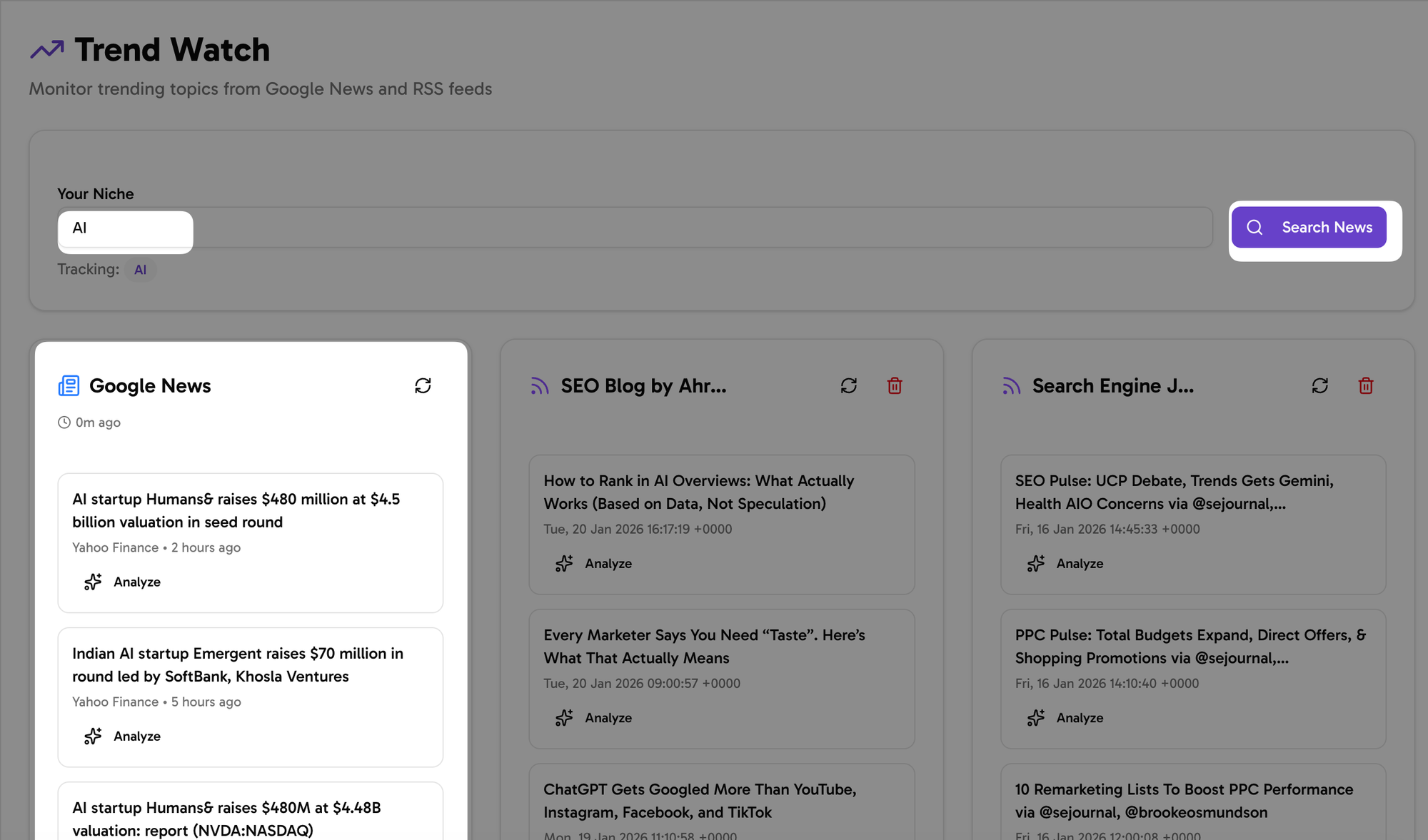
- You will find all latest news.
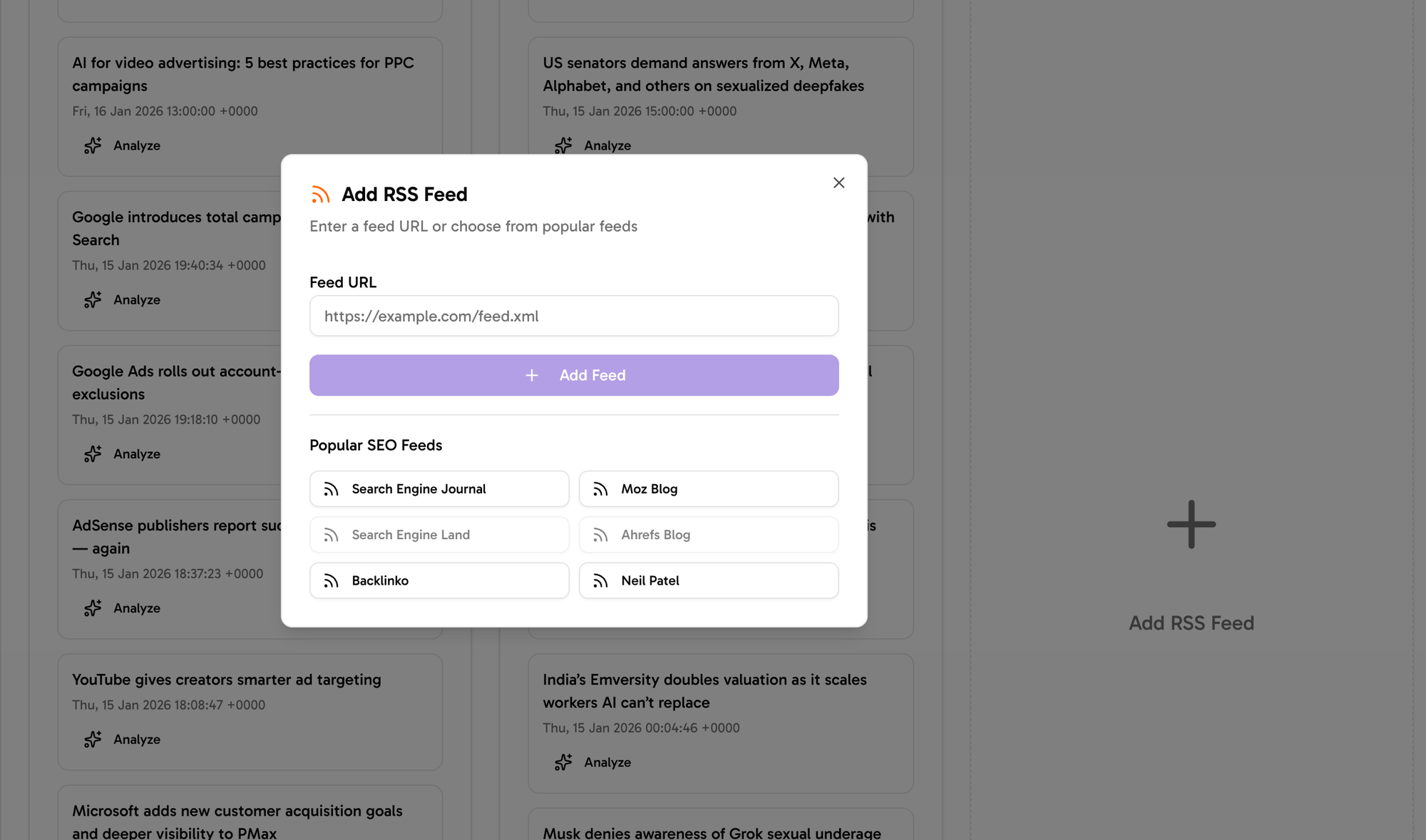
- Next you can add custom feeds, click on add RSS Feeds as below
Analyze Trends with AI
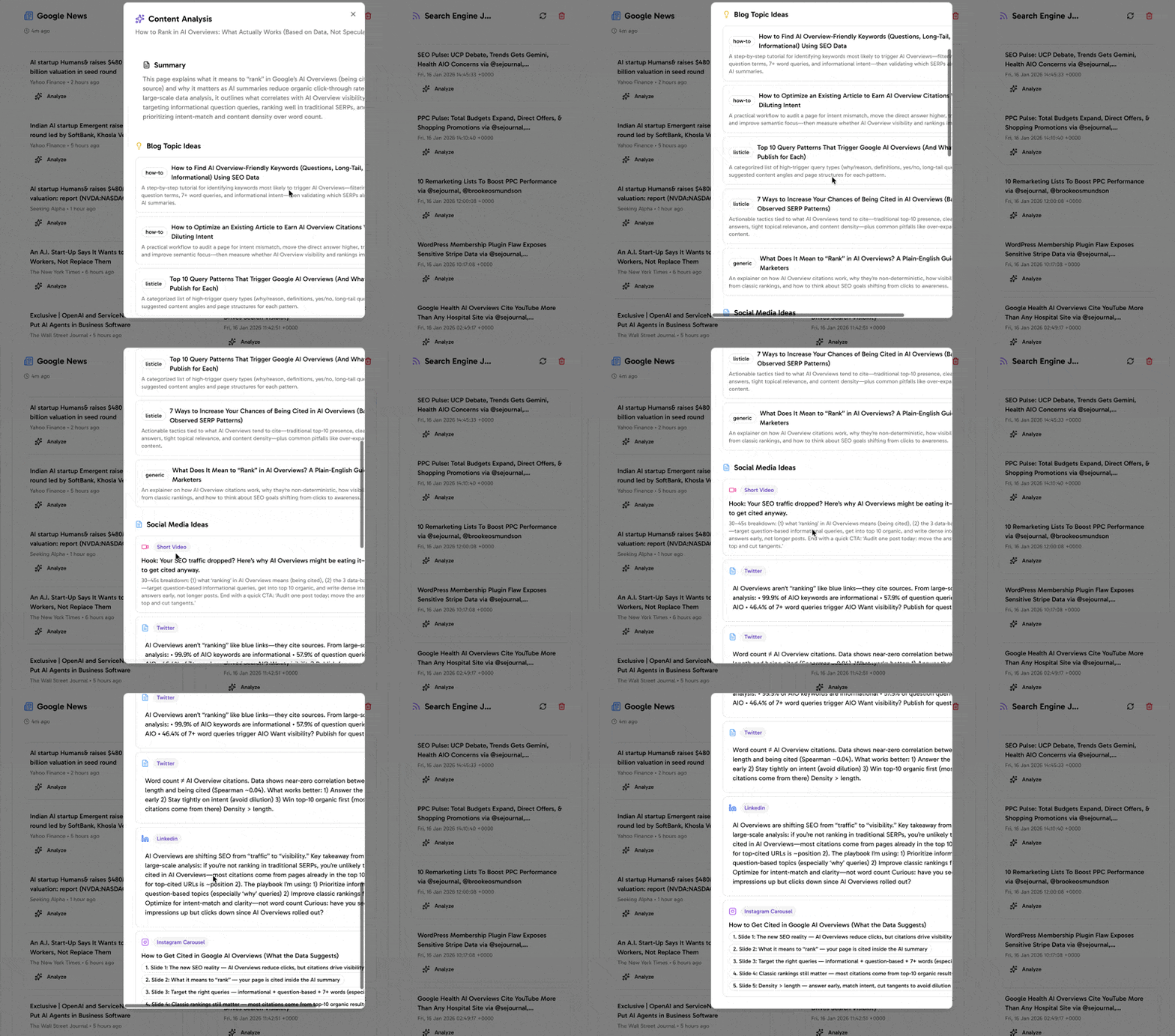
- If you like any news or article just click on "Analyze" button and AI will provide you with summary of article, content ideas for your Website and social media.
How to add Feeds URL?
- You can use chrome extension here to find feed urls of your favorite website.
- Go to rssfinder.app to find feeds related to niche.
- Generate RSS Feed of social media using rss.app.
Trick 2: Build a “trend radar” list of sources you check daily
You need a short list of places where your niche shows early signals. You then check that list each day for 10 to 15 minutes. This habit gives you pattern recognition.
Pick sources that show raw demand
- Reddit communities in your niche
- Facebook Groups and LinkedIn Groups
- Discord servers and Slack groups
- YouTube comments on fast-growing channels
- Product review pages (Amazon, G2, Capterra, Trustpilot)
- App store reviews (iOS and Google Play)
- Industry newsletters that publish weekly
- Podcasts with active listener questions
What to look for in each source
- New words people repeat (new tools, new methods, new problems)
- Questions that show confusion (“What is X?” “Is X worth it?”)
- Complaints that show a gap (“This tool is slow” “This feature is missing”)
- Workarounds people share (“I use X plus Y to do Z”)
Simple daily routine
- Open your list.
- Scan top posts and newest posts.
- Save anything that repeats.
- Write one sentence on why it matters.
Trick 3: Use Google Trends the right way (and compare terms)
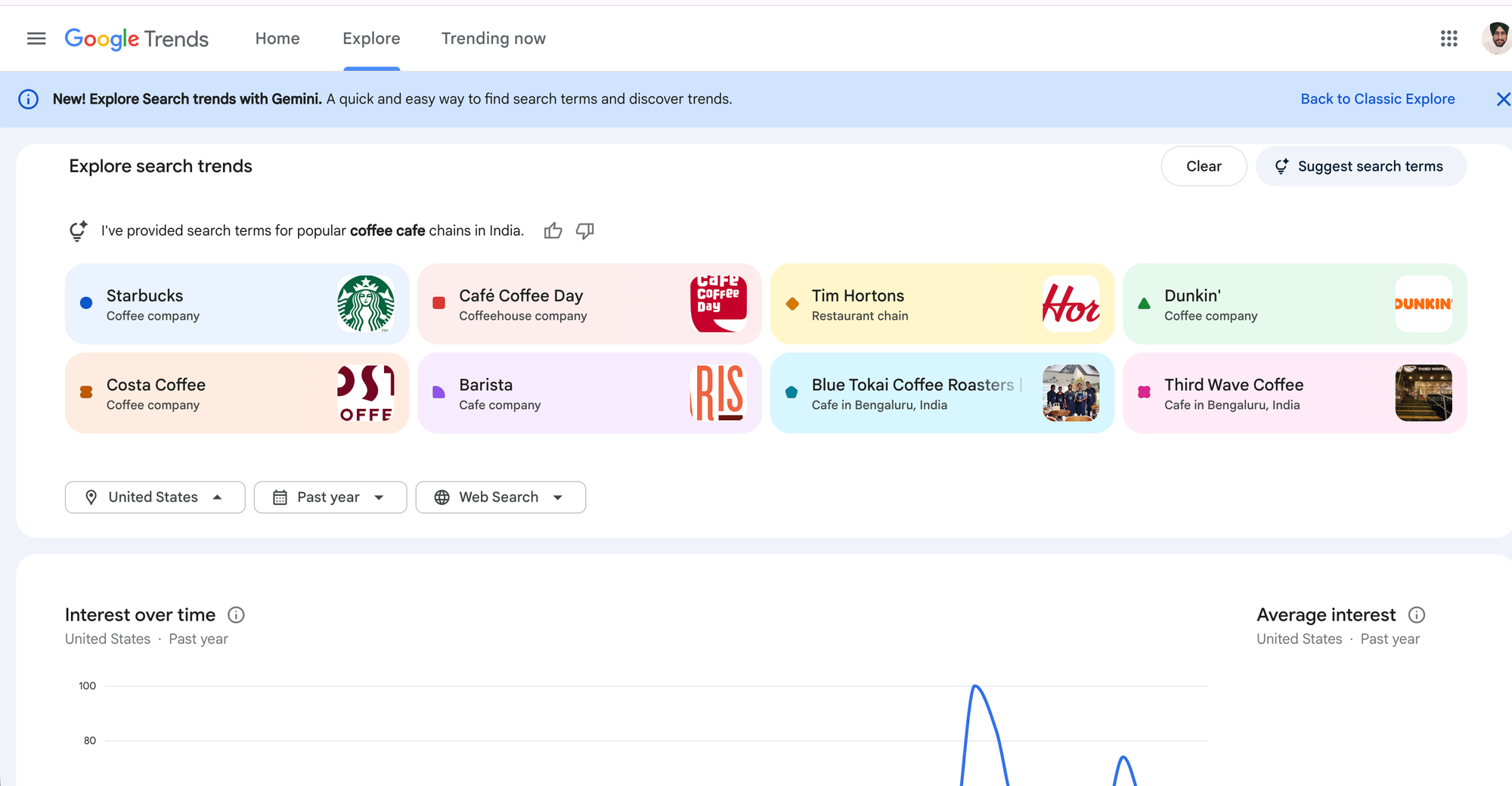
Google Trends helps you confirm if interest grows over time. It also helps you compare two or more topics. This step turns a “cool idea” into a measurable signal.
How to use Google Trends for niche research
- Search your main keyword, then set the location you sell to.
- Set the time range to 12 months and also 5 years.
- Switch category if your term has multiple meanings.
- Check “Related queries” for rising terms.
Compare terms to spot the winner
- Compare a new term vs an old term.
- Compare a tool name vs the problem it solves.
- Compare two competing methods.
What “good” looks like
- A steady climb over months
- Multiple spikes that get higher each time
- Rising related queries that match buyer intent
Trick 4: Track “question trends” with forums, Q&A, and autocomplete
Questions show demand before purchases show up in reports. When people ask the same question more often, a trend is forming. Your job is to capture those questions and answer them fast.
Places to mine questions
- Reddit threads and weekly discussion posts
- Quora topics (use it as a signal source, not as your only source)
- Stack Exchange (for tech and professional niches)
- Facebook Group search bar (type a term and see common posts)
- YouTube search suggestions
- Google autocomplete and “People also ask” boxes
How to turn questions into a trend map
- Create three buckets: “New problem,” “New tool,” “New rule.”
- Paste each question into a sheet.
- Add a count each time you see it again.
- Sort by count each week.
Fast content wins from question trends
- Write one clear answer post per question.
- Record a short video that shows the steps.
- Create a checklist or template as a lead magnet.
Trick 5: Set up alerts that bring trends to you
You do not need to search all day. You need alerts that send you the right updates. Alerts help you react faster and keep your trend tracking consistent.
Alerts to set up
- Google Alerts: Brand names, tool names, and niche phrases
- Talkwalker Alerts: A second option for web mentions
- Reddit keyword alerts: Use third-party tools or RSS feeds
- YouTube channel notifications: For fast-growing creators in your niche
- Newsletter filters: Route key newsletters into one folder
Alert keywords that work well
- “alternative to [tool]”
- “[tool] pricing”
- “[niche] template”
- “[niche] checklist”
- “how to [job-to-be-done]”
- “best [tool] for [audience]”
Keep alerts clean
- Start with 10 to 20 alerts.
- Delete alerts that send noise.
- Keep alerts that show repeated terms and new product launches.
Trick 6: Watch early adopters and “builder” communities
Early adopters test new tools and new methods first. Builder communities share what they build, what breaks, and what they fix. These places show trend signals before mainstream media.
Communities to watch (pick what fits your niche)
- Indie Hackers
- Product Hunt
- Hacker News
- GitHub trending (for software and data niches)
- Dribbble and Behance (for design niches)
- Substack leaderboards (for topic clusters)
What to track each week
- Products that reach top spots fast
- Comments that mention a new use case
- Repeated requests for the same feature
- New categories that appear (example: “AI agents,” “no-code automation”)
How to use this data without copying
- Write a “what it is” guide for beginners.
- Write a “best use cases” guide for buyers.
- Build a small template that solves the top complaint.
Trick 7: Follow money signals (jobs, ads, pricing, and budgets)
Money signals confirm that a trend has real demand. If companies hire for a skill, run ads for a product, or raise prices, they show commitment. These signals help you avoid fads.
Money signals to track
- Job posts: New role titles and new skill requirements
- Ad libraries: New offers and new angles
- Pricing pages: New tiers and new packaging
- Agency pages: New service lines
- Course launches: New topics that creators bet on
Where to find them
- LinkedIn Jobs and Indeed
- Meta Ads Library and Google Ads Transparency Center
- Competitor websites and changelogs
- Creator newsletters and sales pages
How to log money signals
- Save the link.
- Write the offer in one sentence.
- Tag it as “Hiring,” “Ads,” “Pricing,” or “Packaging.”
- Review tags each month for repeats.
Trick 8: Use social listening with a clear keyword set
Social platforms show trend growth in public. You need a keyword set that matches your niche, then you need a simple way to monitor it. This method helps you spot fast changes in language and demand.
Platforms that show trend signals fast
- X (Twitter) for real-time discussion
- TikTok for consumer behavior shifts
- YouTube for long-form education demand
- LinkedIn for B2B shifts and new role needs
- Instagram for product and lifestyle niches
Build a keyword set that works
- 5 problem keywords (pain points)
- 5 solution keywords (methods)
- 10 tool keywords (brands, apps, platforms)
- 5 “comparison” keywords (“vs,” “alternative,” “best”)
What to measure
- Post volume growth for your keywords
- Engagement per post for new topics
- New creators who grow fast in the same topic
- Comments that ask “how do I start” or “what should I buy”
Trick 9: Create a trend scorecard so you can decide fast
You need a rule for decisions. A trend scorecard turns scattered notes into a clear priority list. It also helps your team agree on what to do next.
A simple trend scorecard (0 to 3 points each)
- Search growth: 0 none, 1 small, 2 clear, 3 strong
- Community repetition: 0 rare, 1 sometimes, 2 often, 3 constant
- Buyer intent: 0 curiosity, 1 learning, 2 comparing, 3 ready to buy
- Competition speed: 0 slow, 1 medium, 2 fast, 3 very fast
- Fit for your offer: 0 weak, 1 okay, 2 strong, 3 perfect
How to use the scorecard
- Score each trend idea once per week.
- Pick the top 3 ideas to test.
- Archive ideas that stay low for 4 weeks.
Decision rule you can follow
- 12 to 15 points: Publish and build now.
- 8 to 11 points: Publish a test and watch for 2 weeks.
- 0 to 7 points: Save it, do not spend time yet.
Trick 10: Run “micro-tests” before you commit time or budget
A micro-test proves demand with a small action. It reduces risk and speeds up learning. It also gives you data you can use in your next content and product decisions.
Micro-tests you can run in 48 hours
- Publish a short post that answers one trend question
- Post a poll in a community you own
- Send an email asking one direct question
- Create a landing page with one offer and track clicks
- Run a small ad test with two angles
- Record a 60-second video that shows the new method
What to track during a micro-test
- Click-through rate (CTR)
- Comments that ask for steps or tools
- Email replies and direct messages
- Time on page and scroll depth
- Sign-ups or waitlist joins
How to decide after the test
- If people ask “how do I do this,” create a tutorial.
- If people ask “what should I buy,” create a comparison guide.
- If people ask “can you do this for me,” create a service offer.
Trick 11: Turn trends into an SEO and content plan you can repeat
You win when you publish early and cover the topic fully. SEO rewards clear pages that match search intent. A trend content plan helps you build topical authority before the topic gets crowded.
Use a 3-layer content stack
- Layer 1: Definition page (What it is, who it helps, when to use it)
- Layer 2: How-to pages (Steps, tools, mistakes, examples)
- Layer 3: Comparison pages (X vs Y, best tools, alternatives, pricing)
Pick formats that match the trend stage
- Early stage: “What is…” and “How does it work…”
- Growth stage: “How to…” and “Best practices”
- Buyer stage: “Best,” “Alternatives,” “Pricing,” “Reviews”
On-page SEO checklist for trend posts
- Use the primary keyword in the title and first paragraph: How to get ahead of Trends in your Niche (10 Tricks)
- Use short paragraphs and clear subheadings
- Add a bullet list of steps
- Answer common questions in plain language
- Link to 2 to 5 related pages on your site
- Add one clear call-to-action at the end
How to stay consistent without burnout
- Batch research on one day each week.
- Write from your trend log, not from a blank page.
- Reuse one idea across blog, email, and short video.
- Update your top trend posts every 30 days.
Put the 11 tricks into a weekly system (simple schedule)
A schedule turns tricks into results. Use this weekly loop to keep trend tracking steady. Keep it small so you can follow it every week.
Monday: Collect signals (30 to 45 minutes)
- Scan your trend radar sources.
- Save repeated questions and complaints.
- Add notes to your trend sheet.
Tuesday: Confirm with data (30 minutes)
- Check Google Trends for your top 5 ideas.
- Check related queries and rising topics.
- Log what grows and what drops.
Wednesday: Score and pick (20 minutes)
- Use the trend scorecard.
- Pick 3 ideas to test.
- Pick 1 idea to publish this week.
Thursday: Run a micro-test (60 minutes)
- Publish a short post or a short video.
- Send a short email or run a poll.
- Track responses and clicks.
Friday: Publish the main piece (2 to 4 hours)
- Write the full guide or comparison page.
- Add clear steps and examples.
- Link to your related pages.
Monthly: Review money signals (60 minutes)
- Check job posts and ad libraries.
- Review competitor pricing and packaging changes.
- Update your trend priorities.
Common mistakes that keep you behind trends
Some habits slow you down. Fix these issues and you will move faster with less stress.
Mistake: You chase every new topic
- Fix: Use the scorecard and pick only top ideas.
Mistake: You wait until the trend is “safe”
- Fix: Run micro-tests and learn fast.
Mistake: You track tools but ignore problems
- Fix: Track pain points and jobs first, then tools.
Mistake: You publish one post and stop
- Fix: Use the 3-layer content stack and build a cluster.
Mistake: You do not talk to customers
- Fix: Add one customer call or survey each month.
Frequently Asked Questions (FAQs)
How do I find trends in my niche fast?
Use a daily trend radar list, set alerts, and track repeated questions in communities. Then confirm growth with Google Trends.
What tools help me spot trending topics?
Google Trends, Google Alerts, ad libraries, job boards, and community search bars help you spot early signals and confirm demand.
How do I know if a trend is real or a fad?
Check for steady search growth, repeated community demand, and money signals like hiring, ads, and new pricing tiers.
How often should I update my trend research?
Do a short daily scan and a weekly review. Do a deeper money-signal review once per month.
How can I use trends for SEO content?
Create a definition page, then publish how-to guides, then publish comparison pages. This structure matches search intent as the trend grows.
What should I do after I spot a trend?
Run a micro-test in 48 hours, score results, then publish a full guide or launch a small offer if demand stays strong.
Final Thoughts
You can get ahead of trends if you track signals, confirm them with data, and act with small tests. Use the 10 tricks in this guide to build a weekly habit that finds new topics early and turns them into SEO pages, emails, and offers. If you want faster results, start today: build your trend radar list, set 10 alerts, and run one micro-test this week.
Frequently Asked Questions

Written by
Raman Singh
Raman Singh is a highly skilled marketing professional who serves as the head of marketing at Copyrocket AI. With years of experience in the field, Raman has developed a deep understanding of all asp
View all postsYour AI Marketing Agents
Are Ready to Work
Stop spending hours on copywriting. Let AI craft high-converting ads, emails, blog posts & social media content in seconds.
Start Creating for FreeNo credit card required. 50+ AI tools included.
Related Articles
 General
NotebookLM For Coders: Turn Docs Into Faster Code
Code work often fails for a simple reason. You do not have the right context at the right time. You read docs in one tab, skim tickets in another tab, and then...

 General
How to Optimize for AI Search in 2026: The Complete Guide
AI search has shifted from experimental feature to primary search method for millions of users. ChatGPT Search, Google AI Overviews, Perplexity, Claude, and Gem...
 General
Claude Opus 4.6 Review: Here's What New!
Claude Opus 4.6 from Anthropic draws attention because teams want an AI model that writes better code, follows instructions, and stays consistent across long se...