
How to Optimize Old Posts for AI Overview Citations (Actionable Tips)

Raman Singh
Raman Singh is a highly skilled marketing professional who serves as the head of marketing at Copyrocket AI

AI Overviews reward pages that answer a question fast, support the answer with clear evidence, and keep the page aligned with the original search intent. Many updates fail because they add extra topics, chase new keywords, or rewrite the article into a different promise.
This guide shows how to optimize an existing article to earn AI Overview citations without diluting intent.
You will use a repeatable workflow that improves extractable answers, strengthens sources, and keeps your page focused on the same user job.
Key Takeaways
- Keep intent stable: map the current query, the user goal, and the page promise before you edit.
- Add citation-ready blocks: write short answers, definitions, and steps that an AI system can quote.
- Strengthen evidence: add primary data, credible references, and clear attribution near key claims.
- Improve structure: use clean H2/H3 sections, scannable bullets, and consistent terms.
- Reduce ambiguity: remove vague phrasing, tighten scope, and clarify who the advice fits.
- Measure impact: track AI Overview presence, snippet-like behavior, and engagement signals after changes.
Define “AI Overview citation” and why intent drift blocks it
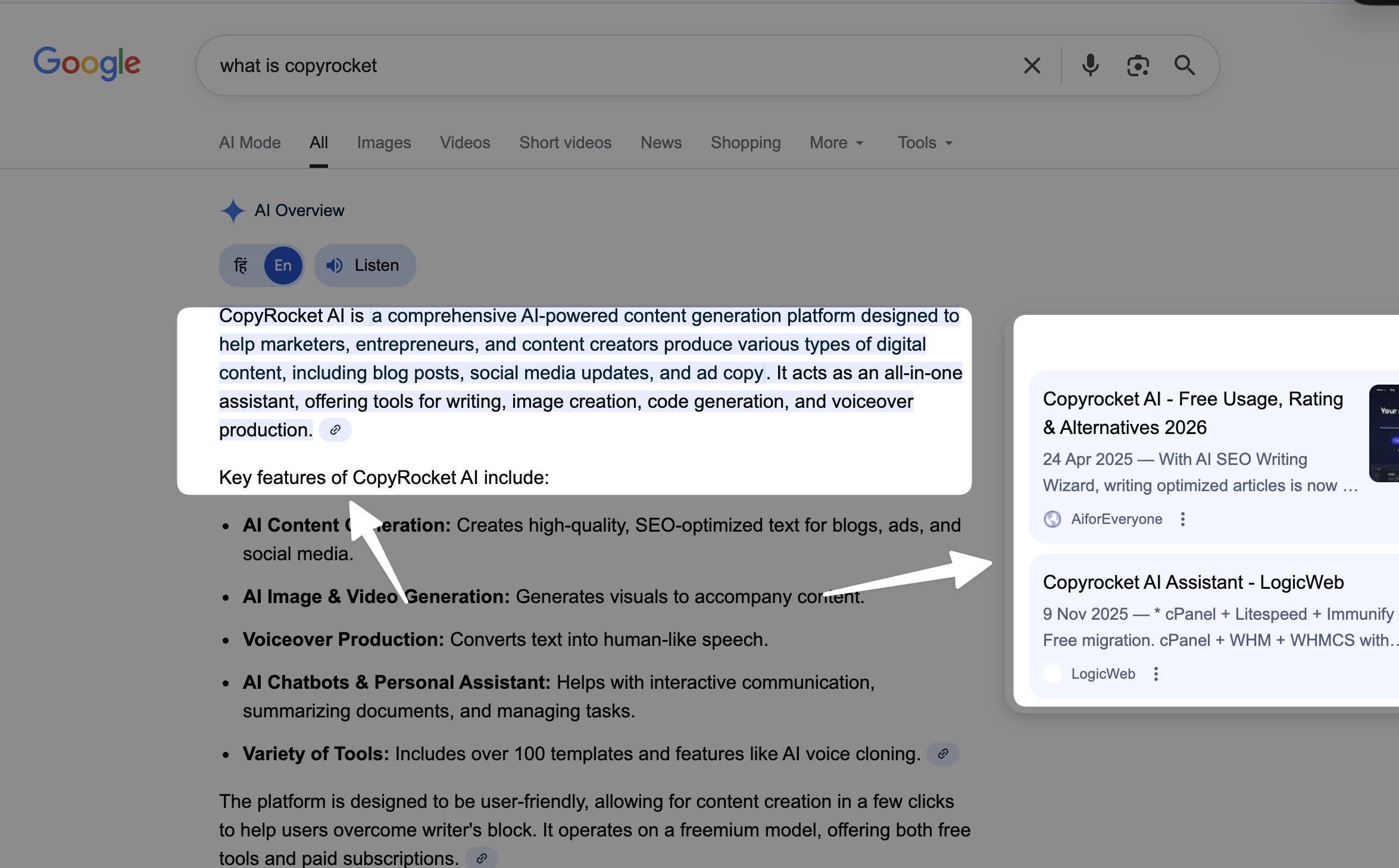
Before you change an article, you need one shared definition. An AI Overview citation is a link that appears inside an AI-generated summary on a search results page.
The system selects sources that provide clear, verifiable, and relevant statements. The system avoids sources that look off-topic, inconsistent, or hard to extract.
What AI systems look for in a source
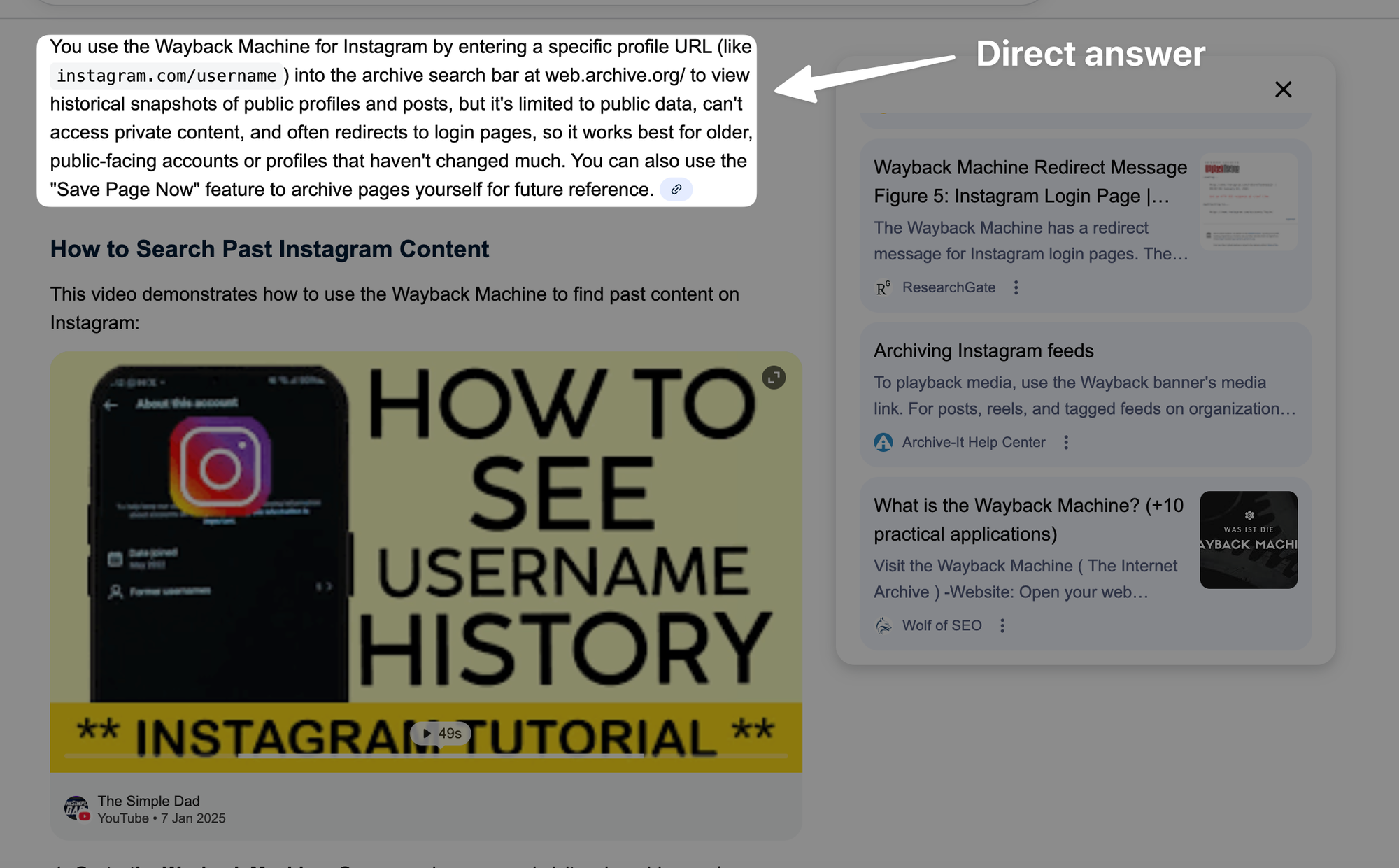
- Direct answers: short statements that match the query wording and meaning.
- Stable intent: the page stays focused on the same problem and audience.
- Evidence signals: citations, data, examples, and author expertise cues.
- Clear structure: headings that match sub-questions and steps that follow a logical order.
- Low friction: fast load, readable layout, and minimal clutter around the answer.
What “diluting intent” looks like in real edits
- You add a new section that targets a different query family, such as “tools,” “pricing,” or “history,” even though the post is a “how-to.”
- You rewrite the intro to chase a broader audience, which changes who the article helps.
- You add long opinion paragraphs that do not support the main task.
- You stuff related keywords into headings that no longer match the user’s question.
How to keep intent stable while still improving the page
- Keep the main promise the same. If the title says “how to,” the page must stay a “how to.”
- Answer adjacent questions only if they remove friction for the same user goal.
- Use add-ons that support the main path, like checklists, examples, and troubleshooting.
Audit the existing article before you write a single new sentence
Optimization starts with a diagnostic pass. You need to know what the page already does well, what it lacks, and where it goes off track. This audit step prevents random edits that weaken intent.
Recommended: Use Our WordPress AI Agent to audit your article
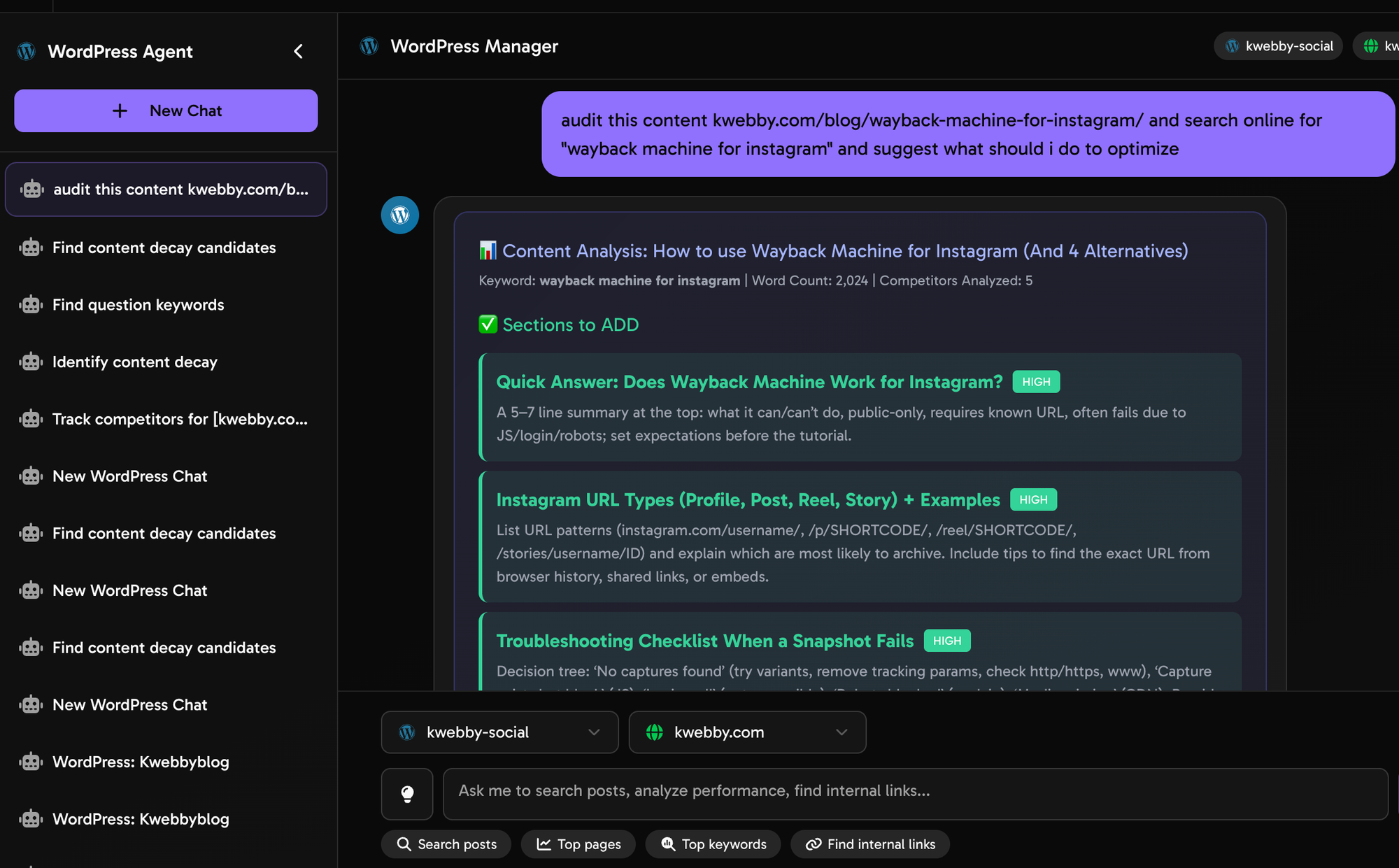
You can use our AI WordPress Agent to audit your article against what's already ranking on Google including AI Overviews.
- First signup to copyrocket ai here.
- Go to Autoblogging Agent and connect your WordPress website with username and APP Password generated from your profile.
- Then Go to WordPress Agent from left sidebar
- Now select your WordPress website and type the following prompt:
Wait for the actionable output as below;
Step 1: Write an “intent lock” statement
Create a one-sentence statement that you will not break during edits.
- Template: “This article helps [specific audience] do [specific task] so they can achieve [specific outcome].”
- Example: “This article helps content editors optimize an existing article for AI Overview citations so they can earn more qualified search traffic without changing the page’s purpose.”
Step 2: Identify the primary query and the top 5 sub-questions
- Primary query: the main phrase the page targets.
- Sub-questions: the questions a user asks next after the main query.
Use these sources to find sub-questions:
- Search results “People also ask” questions.
- Internal site search logs.
- Sales and support tickets.
- Comments on the post.
Step 3: Mark every paragraph as one of four types
- Answer: it directly addresses a sub-question.
- Proof: it supports an answer with data, sources, or examples.
- Action: it tells the reader what to do next.
- Noise: it repeats, wanders, or adds a new topic.
Your goal is simple: keep Answer, Proof, and Action. Reduce Noise.
Step 4: Check extractability
AI systems often quote short, complete statements. Your content needs blocks that stand alone.
- Do key sections start with a direct answer in 1 to 2 sentences?
- Do steps use numbered lists with clear verbs?
- Do definitions follow a simple pattern: term + “is” + meaning?
- Do you avoid pronouns that hide meaning, such as “this,” “that,” or “it,” without a clear noun?
Step 5: Check evidence and attribution near major claims
- Do you cite sources for factual claims, stats, and platform behavior?
- Do you separate your opinion from observed facts?
- Do you name the tool, study, or dataset you reference?
Rewrite the page outline to match how AI Overviews break down answers
A strong outline makes your page easy to quote. It also makes your page easier to read. You do not need to add more words first. You need to fix the order of ideas.
Use an “answer-first” structure inside each section
- Answer: 1 to 2 sentences that solve the sub-question.
- Why: 2 to 4 sentences that explain the reason.
- How: steps or checklist.
- Proof: example, source, or data.
Match headings to real questions
Headings work best when they look like a user question or a direct task.
- Good: “How do you add citation-ready answers to an existing post?”
- Good: “What sources should you cite for AI Overview eligibility?”
- Weak: “AI Overview strategy”
- Weak: “Content optimization tips”
Keep one intent per H2
If one H2 tries to do two jobs, split it. If a section targets a different audience, remove it or move it to a new article.
Build a “citation lane” inside the outline
A citation lane is a set of small blocks that an AI system can quote without extra context. Add these blocks near the top of each major section.
- Definition box in plain text.
- Short “best practice” statement.
- Numbered steps.
- Checklist bullets.
Add citation-ready answer blocks without changing the article’s promise
This is the core of how to optimize an existing article to earn AI Overview citations without diluting intent. You will add short answer blocks that match the query and sub-questions. You will keep the rest of the article as support.
Write “standalone answers” that can be quoted
A standalone answer uses a full subject and a clear verb. It avoids references that require earlier context.
- Weak: “This is why it matters.”
- Strong: “AI Overviews cite pages that provide short, verifiable answers with clear structure and credible sources.”
Use a consistent definition pattern
- Pattern: “Term is definition.”
- Example: “Intent drift is a change in page focus that makes the content answer a different user goal than the original query.”
Add a “quick steps” list early in the post
AI Overviews often summarize processes. Put a short version near the top, then expand later.
- Lock the page intent in one sentence.
- Map the main query to 5 sub-questions.
- Add answer-first blocks under each heading.
- Add sources and examples next to key claims.
- Remove off-topic sections and repeated ideas.
- Validate changes with Search Console and on-page engagement.
Use lists for criteria, steps, and comparisons
Lists reduce ambiguity. Lists also improve scan speed.
- Use bullets for criteria and checks.
- Use numbers for steps and sequences.
- Keep list items parallel. Start each item with a verb when possible.
Keep the same intent while adding depth
You can add depth without adding new intent. Add depth through these methods:
- Add one example for each key step.
- Add one common mistake and one fix for each section.
- Add a short “who this is for” line when advice has limits.
Strengthen E-E-A-T signals with simple, verifiable additions
AI Overviews prefer sources that look reliable. You can improve reliability without adding fluff. You will add proof, attribution, and author signals in direct language.
Add sources where a reader would ask “how do you know?”
- Platform documentation for product behavior.
- Original research or datasets for statistics.
- Reputable industry studies for benchmarks.
- Your own data, if you explain the method and sample size.
Use “claim + support” formatting
- Claim: one sentence.
- Support: a citation, a data point, or a brief example.
Example:
- Claim: “Short answer blocks increase the chance that an AI system can extract a quote.”
- Support: “The block uses a complete sentence, a clear noun, and a direct verb, which reduces parsing errors.”
Show first-hand experience without storytelling bloat
First-hand experience can be one to three lines.
- State what you did.
- State what changed.
- State what you measured.
Example:
- “We added answer-first blocks to 12 existing posts. We kept titles and primary keywords unchanged. We saw higher snippet-like impressions and longer average time on page on 8 posts within 6 weeks.”
Upgrade author and editorial signals
- Add a short author bio with relevant credentials.
- Add an “Updated on” date when you make meaningful changes.
- Add an editorial policy page and link to it.
- Link to your source list when you cite studies often.
Fix on-page SEO elements that affect AI Overview selection
AI Overview citations still depend on classic SEO basics. A page needs clear topical focus, clean HTML, and strong internal context. You will improve these elements without rewriting the page into a new topic.
Title tag: keep intent, sharpen specificity
- Keep the primary keyword close to the start when it fits.
- Use one clear benefit. Avoid vague hype.
- Do not add extra promises that the article does not fulfill.
Meta description: match the page promise
- State who the post helps.
- State the outcome.
- Use one line on what the reader will do.
Heading hygiene: one topic per heading
- Use H2 for main sections.
- Use H3 for sub-steps and sub-questions.
- Keep headings literal. Avoid clever phrasing that hides meaning.
Internal links: add context without distraction
- Link to one deeper guide for each major sub-topic.
- Use descriptive anchor text that matches the destination page.
- Avoid linking to irrelevant product pages inside key answer blocks.
Schema: support understanding, not manipulation
- Add Article or BlogPosting schema with author and date.
- Add FAQPage schema if your FAQ answers are accurate and visible on the page.
- Add HowTo schema only if the content is a true step-by-step process with clear steps.
Page experience: remove friction around key answers
- Reduce intrusive popups that cover the first screen.
- Keep the first answer visible without scrolling on mobile when possible.
- Improve load speed for the main content area.
Expand coverage the right way: fill gaps, do not broaden the topic
Many editors add sections to “make it comprehensive.” That often causes intent drift. You need a gap-fill method that stays inside the same user job.
Use a “same-intent gap” checklist
- Does the page define key terms a beginner needs?
- Does the page show the exact steps in order?
- Does the page include a common mistake for each step?
- Does the page include a short example for each step?
- Does the page explain limits and edge cases?
Add “constraints” to prevent wrong traffic
Constraints help both readers and AI systems understand scope.
- State the platform or context if advice differs by platform.
- State the content type if advice differs by content type.
- State the audience level if advice differs by skill level.
Use micro-examples instead of long case studies
Micro-examples keep the pace fast. They also create quote-ready proof.
- Show a “before” sentence and an “after” sentence.
- Show a “bad heading” and a “good heading.”
- Show a “weak answer block” and a “strong answer block.”
Answer adjacent questions only if they remove friction
Use this test for each new section:
- If you remove the section, does the reader fail the main task?
- If the section ranks on its own, does it attract the same audience?
- If the section needs a different title, it is a different article.
Optimize language for NLP: clarity, consistency, and low ambiguity
AI systems and readers both benefit from clear language. Your goal is not to sound “smart.” Your goal is to be easy to parse and easy to trust.
Use consistent terms for the same concept
- Pick one term for the main object. Use it across the post.
- Example: use “AI Overviews” consistently, not “AI summaries,” “overview boxes,” and “AI panels” in random rotation.
Prefer concrete nouns and active verbs
- Write: “Add a two-sentence answer under each H2.”
- Avoid: “Consider adding some helpful context.”
Reduce pronoun chains
- Weak: “This improves it, which helps that.”
- Strong: “A short answer block improves extractability. Better extractability increases citation chances.”
Use simple sentence patterns
- Subject-verb-object sentences reduce misreads.
- Keep one main idea per sentence.
- Break long sentences into two.
Remove filler and tighten intros
Many posts waste the first 200 words. AI Overviews often prefer sources that answer fast.
- Start sections with the answer.
- Move background context below the answer.
- Delete repeated statements.
Build a “quote bank” inside the article
A quote bank is a set of short statements that summarize key points. These statements help AI systems cite your page. They also help readers remember the steps.
What a good quote bank line looks like
- It is 15 to 35 words.
- It uses a clear subject and verb.
- It avoids vague modifiers like “very,” “really,” or “a lot.”
- It states one idea.
Examples you can adapt
- “AI Overviews cite pages that answer the query in plain language and support the answer with sources close to the claim.”
- “Intent drift happens when an update adds new goals that the original reader did not ask for.”
- “An answer-first section starts with a two-sentence summary, then lists steps, then adds proof.”
- “A strong heading names the question the reader asks, not a vague topic label.”
Where to place quote bank lines
- Directly under H2 headings as the first paragraph.
- After a definition.
- Before a checklist.
- Inside the FAQ section for common questions.
Update visuals and formatting without adding image placeholders
Formatting affects readability and engagement. Engagement supports performance over time. You can improve formatting through spacing, lists, and examples. You do not need to add visual clutter.
Use short paragraphs and predictable patterns
- Keep paragraphs to 2 to 4 lines on mobile.
- Use the same pattern for each step: action, reason, example.
Add tables only when they reduce confusion
- Use a table for comparisons with fixed criteria.
- Do not add a table as decoration.
Use callouts as plain HTML, not gimmicks
- Add a short “Checklist” block with bullets.
- Add a short “Common mistakes” block with bullets.
Prevent intent drift with a controlled update workflow
You need a workflow that protects the page promise. This workflow also makes updates faster across many posts.
Create an edit brief for each update
- Intent lock: one sentence.
- Primary query: one phrase.
- Sub-questions: five items.
- What to add: answer blocks, sources, examples.
- What to remove: off-topic sections, repeated paragraphs.
- What to keep: the existing angle, the audience level, the CTA.
Use a “scope guard” during writing
- If a new paragraph does not support a sub-question, cut it.
- If a new keyword implies a new audience, stop and reassess.
- If a new section needs a new title, create a new article instead.
Run a before-and-after intent test
Ask two simple questions:
- Does the updated page still answer the same main question?
- Would a reader feel tricked after clicking the title?
Keep the CTA aligned with the main task
A mismatched CTA can signal a different intent. It can also reduce trust.
- If the post is a “how-to,” the CTA should offer a checklist, template, or audit.
- If the post is a “definition,” the CTA should offer a glossary, guide, or related explainer.
Track results: what to measure after you optimize for AI Overview citations
You need feedback loops. AI Overview visibility can change by query, location, and device. Track what you can, and use proxies for what you cannot.
Search Console checks
- Impressions and clicks for the primary query and close variants.
- Average position trends after the update date.
- Pages that gain impressions without clicks, which can signal more SERP features.
SERP checks (manual and recorded)
- Check if AI Overviews appear for your target queries.
- Check which sources get cited and what text gets quoted.
- Compare your answer blocks to the cited text patterns.
On-page engagement checks
- Scroll depth to key sections.
- Time on page for organic sessions.
- Clicks on internal links that support the main task.
Update cadence and iteration
- Do one controlled update per page, then wait 2 to 6 weeks.
- Change one major variable at a time when possible.
- Document what you changed and why.
A practical optimization checklist you can reuse on any existing article
Use this checklist as your standard operating procedure. It keeps the page focused and increases the chance of AI Overview citations.
Intent and scope
- Write the intent lock statement.
- Confirm the primary query matches the title and first screen.
- List 5 sub-questions and map them to headings.
- Remove sections that target a different user goal.
Answer blocks and structure
- Add a 1 to 2 sentence answer at the start of each H2 section.
- Add numbered steps for processes.
- Add checklists for criteria and audits.
- Add one example per major step.
Evidence and trust
- Add citations for key claims.
- Place sources close to the claim they support.
- Add author, update date, and editorial signals.
NLP clarity
- Use consistent terms.
- Use active voice when it improves clarity.
- Reduce pronouns and vague references.
- Cut filler and repeated lines.
Technical and UX
- Check mobile readability.
- Reduce layout shifts and intrusive elements.
- Add relevant internal links.
- Validate schema where it fits.
Common mistakes that reduce AI Overview citation chances
Many pages miss citations for avoidable reasons. These fixes usually improve user experience too.
Mistake 1: You add new sections that chase new keywords
- Problem: the page becomes a mixed bag of intents.
- Fix: move the new topic into a separate article and link to it once.
Mistake 2: You hide the answer under long context
- Problem: the system cannot extract a clean quote fast.
- Fix: put a short answer first, then explain.
Mistake 3: You use vague language
- Problem: vague terms reduce trust and extractability.
- Fix: use concrete nouns, clear verbs, and measurable criteria.
Mistake 4: You cite sources in a separate “resources” section only
- Problem: the claim and the proof sit too far apart.
- Fix: cite near the claim, then keep a resource list as a bonus.
Mistake 5: You rewrite the article voice and audience level
- Problem: the page stops matching the original query intent.
- Fix: keep the same audience, then add optional “advanced” notes as short sub-bullets.
Frequently Asked Questions (FAQs)
How do I optimize an existing article to earn AI Overview citations without diluting intent?
Lock the page intent first, then add answer-first blocks that match sub-questions, support key claims with sources, and remove off-topic sections that change the page promise.
Do I need to rewrite the whole article to get cited in AI Overviews?
No. Most pages improve with structural edits, short standalone answers, better evidence, and tighter scope. Large rewrites often cause intent drift.
What type of content gets cited most often?
Content that gives direct answers, clear steps, definitions, and checklists. The page also needs credible support near major claims.
Should I add more related keywords to increase AI Overview visibility?
Add related terms only when they clarify meaning or match sub-questions. Do not add terms that pull the page into a different topic or audience.
Where should I place sources and citations in the article?
Place citations close to the claim they support. This placement makes the claim easier to verify and easier to quote with context.
How long does it take to see results after an update?
Many sites see changes in impressions and rankings within 2 to 6 weeks, but AI Overview visibility can vary by query and location. Track results over multiple checks.
Final Thoughts: You can earn AI Overview citations without changing what your article is “about.” You need clear intent, answer-first structure, quote-ready blocks, and evidence near key claims. Start with one high-performing post, apply the checklist, and measure changes for 2 to 6 weeks. If you want a faster workflow, create an edit brief template and use it on every update so each article stays focused and citation-ready.
Call to action: Pick one existing article today. Write an intent lock statement, add one answer-first block under each H2, and remove one off-topic section. Then track the query set in Search Console for the next month.
Frequently Asked Questions

Written by
Raman Singh
Raman Singh is a highly skilled marketing professional who serves as the head of marketing at Copyrocket AI. With years of experience in the field, Raman has developed a deep understanding of all asp
View all postsYour AI Marketing Agents
Are Ready to Work
Stop spending hours on copywriting. Let AI craft high-converting ads, emails, blog posts & social media content in seconds.
Start Creating for FreeNo credit card required. 50+ AI tools included.
Related Articles
 General
NotebookLM For Coders: Turn Docs Into Faster Code
Code work often fails for a simple reason. You do not have the right context at the right time. You read docs in one tab, skim tickets in another tab, and then...

 General
How to Optimize for AI Search in 2026: The Complete Guide
AI search has shifted from experimental feature to primary search method for millions of users. ChatGPT Search, Google AI Overviews, Perplexity, Claude, and Gem...
 General
Claude Opus 4.6 Review: Here's What New!
Claude Opus 4.6 from Anthropic draws attention because teams want an AI model that writes better code, follows instructions, and stays consistent across long se...