
I Tested MiniMax M2.7 on 5 Real Projects — Here Are My Honest Scores

Raman Singh
Raman Singh is a highly skilled marketing professional who serves as the head of marketing at Copyrocket AI

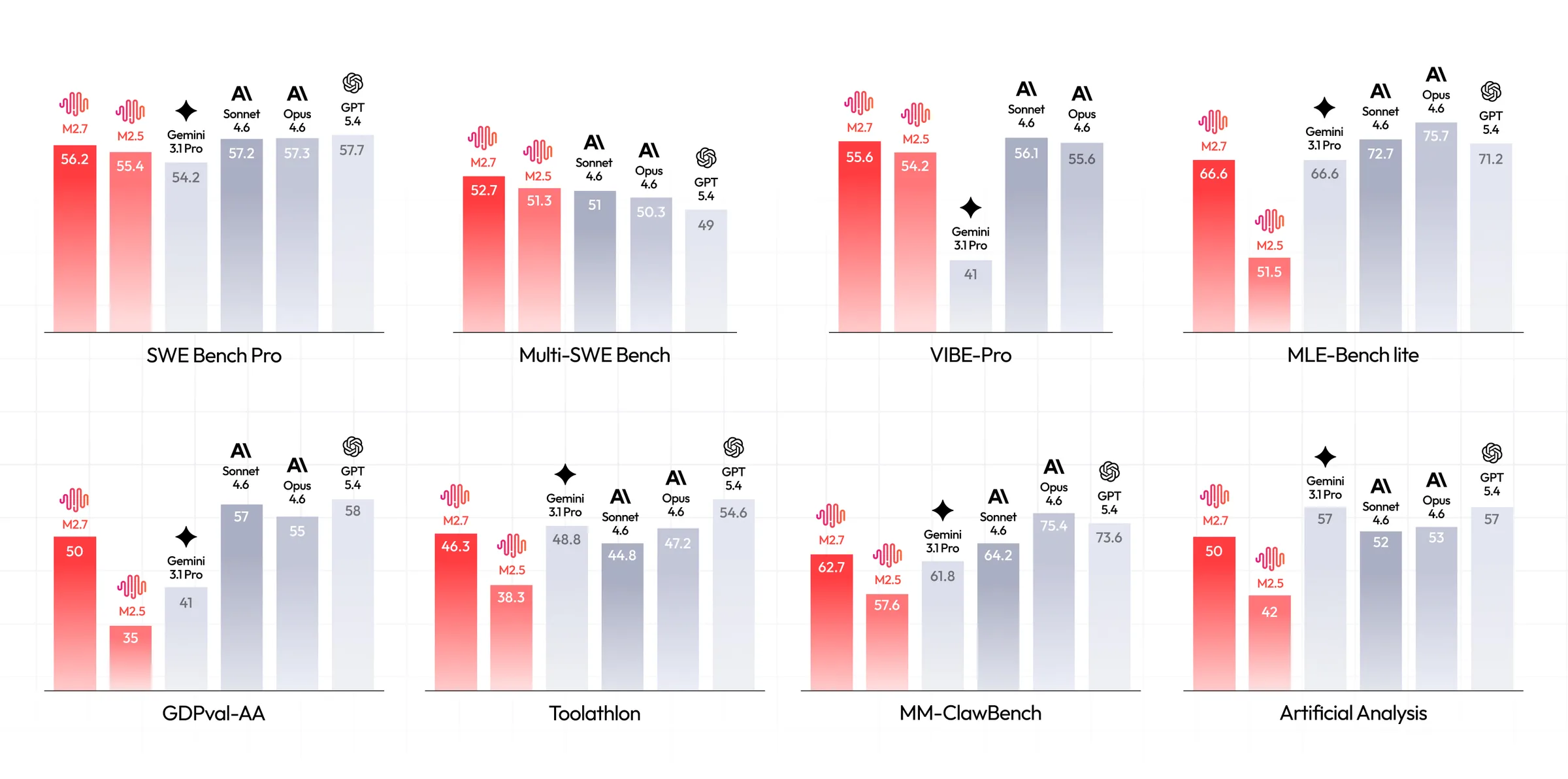
MiniMax M2.7 launched with a bold claim: SWE-Pro benchmark scores of 56.22%, nearly matching Claude Opus's best level. At just $0.30 per million input tokens and $1.20 per million output tokens, the price-to-performance pitch is aggressive.
So I ran it through five real build challenges — a freelancer invoice app, a Python data analyzer, a Mac desktop app, a tower defense game, and a personal finance dashboard — and then made it play chess against GPT-5.4.
Here are my scores, section by section, with no filter.
Key Takeaways
MiniMax M2.7 scored 56.22% on SWE-Pro, closely approaching Claude Opus 4.6's performance on software engineering benchmarks.
The model is priced at $0.30 per million input tokens and $1.20 per million output tokens — approximately 17x cheaper than Claude Opus 4.6 on input.
In my five-app test, M2.7 scored 3/5 on web app, 5/5 on Python CLI, 2.5/5 on Mac app, 1/5 on game, and 4/5 on UI/UX.
Instruction-following for detailed UI/UX specs is still M2.7's weakest area compared to Claude Opus and GPT-5.4.
M2.7 lost a chess match to GPT-5.4 by generating 10 consecutive invalid moves — showing reasoning gaps in rule-constrained environments.
For Python data processing and report generation, M2.7 genuinely impressed — better than GLM 5.1 on report quality and chart output.
What Is MiniMax M2.7?
MiniMax is a Shanghai-based AI company that has been iterating fast. Their previous model, M2.5, released in February 2026, became the most-used model on platforms like Kilo Code — accounting for 37% of all Code mode usage — ahead of Claude Opus 4.6 and GPT-5.4.
M2.7 is the next step.
The headline feature is self-evolution: the model participated in its own training by updating its own memory, building skills inside its agent harness, and running over 100 rounds of self-optimization — achieving roughly a 30% performance gain on internal benchmarks without human intervention.
That is a meaningful technical claim and one that separates M2.7 from static, freeze-on-ship models.
The context window is 204,800 tokens.
It comes in two API variants: standard and M2.7-highspeed, which delivers the same output at faster inference. MiniMax also offers full automatic cache support with no configuration needed.
Benchmarks on launch day showed 56.22% on SWE-Pro, 55.6% on VIBE-Pro (end-to-end project delivery), and 76.5 on SWE Multilingual. On GDPval-AA — a professional office document benchmark — M2.7 hit an ELO score of 1495, the highest among open-source models, outperforming GPT-5.3.
Try Minimax M2.7 On Our Free AI Chat Bot here.
How I Structured My Test
I used a structured prompt methodology across all five projects. Prompts were divided into phases: architecture and specification first, database schema second, core functionality third, and validation and success criteria last. This approach reduces credit burn and gives the model a clear delivery target at each stage.
The five test categories were:
InvoiceFlow — a web-based invoice creator for freelancers
DataPulse — a Python CLI tool for CSV/Excel data analysis with visualizations
NoteSync — an Electron-based Mac desktop app for meeting notes
Tower Blitz — a Python/Pygame tower defense game
Personal Finance Dashboard — an instruction-following test for a full dashboard UI
All prompts are publicly available. Each test was scored out of 5.
App 1: InvoiceFlow — Web Invoice Creator for Freelancers | Score: 3/5
What It Built
InvoiceFlow is a full invoice management platform: client management, company settings, logo upload, currency selection, tax rate configuration, and PDF export. On first look, the dashboard is clean and functional — exactly what I asked for structurally.
The model created a proper database schema, defined project structure, and handled most core functionality including auto-tax calculation on line items. Adding a client, setting the invoice date, selecting draft or sent status — all of it worked.
Where It Fell Short
The company logo I uploaded did not appear in the generated PDF. I confirmed this across multiple attempts. M2.7 added the logo field in settings and it visually displayed in the app, but the PDF export pipeline dropped it.
The model also did not fully follow my UI/UX specification. I gave detailed instructions on layout, visual treatment, and component behavior. M2.7 delivered a "standard" output — functional, but not what was described. This is a pattern across Chinese open-source models. Compare the GLM 5.1 video in this channel and you will see the same gap in UI/UX instruction adherence.
Currency switching also required manual entry rather than a clean selector — a UX gap that took extra prompt iterations to surface.
Verdict
Functional core. PDF logo bug and partial instruction-following cost it marks. 3 out of 5.
App 2: DataPulse — Python CSV/Excel Analyzer | Score: 5/5
What It Built
DataPulse is a Python CLI tool for data processing and analysis. It profiles datasets, computes statistics, detects outliers, generates visualizations, and exports HTML reports. The tool includes data comparison across two datasets, format conversion, and preview commands.
Running It
First run surfaced one dependency error: Kaleido package was missing for image export. The error message was clear and fixing it was one pip install command. After that, the tool ran cleanly — profiling data, computing correlations, generating insights, and saving a report.
The HTML report quality was excellent. Data profile with column types, a statistical analysis section, age distributions, salary medians, performance correlations, and a heat map — all formatted and legible. If you watched my GLM 5.1 video, the reports from that model were poorly structured. M2.7's output here was a significant step up.
Six strong correlations were detected automatically. The executive summary identified one outlier. This is the kind of output that would take hours to build manually in Excel.
Verdict
One missed dependency on first run, then near-perfect execution. The report quality alone earns this. 5 out of 5.
App 3: NoteSync — Electron Mac Desktop App | Score: 2.5/5
What It Built
NoteSync is an AI-powered meeting note generator and organizer built in Electron. The app has folder-based note organization, markdown formatting, tag support, and light/dark mode toggle.
What Worked
Light and dark mode toggle worked immediately. The folder structure rendered correctly. Creating a folder — for example a "Promptslove" team folder — and adding a new note worked. The markdown preview toggled properly between edit and formatted view. Search functioned.
What Did Not Work
Notes did not save to the folder I created them in. I created a note inside the "Promptslove" folder, clicked save, and the note appeared only in the "All" view — not in the folder I created. This is a core feature failure.
Tag automation was defined in the prompt. Tags existed in the UI as pre-populated items but the model did not wire auto-tag logic to new notes. The plus buttons in dark mode were not visible — a contrast issue that required focusing carefully on the screen to find them.
Several of these are not minor edge cases. Folder-based saving is a fundamental feature in a notes app.
Verdict
Good structure, broken core behavior, dark mode contrast issues. 2.5 out of 5.
App 4: Tower Blitz — Python/Pygame Tower Defense Game | Score: 1/5
What It Built
Tower Blitz is a tower defense game built in Python using Pygame and JSON. The interface launched and the visual layout looked correct — grid, tower selector panel, wave control button.
What Happened
Left-click to place a tower did not work. The Start Wave button did not work. After two to three debug iterations, the game still failed to respond to mouse inputs. The core game loop was broken.
If you watched my GLM 5.1 video, GLM built a working tower defense game in a single shot — intuitive controls, correct placement mechanics, wave logic. M2.7 produced a visually coherent but non-functional game in the same category.
Verdict
Looks correct, plays broken. A non-functional game cannot score higher. 1 out of 5.
App 5: Personal Finance Dashboard — UI/UX Instruction Test | Score: 4/5
What It Built
This test was specifically about instruction-following on a design specification, not just whether the app worked. I gave M2.7 explicit instructions: white background with subtle shadows, a defined left/right column layout, summary cards, JetBrains Mono for number typography, Inter for body text, a specific yellow/orange color scheme, and hover effects on interactive elements.
What Impressed Me
M2.7 followed most of it. White background, subtle shadows, color combination close to spec, hover effects implemented, JetBrains Mono for numbers — all present. I was genuinely impressed. For a model at this price point, this level of design spec adherence is not common.
Where It Fell Short
The date filter rendered as static — no functional filtering. The live ticker button was missing. The overall color theme applied partially: M2.7 added yellow/orange accents rather than making the entire dashboard theme match the palette I described. One mark deducted for each.
Verdict
Strong instruction-following overall. Two functional gaps and one theme interpretation error. 4 out of 5.
Bonus: Chess Match — MiniMax M2.7 vs GPT-5.4
I used my chess battle script (available at promptslove.com) to pit M2.7 (playing white) against GPT-5.4 (playing black). Thinking mode was disabled for both to keep response time manageable.
M2.7 opened reasonably — pawn out, then knight, then bishop. GPT-5.4 captured a knight. Then M2.7 generated 10 consecutive invalid chess moves. The game engine declared forfeit and GPT-5.4 won.
This is not a trivial failure. Chess is a rule-constrained environment. Generating invalid moves means the model either lost track of board state or failed to reason about legal move sets after material loss. GPT-5.4 showed no such breakdown.
This aligns with what independent tests show. On BridgeBench, not all results for M2.7 are improvements over M2.5. The self-evolution gains are real in some areas and absent in others.
Who Should Use MiniMax M2.7
Use M2.7 if you:
Work heavily in Python data processing, scripting, or CLI tools
Need to keep API costs low across high-volume agent workflows
Want a 204K context window without frontier pricing
Are building multi-agent pipelines where the model participates in its own harness (OpenClaw)
Do not rely on M2.7 if you:
Need pixel-level UI/UX spec adherence from a single prompt
Are building interactive games with complex input logic
Need reliable reasoning inside rule-constrained environments
Are comparing it to Claude Opus for thorough code generation and test coverage
Final Thoughts
MiniMax M2.7 is a serious model at an aggressive price. For Python data pipelines, report generation, and structured UI work with clear design specs, it punches well above its cost tier. At $0.30 per million input tokens — 17x cheaper than Claude Opus 4.6 — the value case for agentic and high-volume workflows is clear.
Where it falls short: game logic, rule-constrained reasoning, and pixel-level UI spec adherence. These are real gaps and they matter depending on what you build.
My overall score across five apps: 15 out of 25. That puts it in the same tier as GLM 5.1 but slightly behind in creative and interactive outputs. If you are testing models for your stack, run M2.7 on your Python and data tasks first. That is where it earns its marks.
Download the chess battle script and all prompts used in this test at promptslove.com.
Frequently Asked Questions

Written by
Raman Singh
Raman Singh is a highly skilled marketing professional who serves as the head of marketing at Copyrocket AI. With years of experience in the field, Raman has developed a deep understanding of all asp
View all postsYour AI Marketing Agents
Are Ready to Work
Stop spending hours on copywriting. Let AI craft high-converting ads, emails, blog posts & social media content in seconds.
Start Creating for FreeNo credit card required. 50+ AI tools included.
Related Articles
 General
NotebookLM For Coders: Turn Docs Into Faster Code
Code work often fails for a simple reason. You do not have the right context at the right time. You read docs in one tab, skim tickets in another tab, and then...

 General
How to Optimize for AI Search in 2026: The Complete Guide
AI search has shifted from experimental feature to primary search method for millions of users. ChatGPT Search, Google AI Overviews, Perplexity, Claude, and Gem...
 General
Claude Opus 4.6 Review: Here's What New!
Claude Opus 4.6 from Anthropic draws attention because teams want an AI model that writes better code, follows instructions, and stays consistent across long se...