
Kimi K2.6 Review: I Built 5 Real Apps and Here's What Happened

Raman Singh
Raman Singh is a highly skilled marketing professional who serves as the head of marketing at Copyrocket AI

Moonshot AI dropped Kimi K2.6 on April 20, 2026, and the AI community hasn't stopped talking about it. After building five real applications — a full-stack meal planner, a landing page, a Python CLI tool, a Mac app, and a strategy game — this is my honest review. You'll get scores, cost breakdowns, and the prompting tips that actually made it work.
Key Takeaways
Kimi K2.6 is a 1-trillion-parameter open-source MoE model with 262K context window, released under a modified MIT license you can self-host.
It scored 58.6% on SWE-Bench Pro — ahead of GPT-5.4 (57.7%) and Claude Opus 4.6 (53.4%) on real-world GitHub issue resolution.
Pricing on OpenRouter sits at $0.80/M input and $3.50/M output tokens, compared to Claude Opus 4.7's $5/$25 — roughly 10x cheaper per task.
In my one-shot build tests, 3 out of 5 apps scored 5/5, with only the Python CLI tool scoring below expectations.
Agent Swarm scales to 300 parallel sub-agents across 4,000 coordinated steps — up from 100 sub-agents in K2.5.
For UI/UX generation from detailed prompts, Kimi K2.6 is arguably the best open-source model available today.
What Is Kimi K2.6?
Kimi K2.6 is Moonshot AI's latest open-weight model, built for long-horizon coding, autonomous agent execution, and what the company calls "coding-driven design." Under the hood, it runs a Mixture-of-Experts architecture — 1 trillion total parameters with 32 billion active per token, across 384 experts with 8 activated simultaneously.
The architecture hasn't changed dramatically from K2 or K2.5. What changed is the execution layer. Context window sits at 262,144 tokens — enough to hold an entire mid-sized codebase plus test output plus the agent's scratchpad without losing track of earlier context. Automatic context compression kicks in before hitting that ceiling.
The model supports text, image, and video input natively. It ships in two modes: standard and thinking. Thinking mode shows the chain-of-thought before the final answer and works best for hard debugging, math proofs, and complex multi-step planning. For vibe-coding and UI generation, standard mode is faster and produces clean results.
Try Kimi K2.6 On Our Free AI Chat Bot here.
Benchmark Numbers That Actually Matter
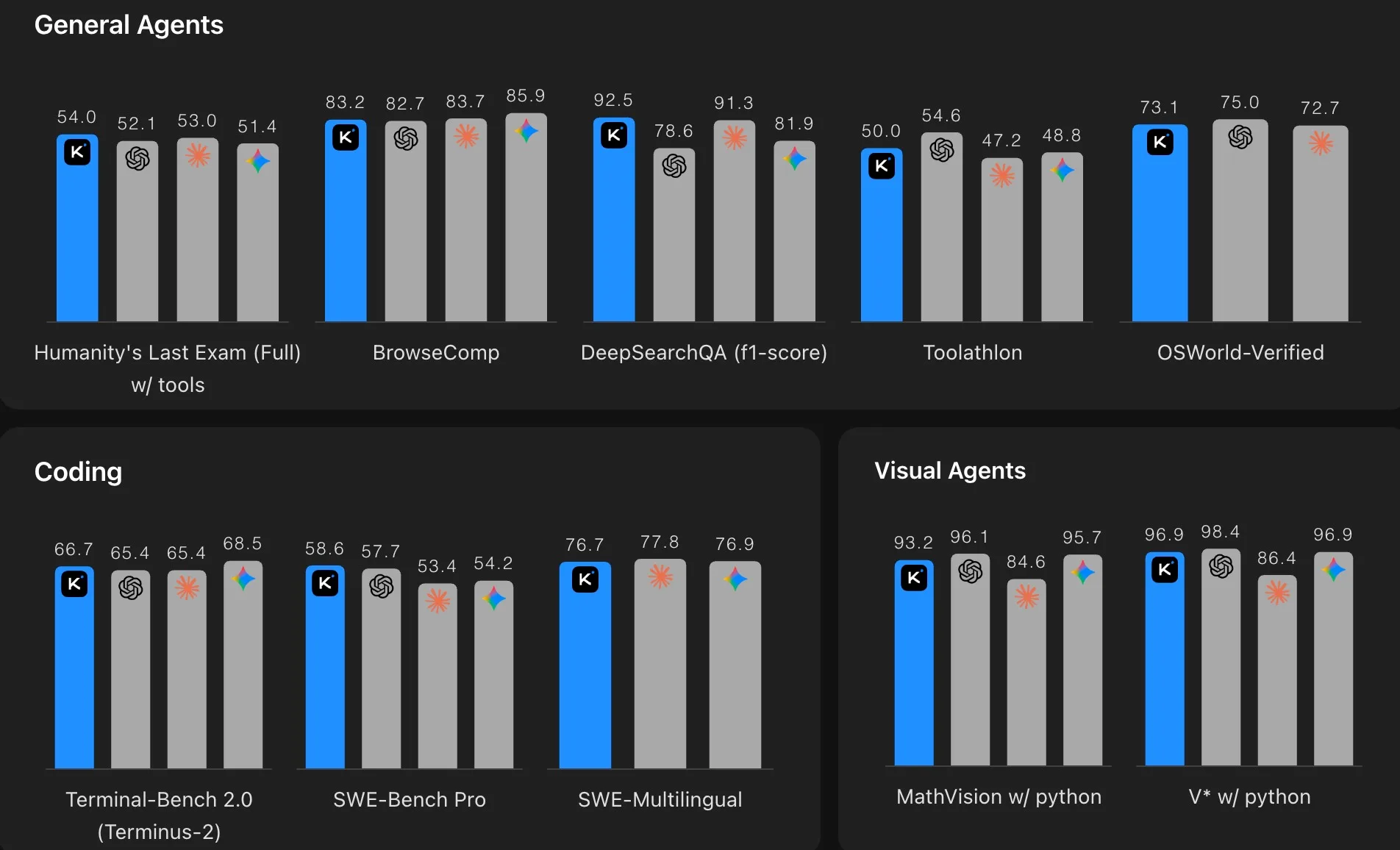
Most benchmark tables show cherry-picked data. Here's the comparison that tells the real story for developers:
SWE-Bench Pro (real GitHub issue resolution, penalizes hallucinated patches):
Kimi K2.6: 58.6%
GPT-5.4: 57.7%
Gemini 3.1 Pro: 54.2%
Claude Opus 4.6: 53.4%
HLE with Tools (Humanity's Last Exam — the hardest agentic benchmark in use):
Kimi K2.6: 54.0%
Claude Opus 4.6: 53.0%
GPT-5.4: 52.1%
BrowseComp (web-browsing agent performance):
Kimi K2.6: 83.2%
GPT-5.4: 82.7%
Claude Opus 4.7: 79.3%
SWE-Bench Verified (the easier, more commonly cited benchmark):
Claude Opus 4.7: 87.6%
Kimi K2.6: 80.2%
GPT-5.4: ~80%
The clear takeaway: on agentic tasks — the benchmarks closest to what developers actually do — Kimi K2.6 either leads or ties the closed-source frontier. Claude still holds a meaningful lead on raw coding accuracy in SWE-Bench Verified. Choose based on your actual use case.
One more data point: Kimi K2.6 reduced its hallucination rate from 65% (K2.5) to 39%. That's a 40% reduction in fabricated answers — a bigger quality jump than any benchmark score change.
I Built 5 Apps With Kimi K2.6: Honest Scores
I used OpenCode connected to the Kimi K2.6 model via an OpenRouter API key. All prompts were crafted in a single session over 20–30 minutes, with detailed design specs included. Every build was a one-shot attempt — no iterative follow-up prompts.
App 1: MealMind.ai — Full-Stack Meal Planner ⭐ 5/5
What I asked for: A full-stack web app with login, signup, weekly meal planner, grocery list, pantry tracker, and recipe section. Integrated Unsplash API for food images and OpenRouter's Gemini Flash model for AI meal generation.
What I got: A fully responsive React app with working authentication flow, a complete dashboard with four navigation sections, a functional weekly meal generator with macros, calorie graphs, and ingredient-level recipe views. The UI adapts cleanly on resize.
One issue: The settings save function didn't work on the first build. But this is a one-shot build — a single follow-up prompt would fix it. For what Kimi K2.6 produced without iteration, this is exceptional.
App 2: LoopCast Landing Page — Podcast to Newsletter Platform ⭐ 5/5
What I asked for: A marketing landing page for LoopCast, a podcast-to-newsletter platform. My prompt specified the full design system: fonts, color palette, spacing scale, shadow values, animation behavior, and hover states.
What I got: A landing page that genuinely outdid my expectations. It included a 3D app mockup with live animation, tab-based content switching, a scrolling logo panel, an animated testimonials section, working pricing toggle (monthly/annual), an FAQ section, and a newsletter signup. Every animation I specified was implemented.
One issue: It used emoji icons instead of Lucide icons I specified. Minor. One prompt fixes it.
App 3: GitPulse — Python CLI Developer Burnout Detector ⭐ 2.5/5
What I asked for: A Python CLI tool called GitPulse that analyzes local Git history and shows productivity patterns — commits by day of week, late-night commit trends, weekly activity graphs — all displayed as ASCII charts in the terminal. Installable as a desktop-wide command.
What I got: The analytics logic was solid. The output includes summary stats, activity graphs by day, weekly commit trends, and burnout signals. Demo data was set up correctly for testing.
The problem: It didn't create a proper CLI command. Instead of packaging GitPulse as an installable command (the point of a CLI tool), it created a main.py file. For a real CLI you need to install it desktop-wide and run it in any folder. That core requirement was missed.
Score: 2.5/5 — a one-shot limitation that likely needs more explicit packaging instructions in the prompt.
App 4: SnapVault — Mac Screenshot Manager with OCR ⭐ 5/5
What I asked for: A macOS menu-bar app that manages screenshot history, shows OCR-extracted text from each screenshot, supports favorites, and allows single-click deletion.
What I got: A native-looking macOS app that launched from the dock, opened a clean two-panel interface, saved screenshots to a database, displayed OCR text on the right panel, and supported all CRUD operations. "Show in Finder" worked. Delete worked. The UI looked genuinely macOS-native.
For a one-shot build, this was the most impressive of the five apps.
App 5: Hex-Based Strategy Game ⭐ 3/5
What I asked for: A hex-grid turn-based strategy game with multiple maps, working movement controls, attack ranges, and a pause menu.
What I got: Three pre-built maps (Valley, plus two others), working hex movement, visible attack range display, turn-based flow, a functioning pause menu with escape key, and a "How to Play" overlay. All controls worked correctly.
The problem: The graphics were basic. The visual quality didn't match the prompt intent. All the mechanics worked — it just didn't look polished.
Score: 3/5 — functional and impressive for a one-shot build, but UI polish falls short.
What Did It Cost?
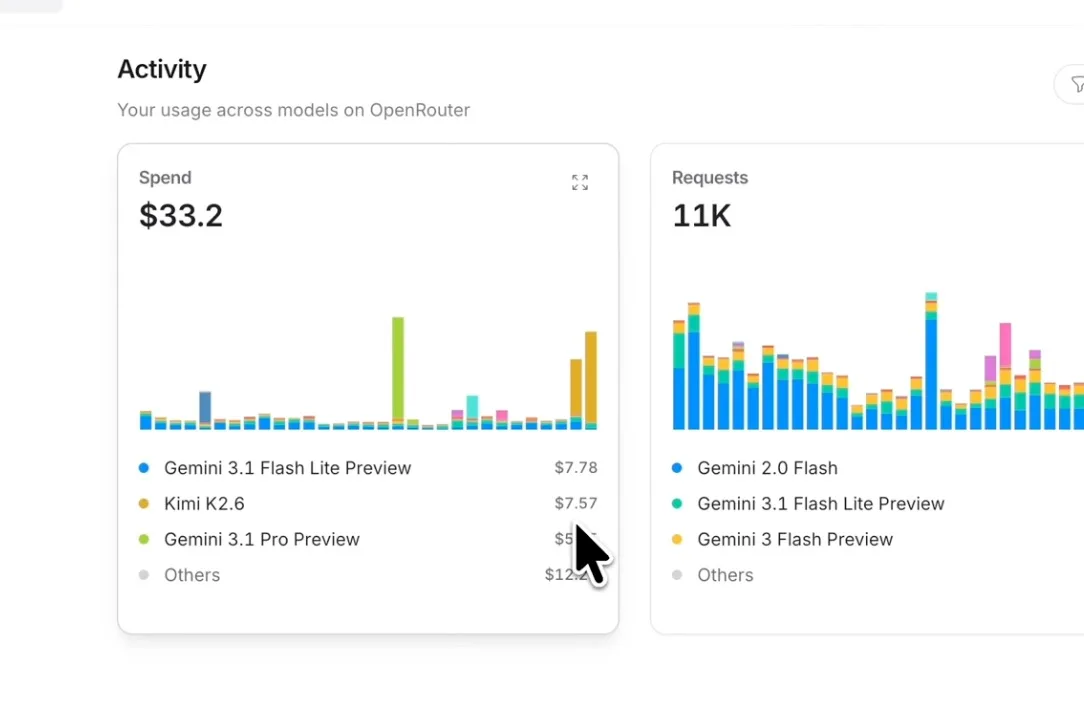
Building all five apps with Kimi K2.6 through OpenRouter cost approximately $7.57 total.
On OpenRouter, Kimi K2.6 is priced at $0.80 per million input tokens and $3.50 per million output tokens. Cached input tokens cost $0.15/M — a 75% reduction for repeated context. That caching matters for long coding sessions where system prompts and file contents get re-sent each turn.
For comparison:
Claude Opus 4.7: $5/M input, $25/M output
GPT-5.4: $2/M input, $8/M output (typical Pro settings)
Kimi K2.6 direct Moonshot API: $0.60/M input, $2.50/M output
For a fintech startup running 1 million requests annually with ~5K output tokens each: Kimi K2.6 costs around $13,800/year. The same workload on Claude Opus 4.7 runs roughly $150,000. That cost difference funds two engineering hires.
Agent Swarm: What It Actually Is
Kimi K2.6's Agent Swarm isn't just a marketing term. It's a production architecture change.
K2.5 could coordinate 100 sub-agents across 1,500 steps. K2.6 scales to 300 sub-agents executing 4,000 coordinated steps simultaneously. Each sub-agent can be domain-specialized — one handles web search, another writes long-form content, another generates code, a fourth runs tests. The coordinator dynamically assigns tasks based on what the swarm discovers during execution.
The practical result: the model ran an unassisted 13-hour session to overhaul an 8-year-old financial matching engine. It made 1,000+ tool calls, modified more than 4,000 lines of code, and extracted a 185% throughput improvement by reconfiguring the core thread topology. No human in the loop.
For most developers, you won't hit the 300-agent ceiling. But the same architecture that enables that ceiling also makes single-agent tasks more reliable across long coding runs. The model doesn't drift or forget earlier context the way older architectures do.
How to Access Kimi K2.6
Free access:
kimi.com — daily quota on chat and agent mode
Cloudflare Workers AI — free tier available
Self-hosting from HuggingFace weights (requires multiple A100/H100 GPUs)
Paid API access:
Moonshot API: platform.kimi.ai — $0.60/$2.50 per million tokens
OpenRouter: openrouter.ai — $0.80/$3.50 per million tokens
Also available via Novita, Baseten, Fireworks, Parasail
Developer tooling:
Kimi Code CLI — first-party command-line interface
OpenCode — open-source coding tool (what I used in my tests)
Kilo Code (VS Code, JetBrains extensions, Hermes agent)
The model follows the OpenAI API format, so any tool that accepts an OpenAI-compatible endpoint works. Drop in your OpenRouter API key, set the model to moonshotai/kimi-k2.6, and your existing workflow adapts with zero code changes.
Kimi K2.6 Prompting Tips (With Real Examples)
Getting strong results from Kimi K2.6 requires different habits than prompting a general chatbot. The model excels at instruction-following but needs specific input to produce production-grade output.
Tip 1: Specify the Full Design System in UI Prompts
Kimi K2.6 can generate production-ready interfaces, but it makes design decisions based on whatever context you give it. Vague prompts produce generic output. Detailed design specs produce results that look intentional.
Weak prompt:
Build a landing page for a podcast app with a dark theme.Strong prompt:
Build a landing page for LoopCast, a podcast-to-newsletter platform.

Design system:
- Font: Inter (headings), DM Sans (body)
- Colors: Background #0A0A0A, primary accent #6366F1, text #E5E7EB
- Spacing scale: 4px base, sections use 80px vertical padding
- Shadows: 0 0 40px rgba(99, 102, 241, 0.15) for card glow
- Animations: scroll-triggered fade-in (0.6s ease-out), hover scale 1.02 on cards

Sections:
1. Hero with 3D phone mockup and animated step flow
2. Feature grid with hover effects using Lucide icons
3. Logo scrolling panel (auto-scroll)
4. Testimonials carousel with avatar + company
5. Pricing toggle (monthly/annual)
6. FAQ accordion
7. Newsletter signup
The model follows every spec when you provide it. In my tests, the animation behavior, hover states, and section structure all appeared exactly as written — the only miss was icon library selection.
Tip 2: Use Phases for Full-Stack Apps
Full-stack apps require database schemas, authentication flows, and API structure that conflict with each other if designed in isolation. Splitting the prompt into phases prevents that drift.
Structure your prompt as:
Phase 1 — Architecture & Schema
Define the database tables, relationships, and API endpoint list.

Phase 2 — Backend
Build the Node.js/Express API with the schema from Phase 1.
Include rate limiting on /auth/signup and /auth/login.

Phase 3 — Frontend
Build the React frontend that consumes the Phase 2 API.
Use the design system: [your specs here]

Phase 4 — Integration
Wire the frontend API calls to the backend.
Handle loading states and error messages.
This is how the MealMind.ai app scored 5/5 in a one-shot build. The phase structure gives the model a clear contract between layers.
Tip 3: Don't Tell It When to Use Tools — Tell It What to Produce
Kimi K2.6 handles tool selection automatically. Telling the model "use web search to find..." or "use the code runner to..." can actually interfere with its autonomous decision-making. Instead, describe the output you want.
Triggers tool use unnecessarily:
Search the web for food images and add them using the image API.Produces better results:
Display food images for each recipe. Use the Unsplash API (include the API key in a config file)
with a query based on the meal name. Fall back to a placeholder if the image fails to load.
The model decides how to fetch and display the image. You describe the user experience.
Tip 4: Add Explicit Output Format for CLI Tools
This is the lesson from the GitPulse 2.5/5 score. When building CLI tools, be explicit about packaging. Kimi K2.6 defaults to creating a working script — it won't infer that you want a system-installable command unless you say so.
Weak:
Build a Python CLI tool called GitPulse that analyzes Git history.Strong:
Build a Python CLI tool called GitPulse that analyzes Git history.

Packaging requirements:
- Create a setup.py (or pyproject.toml) with the entry_points configuration so
  `pip install -e .` makes `gitpulse` available as a system command
- The command should work in any directory, not just the project folder
- Target Python 3.9+
- Dependencies: click, rich (for terminal formatting), gitpython
The difference is the packaging spec. Without it, you get a main.py that works but doesn't install as a real CLI.
Tip 5: Use Thinking Mode for Debugging, Not Building
Kimi K2.6 Thinking mode exposes the chain-of-thought before answering. Use it when you're debugging a specific error, optimizing a complex algorithm, or planning a multi-step architecture. Don't use it for straight UI builds or boilerplate generation — it's slower, and the extra tokens don't improve output quality for those tasks.
Use Thinking mode for:
"Why is this authentication middleware failing on concurrent requests?"
"Design the optimal database schema for a multi-tenant SaaS with usage-based billing"
"Find the performance bottleneck in this Node.js event loop code"
Use standard mode for:
Full-stack app scaffolding
Landing page builds
API endpoint generation from a spec
CSS/animation implementation
Tip 6: Include Competitor Reference for Design Quality
Kimi K2.6 can match or exceed the style of reference sites when you name them. This isn't copying — it's calibrating the quality bar.
Example:
The design quality should match Linear.app — clean, minimal, high-contrast typography,
subtle micro-animations, and generous whitespace. No gradients on text. No stock photo heroes.
In my landing page test, adding a quality reference shifted the output from "functional UI" to something that genuinely impressed me.
Kimi K2.6 vs Other Open-Source Models
At launch, I compared Kimi K2.6 one-shot outputs to GLM 5.1 and MiniMax 2.7 on the same prompts. Neither produced comparable results on the UI/UX and full-stack tasks. Kimi K2.6 handled the full design system spec, multi-page routing, and database schema in a way the others didn't match in a single shot.
The honest comparison matrix:
Capability | Kimi K2.6 | GLM 5.1 | MiniMax 2.7 |
|---|---|---|---|
One-shot full-stack apps | ✅ Strong | ⚠️ Partial | ⚠️ Partial |
UI/design quality from spec | ✅ Excellent | ⚠️ Generic | ⚠️ Generic |
CLI packaging | ⚠️ Needs explicit spec | ❌ Weak | ❌ Weak |
Game logic | ✅ Functional | ✅ Functional | ✅ Functional |
Cost per million tokens | $3.50 output | Lower | Lower |
Context window | 262K | 128K | 128K |
Kimi K2.6 costs more per token than GLM 5.1. For simple text tasks, that difference matters. For complex coding builds where output quality determines whether you iterate twice or ten times, Kimi K2.6 saves time and iterations.
Final Thoughts
Kimi K2.6 sets a new bar for open-source coding models. For developers building UI-heavy apps, full-stack prototypes, or agentic workflows, the combination of one-shot quality, 262K context, and 10x cost advantage over Claude Opus is a serious proposition.
The model isn't perfect. It missed the CLI packaging spec in my GitPulse test. It defaulted to emoji icons instead of Lucide. These are one-iteration fixes. For a single-shot, no-follow-up build, scoring 3 out of 5 apps at 5/5 is exceptional.
If you build on OpenCode or any OpenAI-compatible tool, plug in your OpenRouter key and model ID moonshotai/kimi-k2.6 — your workflow doesn't change, but your output quality and cost per build both improve. Try the detailed design system prompt format from the tips section. The difference between a generic output and something that genuinely surprises you is usually thirty extra lines in the prompt.
Frequently Asked Questions

Written by
Raman Singh
Raman Singh is a highly skilled marketing professional who serves as the head of marketing at Copyrocket AI. With years of experience in the field, Raman has developed a deep understanding of all asp
View all postsYour AI Marketing Agents
Are Ready to Work
Stop spending hours on copywriting. Let AI craft high-converting ads, emails, blog posts & social media content in seconds.
Start Creating for FreeNo credit card required. 50+ AI tools included.
Related Articles
 General
NotebookLM For Coders: Turn Docs Into Faster Code
Code work often fails for a simple reason. You do not have the right context at the right time. You read docs in one tab, skim tickets in another tab, and then...

 General
How to Optimize for AI Search in 2026: The Complete Guide
AI search has shifted from experimental feature to primary search method for millions of users. ChatGPT Search, Google AI Overviews, Perplexity, Claude, and Gem...
 General
Claude Opus 4.6 Review: Here's What New!
Claude Opus 4.6 from Anthropic draws attention because teams want an AI model that writes better code, follows instructions, and stays consistent across long se...