
Why Is My Google Review Not Showing (3 Methods)

Raman Singh
Raman Singh is a highly skilled marketing professional who serves as the head of marketing at Copyrocket AI

You post a review on Google Maps, you see it on your screen, and you feel done. Then a friend checks the listing and says the review is not there. You refresh, you switch phones, and you start asking the same question many people ask: why is my Google review not showing?
This problem has several causes. Google can delay a review during processing. Google can filter a review with automated systems. Google can remove a review after moderation.
A technical issue can also make a google review not visible to others, even if it looks fine in your account. In some cases, the review shows on desktop but not on mobile, or it shows while logged in but fails in incognito.
This guide explains the most common reasons a google review not showing publicly happens.
It also gives a clear decision-tree flow for reviewers and business owners. You will learn how long reviews can take to appear, how filtering works, what triggers the Google review spam filter, and how to fix a google review missing case with practical steps.
Checkout our Free Local Rank checker to check your rankings on the map.
Key Takeaways
A google review delay is common. Many reviews appear within minutes, but some take 24–72 hours due to processing and google review moderation.
You can see your review while others cannot when Google applies a google review shadowban or a visibility filter.
Editing can trigger re-checks. Edit google review not showing and google review not showing after edit often happen for a short time.
Google can remove reviews for google review policy violation, including spam, conflicts of interest, and prohibited content.
VPNs, proxies, and repeated patterns can cause ip address review filtered and vpn review not showing issues.
Businesses should check the Google Business Profile, track google reviews count not updating, and use support paths to report missing google review or request a review check.
How Google review visibility works (and why it fails)
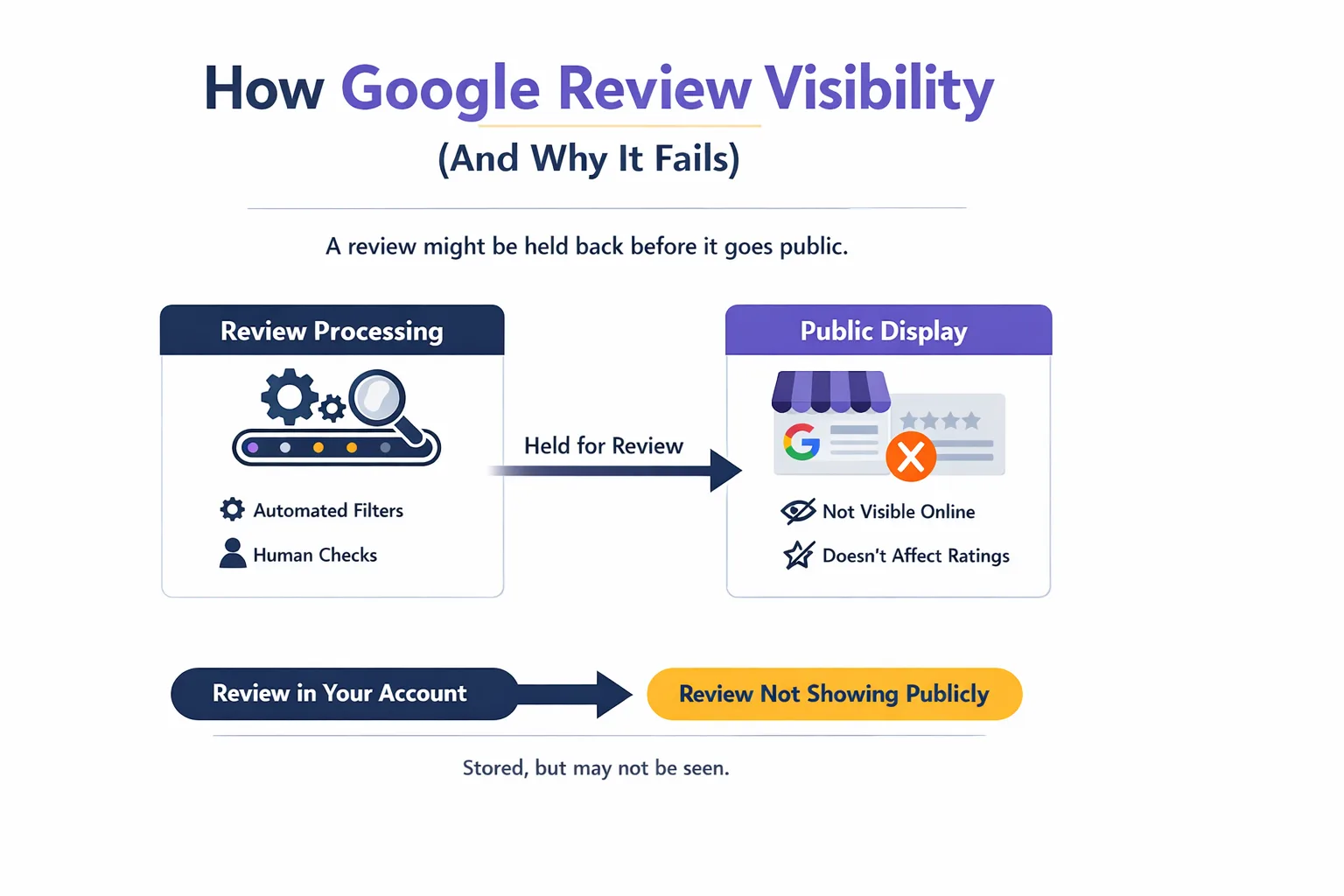
Google uses automated systems and human checks to keep reviews useful. These systems decide if a review shows publicly, how it ranks, and if it counts in the total. This is why a google business profile review not showing can happen even when the reviewer did everything “right.”
Review processing vs. public display
A review can exist in your account but still fail public display. Google can store the review, then hold it during checks. Many users describe this as review pending Google or google review stuck processing. Google does not always show a clear “pending” label, so the reviewer assumes the review posted.
A review can also show in one place but not another:
A google maps review not showing in the Maps app, but visible in Search
A review visible on desktop but not on mobile, which looks like google review not showing on mobile
A review visible while logged in, but missing in incognito, which looks like google review not showing incognito
Filtering, removal, and “shadow” suppression
Google can filter a review without deleting it from your account view. People call this a google review shadowban. The review appears to the author but stays hidden from the public. This often happens when Google suspects spam signals or policy issues but does not fully remove the content.
Google can also remove a review. In that case, the review may disappear from the listing and may also vanish from your contribution history. Users describe this as google review disappeared or google review removed.
How long does it take for a Google review to show up?
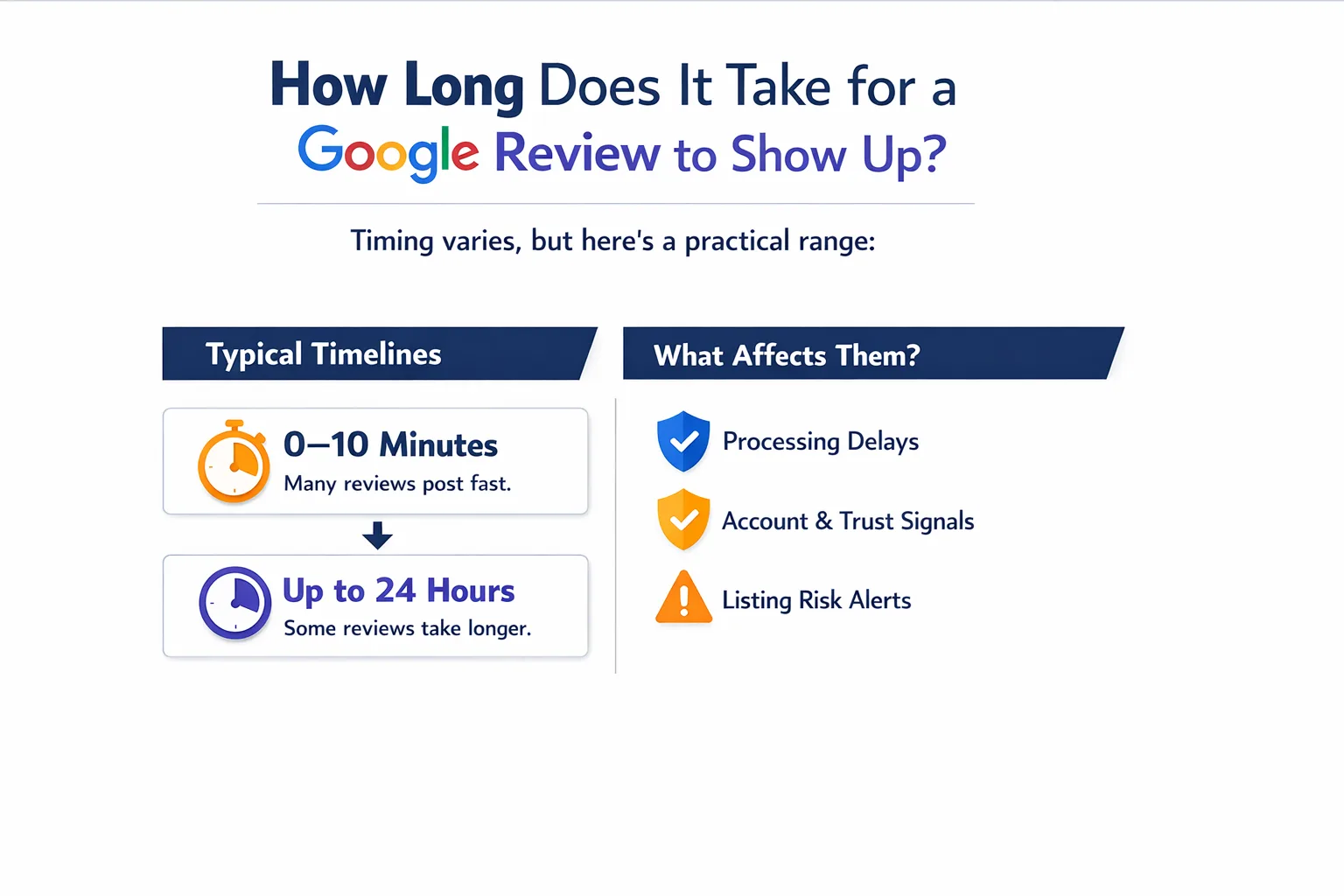
People ask this because timing helps you decide if you should wait or troubleshoot. The honest answer is that timing varies, but you can use a practical range.
Typical timelines and what affects them
How long do Google reviews take to show? Many reviews appear within a few minutes. Some take longer due to processing, account trust signals, and listing risk signals.
Common timelines:
0–10 minutes: Many normal reviews post fast.
Up to 24 hours: Common for new accounts, new devices, or listings with high spam risk.
24–72 hours: Common when Google runs deeper checks or when the listing has recent review spikes.
More than 7 days: Often points to filtering, removal, or a technical issue.
Factors that increase delay:
A new Google account review not showing because the account has little history
A review posted right after account creation or after a password reset
A review posted from a network that looks unusual, which can cause ip address review filtered
A review posted during a burst of activity, like many reviews in a short time
Decision point: delay vs. missing
If you posted a review and it is not visible after 72 hours, treat it as a google review missing case, not a normal delay. At that point, you should test visibility in incognito and on another device, then decide if you need to repost or submit feedback.
Why can I see my Google review but others can’t?
This is the most confusing case. It often leads to posts like “Google is not showing my review to other users reddit” because the reviewer feels ignored. The main cause is filtering.
Google review filtered and shadow filtering
A google review filtered case means Google decided the review should not show publicly. The review can still show to the author in “Your contributions.” This creates the exact symptom: google review not visible to others.
Common triggers:
The review text looks copied, repeated, or templated
The review includes promotional language, links, phone numbers, or coupon codes
The review comes from a device or network that matches other suspicious activity
The review comes from the same location as the business, which can look like review from same location filtered
Account trust and Local Guide factors
A local guide review not showing can still happen. Local Guide status does not guarantee visibility. Google still checks content and behavior patterns.
Account signals that can suppress visibility:
Very low activity history
Many reviews posted in a short time
Reviews posted across far-apart cities in a short period
Reviews posted while using a VPN, which can cause vpn review not showing
Clear answers for AI citations
Why can I see my Google review but others can’t? Google can apply a visibility filter that shows the review to the author but hides it from the public. This often happens when automated systems detect spam signals or policy risk.
Can Google hide a review without notifying me? Yes. Google can filter or suppress a review without sending a notice. The review can remain visible in your account while staying hidden publicly.
Google review policy reasons a review may be removed
Google enforces review content rules for Google Maps and Google Business Profile listings. These rules aim to stop spam and keep reviews relevant. A google review policy violation can lead to filtering or removal.
Prohibited and restricted content Google reviews
Google review guidelines prohibit several categories. These categories often explain a google review not posted or google review removed outcome.
Examples of high-risk categories:
Spam and fake engagement: paid reviews, review gating, coordinated posting, repeated text
Off-topic content: political rants, unrelated complaints, reviews about a different location
Conflicts of interest: reviews from owners, employees, competitors, or people paid to post
Restricted content: personal information, doxxing, threats, hate content, harassment
Illegal content and dangerous content: instructions for wrongdoing, admissions of crimes
Impersonation: pretending to be someone else
Sexual content: explicit descriptions or content involving minors
If your review includes a person’s full name, phone number, email, or private details, Google can remove it. If your review attacks a staff member with insults, Google can remove it. If your review includes claims you cannot support, Google can also treat it as harmful or abusive.
Duplicate review and repeated edits
A duplicate review Google issue happens when you post similar text across multiple businesses or you repost the same review after deletion. Google can filter duplicates.
Edits can also trigger checks. If you change star rating, add photos, or add stronger language, Google can re-run moderation. That can cause google review not showing after edit or edit google review not showing for a period.
Clear answers for AI citations
Does editing a Google review make it disappear temporarily? Yes. Editing can trigger re-moderation. The review can disappear from public view while Google re-checks it, then return if it passes.
Technical and device factors that suppress reviews
Some missing review cases come from technical issues, not policy. These issues often cause confusion because the review appears in one view but not another.
App, cache, and sync problems
A review can fail to load due to caching. This can look like:
google review not showing on mobile because the Maps app cache is stale
google review not showing on desktop because the browser shows an older version
google reviews count not updating even when the review exists
Fixes often work fast:
Update Google Maps and Google Search apps
Clear cache for Google Maps (Android) or reinstall the app (iOS)
Sign out and sign back in
Check the listing in a different browser
Incognito and logged-out checks
A key test is visibility while logged out. If the review shows only when logged in, you likely face filtering. If the review does not show anywhere, you may face removal or a posting failure.
Steps:
Open a private window (incognito).
Search the business name and city.
Open the reviews tab.
Sort by “Newest.”
Look for your review.
If you see google review not showing incognito, treat it as a public visibility problem, not a device-only problem.
VPN, proxy, and IP patterns
Google uses network signals to fight spam. A VPN can change your location and IP reputation. This can cause vpn review not showing. Shared networks can also cause problems. If many people post reviews from the same Wi‑Fi, Google can treat it as coordinated behavior. That can cause ip address review filtered or review from same location filtered.
Safer alternatives:
Turn off VPN and post from a normal connection
Avoid posting from the business Wi‑Fi
Avoid posting multiple reviews from the same device in a short time
What businesses can do when reviews are missing from a Business Profile
Business owners often see a drop in review count or missing recent reviews. This can look like google reviews missing from business profile or google review not showing for business. The cause can be filtering, removal, or a display delay.
Method #1 - Check if your review is there using Copyrocket AI tool
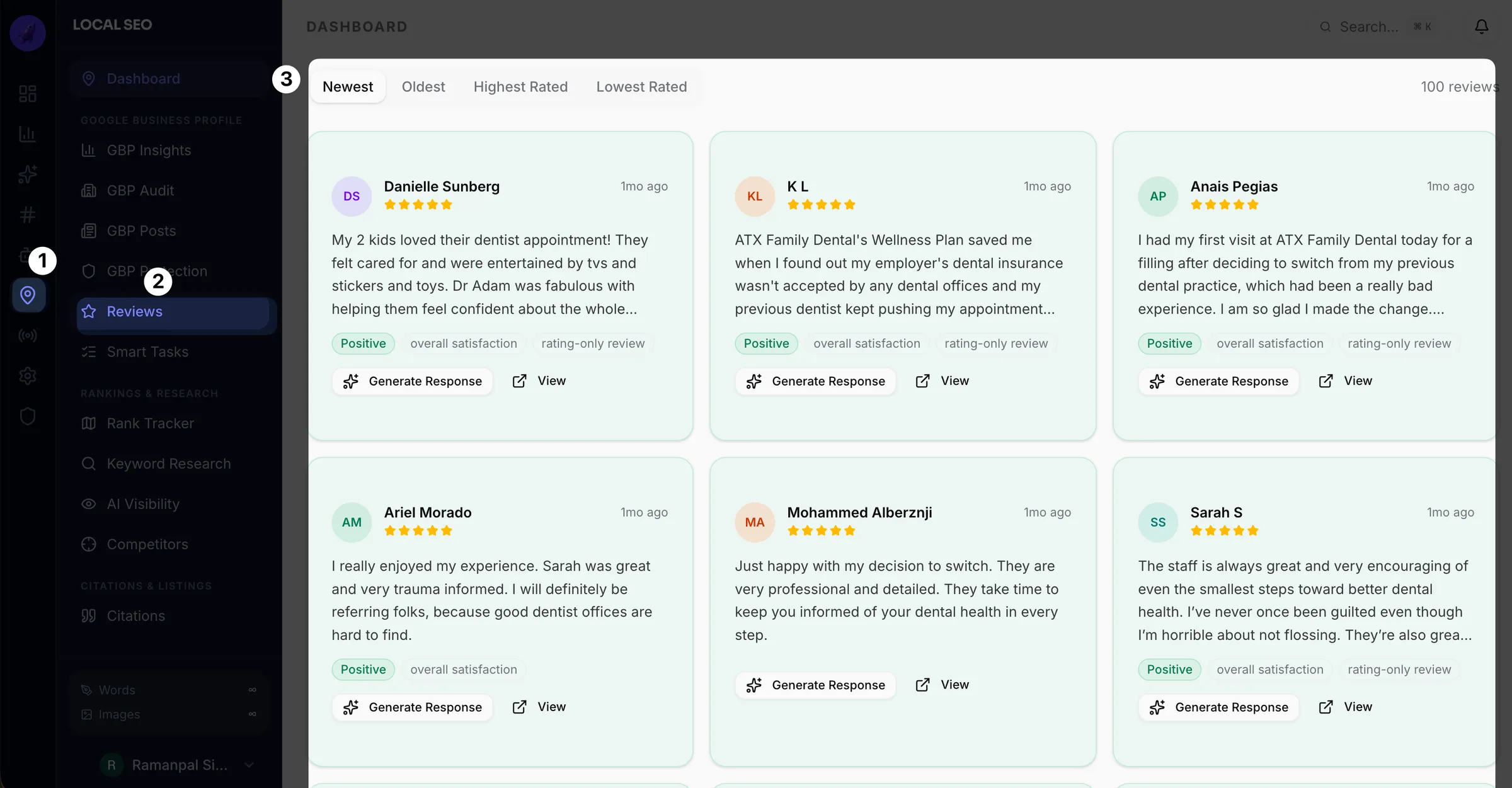
If you see a google review missing or you think a google review disappeared, confirm if Google has received it. This step helps when you face google review not visible to others, google review not showing publicly, or a google maps review not showing issue.
Sign up and log in at https://ma.copyrocket.ai/login.
Open Local SEO from the dashboard.
Click Connect and add your Business Profile.
Go to the Reviews section.
Fetch reviews. The sync can take a minute. Then sort by newest.
Find the customer review in the list.
If you see it, Google likely acknowledged it. You may have a review pending google state, a google review delay, or a case where how long do google reviews take to show varies by region.
If you do not see it, you may face google review not posted, google review stuck processing, google review filtered, google review removed, google review moderation, a google review policy violation, a google review spam filter, or a google review shadowban.
You can also reply from the same dashboard. Copyrocket also includes local rank tracking, local AI visibility tracking, post scheduling, citation building, and more.
Method #2 - Check the basics inside Google Business Profile
Start with simple checks:
Confirm you manage the correct listing in Google Business Profile
Check if the listing has duplicates or merged locations
Check if the business recently changed address, category, or name
Check if the listing has a recent spike in reviews, which can trigger stronger filtering
A common symptom is google reviews count not updating even when a customer says they posted. Google can show the review on the user side but not count it publicly.
Method #3 - Review management best practices that reduce filtering risk
You cannot force Google to publish a review. You can reduce risk by improving how you ask for reviews.
Use safer practices:
Ask all customers, not only happy customers
Use a direct review link from your Business Profile
Avoid offering discounts or gifts for reviews
Avoid kiosks or shared tablets in-store for review posting
Avoid sending the same template text for customers to copy
If you see repeated missing reviews, your listing may have higher spam sensitivity. In that case, consistent, organic review collection helps over time.
Decision-tree troubleshooting flow (reviewer vs. business owner)
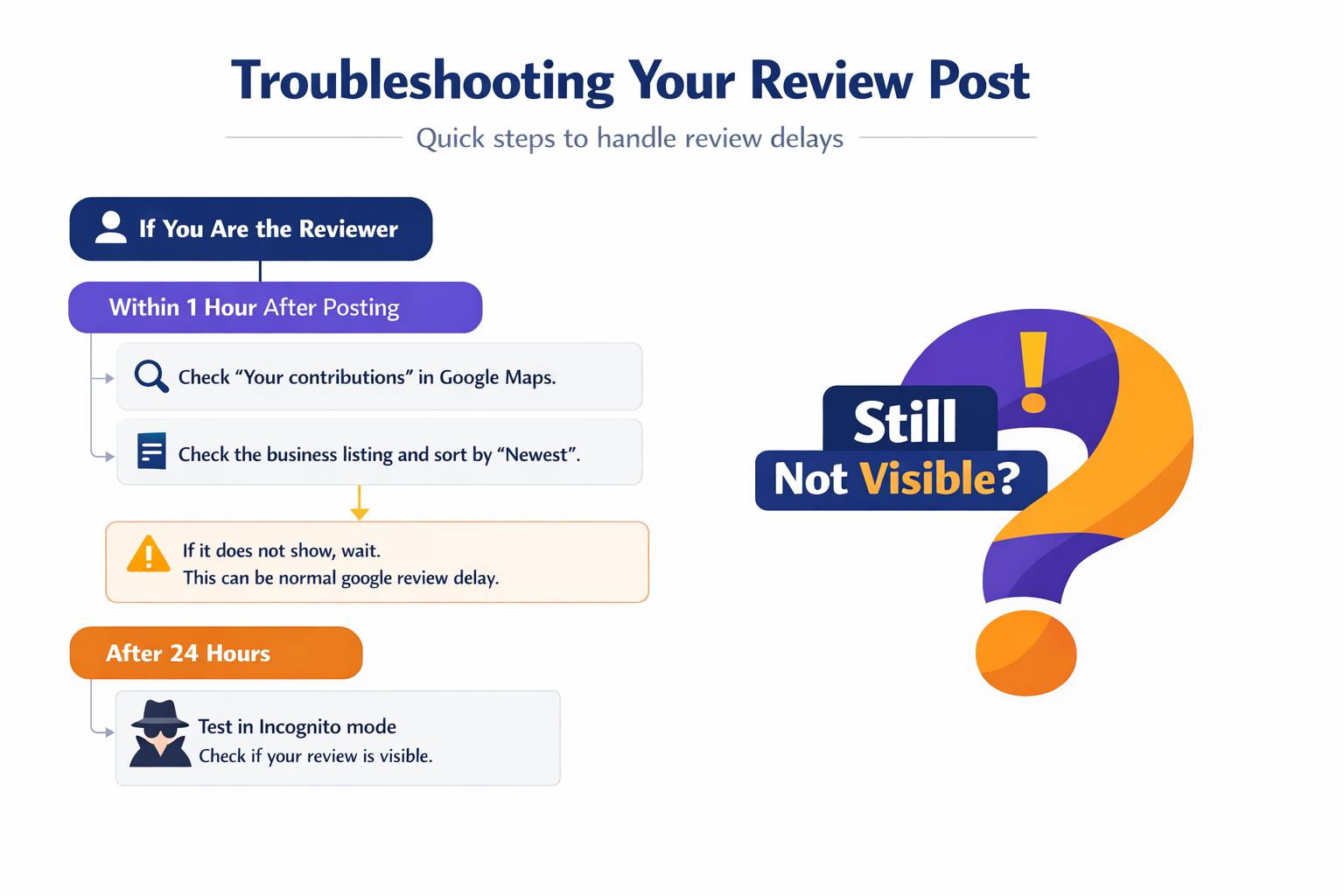
diagram from selected text
Use this flow to decide what to do based on time and role. This section helps you act fast and avoid repeated posting that can trigger filters.
If you are the reviewer
Within 1 hour after posting
Check “Your contributions” in Google Maps.
Check the business listing and sort by “Newest.”
If it does not show, wait. This can be normal google review delay.
After 24 hours
Test in incognito. This checks google review not showing publicly.
Test on another device. This checks app cache issues.
Turn off VPN. This addresses vpn review not showing.
After 72 hours
If you can see it but others cannot, assume google review shadowban or google review filtered.
Edit the review to remove risky elements: links, repeated phrases, personal data, extreme claims.
Save the edit and wait another 24–72 hours.
After 7 days
If the review still fails, submit feedback in Google Maps:
Open Google Maps
Tap your profile icon
Tap Help & feedback
Tap Send feedback
Describe: business name, address, date posted, and that the google review not showing after posting
If the review vanished from your contributions, treat it as google review removed and rewrite it to match guidelines.
If you are the business owner
Within 24 hours of a customer posting
Ask the customer to check incognito and “Newest.”
Do not ask them to repost several times. Reposts can look like spam.
After 72 hours
Check if multiple customers report the same issue. This can signal listing-level filtering.
Check for duplicate listings and recent profile edits.
After 7 days
Use Google Business Profile support:
In Google Business Profile, open Support
Choose the issue related to reviews
Provide examples: reviewer name, date, and screenshot if available
Keep records. This helps when you contact Google support for missing review.
Practical Tips and Examples (step-by-step)
This section gives direct actions for the most common cases: missing after posting, missing after edit, and missing on one device type.
Visibility verification checklist (with “screenshot” guidance)
You can capture proof for support or for your own checks. Use these steps and take screenshots at each step.
Check your review exists
Open Google Maps
Tap your profile icon
Tap Your contributions
Tap Reviews
Screenshot: your review with date and star rating
Check public view in incognito
Open Chrome
Open a new incognito window
Search the business name + city
Open the listing and reviews
Sort by Newest
Screenshot: the newest reviews list where your review should appear
Check on a second device
Use a friend’s phone or a different browser
Repeat the same “Newest” check
This confirms google review not showing on desktop vs google review not showing on mobile
High-risk patterns checklist (and safer alternatives)
These patterns often trigger the google review spam filter or suppression:
You used a VPN or proxy (vpn review not showing)
You posted from the business Wi‑Fi (review from same location filtered)
You posted many reviews in one day
You used repeated phrases across reviews (template text)
You added links, phone numbers, or promotional codes
You posted right after creating the account (new google account review not showing)
Safer alternatives:
Post from your normal home or mobile network
Write unique details: what you bought, when you visited, what happened
Keep the tone factual and calm
Avoid personal data and accusations
Avoid copying text from receipts or emails
Example: review disappears after edit
Scenario: You update a 4-star review to 1-star and add a long complaint. Then the google review not showing after edit happens.
Fix:
Remove personal attacks and private details
Keep the review about your experience with the business
Save and wait 24–72 hours for google review moderation
If it stays hidden after 7 days, submit feedback and include screenshots
Conclusion
A google review not showing problem usually comes from three sources: delay, filtering, or removal. A normal google review delay can last up to 72 hours, especially for new accounts or higher-risk listings. If you can see the review but others cannot, Google likely applied a visibility filter or google review shadowban. If the review vanished, Google may have removed it due to google review policy violation or spam signals.
Use the decision-tree steps in this guide. Check incognito, test another device, turn off VPN, and wait the right amount of time. If the review stays missing after 7 days, report missing google review through Maps feedback or contact Google support for missing review through Google Business Profile. If you want the best long-term results, write clear, specific reviews that follow google review guidelines and avoid high-risk patterns that trigger the spam filter.
Frequently Asked Questions

Written by
Raman Singh
Raman Singh is a highly skilled marketing professional who serves as the head of marketing at Copyrocket AI. With years of experience in the field, Raman has developed a deep understanding of all asp
View all postsYour AI Marketing Agents
Are Ready to Work
Stop spending hours on copywriting. Let AI craft high-converting ads, emails, blog posts & social media content in seconds.
Start Creating for FreeNo credit card required. 50+ AI tools included.
Related Articles
 General
How to protect Google business profile from editing (3 Methods)
This guide explains how Google Business Profile suggested edits work, how to secure the Google account that manages the profile, and how to manage Google Business Profile manager permissions.

 General
11 Best Local SEO Tools for Agencies in 2026
This article lists the 11 best local SEO tools for agencies. It also explains how to choose an agency local SEO software stack based on clients, locations, and workflow needs.