
Seedance 2.0 - Detailed Prompting Guide You Only Need

Raman Singh
Raman Singh is a highly skilled marketing professional who serves as the head of marketing at Copyrocket AI

Seedance 2.0 is an AI video model that turns text, images, video, and audio into short video clips. Many creators use it for ads, product shots, music visuals, storyboards, and social clips. This Seedance 2.0 guide explains what the model does, how to access it, and how to get clean results with a repeatable prompt and settings method. You will learn a Seedance 2.0 workflow for text to video Seedance and image to video Seedance, plus ways to use reference images Seedance and reference video Seedance for better control.
You will also get a Seedance 2.0 tutorial for prompt structure, Negative prompts Seedance, camera movement prompts, cinematic prompts, and shot list prompts. The article includes Seedance 2.0 prompt examples and Seedance 2.0 viral prompts patterns that people reuse for consistent results. Last, you will see a practical AI video generator comparison, including seedance vs Kling, seedance vs Veo, and seedance vs Sora, with guidance on when each model fits best.
Key Takeaways
Seedance 2.0 is a Multimodal video generation model that supports text, image, video, and audio inputs for short clips.
You get better results with a fixed prompt structure: subject, action, scene, camera, lighting, style, and constraints.
Seedance 2.0 settings and parameters matter for motion, coherence, and consistency across clips.
character consistency Seedance and style consistency Seedance improve when you reuse reference images, reference video, and locked descriptors.
A reproducible Seedance 2.0 workflow reduces wasted credits and speeds up iteration.
Seedance vs Kling vs Veo vs Sora depends on access, control needs, and the type of shot you want.
Troubleshooting works best as a decision tree that targets the failure mode first.
What is Seedance 2.0 and what is it used for?
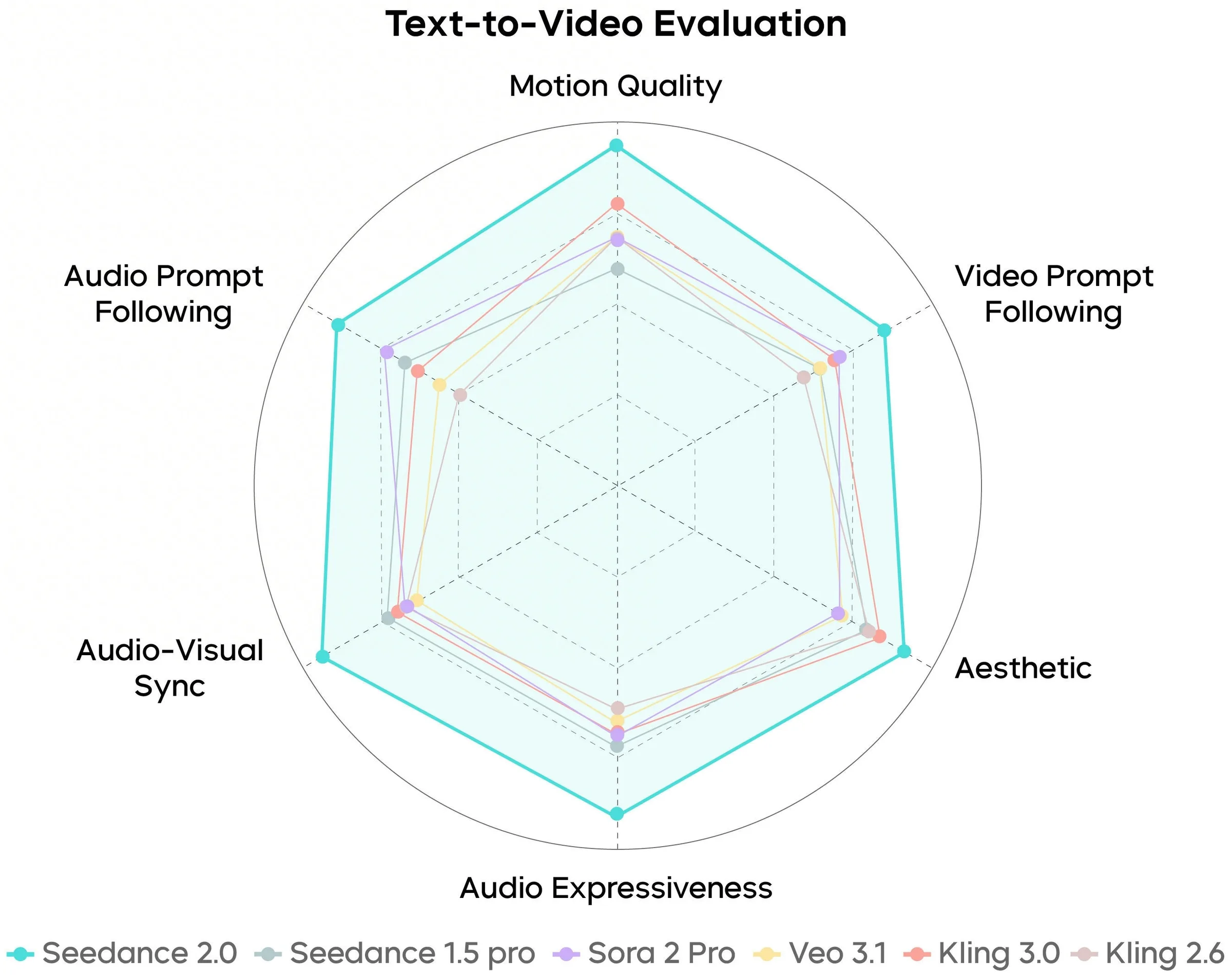
Seedance 2.0 is a multimodal video generation model that creates short videos from prompts and optional media references. People also call it Higgsfield Seedance 2.0 in some listings and discussions. The model can generate motion, camera moves, and scene changes from a single prompt. It can also use reference inputs to keep a character, product, or style stable across clips.
Creators use Seedance 2.0 for:
Social video loops and short narrative clips
Product demos and ad concepts
Music visualizers and lyric scenes (with audio to video Seedance)
Storyboards and previsualization for film shots
Video to video Seedance restyling and motion transfer
What makes Seedance 2.0 different?
Seedance 2.0 features focus on control and multimodal inputs. Many users pick it when they want:
A clear camera plan with camera movement prompts
A consistent look across a series with style consistency Seedance
A stable subject with character consistency Seedance
Fast iteration with short clips and repeatable settings
Seedance 2.0 limitations usually show up in:
Fine text rendering on signs and screens
Hands, fast action, and crowded scenes
Long story continuity across many shots without references
How do I access Seedance 2.0 and where can I use it?
Access options and platform availability
People usually access Seedance 2.0 through a hosted app or partner platform rather than running it locally. Availability changes often, so you should check:
The Seedance 2.0 official website Dreamina app.
The vendor dashboard for Seedance 2.0 access and plan details
Community threads like Seedance 2.0 guide reddit for current links and waitlists
If you see references to Seedance 2.0 huggingface or a Seedance 2.0 paper or Seedance 2.0 technical report, treat them as research or demos unless the page clearly offers an official inference endpoint. Many “model cards” list concepts but do not provide public generation.
Pricing, credits, and plan differences
Seedance 2.0 pricing often uses a credit system based on resolution, duration, and extra controls like reference video. Plans usually differ by:
Monthly credits
Max resolution and max duration per clip
Queue priority and concurrency
Commercial usage rights level
Because pricing changes by platform, you should confirm inside the billing page before you commit. If a platform does not show clear terms, do not assume commercial rights.
But if you use Partner program like fal.ai here's the following pricing;
Text to video costs $0.3034/second
Image to video costs $0.3024/second
Text to Video (Fast) model costs $0.2419/second
Image to video (Fast) model costs $0.2419/second
Usage rights and policy constraints
Most hosted AI video tools apply rules that restrict:
Impersonation and deceptive political content
Explicit content and illegal content
Use of copyrighted characters or logos in a misleading way
For licensing, many platforms grant you rights to use outputs commercially if you follow policy and pay for a plan that includes commercial use. You should save the plan terms and the generation logs for proof.
Seedance 2.0 features, inputs, and settings
What inputs does Seedance 2.0 support (text, image, video, audio)?
Seedance 2.0 multimodal workflows usually support:
Text to video Seedance: prompt-only generation
Image to video Seedance: animate a still image or use it as a reference
Video to video Seedance: restyle, re-render, or change motion feel
Audio to video Seedance: drive timing, rhythm, or mood from an audio track
Reference images Seedance and reference video Seedance: guide identity, wardrobe, props, and composition
If your platform supports multiple references, you can assign roles like “character reference” and “style reference.” If it does not, you can still simulate roles by describing them in the prompt and keeping the same reference input.
Seedance 2.0 input specs: resolution, aspect ratio, duration
Seedance 2.0 input specs depend on the host platform. Many platforms follow common limits:
Aspect ratio: 16:9, 9:16, 1:1 are common options for Seedance 2.0 aspect ratio
Resolution: 720p and 1080p are common for Seedance 2.0 resolution tiers
Duration: 4–10 seconds is common for Seedance 2.0 duration per clip
Treat these as typical ranges, not guaranteed limits. Always check the UI for the current caps. If you need a 30–60 second sequence, you should plan a multi-clip edit with consistent references.
Seedance 2.0 settings and parameters that matter
Seedance 2.0 settings vary by platform, but these Seedance 2.0 parameters show up often:
Seed / random seed: repeatability across reruns
Motion strength: how much movement the model adds
Prompt strength / guidance: how strictly it follows text
Reference strength: how strongly it follows reference images or video
Frame rate: smoothness vs cost
Stabilization: reduces jitter but can reduce dynamic motion
A simple rule helps: raise reference strength for identity, lower motion strength for clean faces, and raise motion strength for action shots.
Seedance 2.0 prompt structure that works
A clear prompt structure for consistent results
A strong Seedance 2.0 prompt uses a fixed order. This prompt structure reduces confusion and improves repeatability:
Subject: who or what is on screen
Action: what the subject does
Scene: location and time
Camera: lens, framing, movement
Lighting: key light style and mood
Style: film stock, color grade, genre
Constraints: duration, no cuts, no text, no extra people
Negative prompts Seedance: what to avoid
You should keep nouns stable across clips. You should also reuse the same identity line for character consistency Seedance.
How do I write a Seedance 2.0 prompt for cinematic camera movement?
Use camera movement prompts that state:
Shot size: wide, medium, close-up
Lens: 24mm, 35mm, 50mm, 85mm
Move: dolly in, dolly out, pan, tilt, crane, handheld, steadicam
Speed: slow, steady, fast
Focus: shallow depth of field, rack focus
Rule: “single continuous shot” if you want no cuts
Example camera line you can reuse:
“Medium close-up, 50mm lens, slow dolly in, shallow depth of field, gentle handheld micro-movement, single continuous shot, no cuts.”
Negative prompts Seedance that reduce common artifacts
Negative prompts Seedance help when the model adds unwanted elements. Common negatives include:
“no text, no subtitles, no watermark, no logo”
“no extra fingers, no deformed hands, no melted face”
“no flicker, no jitter, no frame warping”
“no sudden zoom, no jump cuts”
“no duplicate subject, no extra people”
You should keep negatives short and specific. Long negative lists can reduce motion and detail.
Seedance 2.0 prompt examples and viral prompt patterns
Seedance 2.0 prompt examples (with token purpose)
Below are tested-style templates you can copy. Each example includes a “why it works” note so you can edit with intent.
Example 1: Cinematic product shot (text to video Seedance)
“Single glass perfume bottle on a wet black stone table, tiny water droplets, the bottle rotates slowly clockwise. Dark studio, soft rim light, subtle fog in the background. Camera: 85mm lens, close-up, slow dolly left, shallow depth of field, single continuous shot. Style: high-end commercial, clean reflections, neutral color grade. Constraints: no text, no labels, no extra objects.”

Why each part matters:
“single glass perfume bottle” locks the subject count
“wet black stone table” gives stable texture cues
“85mm close-up” reduces distortion
“single continuous shot” reduces random cuts
Example 2: Character intro (image to video Seedance with reference images Seedance)
Use the reference character. A young woman with short black hair and a red jacket walks through a rainy street at night, she looks at camera and smiles. Neon signs reflect on wet pavement. Camera: 35mm lens, medium shot, slow tracking shot from right to left, slight handheld. Lighting: neon key light, soft fill, rain highlights. Style: cinematic, realistic skin, film grain. Constraints: keep face identity, keep jacket color, no text.
Why it works:
“Use the reference character” tells the model to prioritize identity
“keep face identity” repeats the goal as a constraint
“35mm medium shot” balances environment and face detail
Example 3: Video to video Seedance restyle
“Use the reference video motion. Restyle into 1990s anime, clean line art, soft cel shading, strong silhouettes. Keep the same camera movement and timing. Constraints: keep subject count, no new objects, no text.”
Why it works:
“keep the same camera movement and timing” reduces drift
“keep subject count” prevents extra characters
Seedance 2.0 viral prompts patterns
Many Seedance 2.0 viral prompts share the same pattern:
A simple subject
A strong camera move
A clear lighting hook
A short style label
A “single shot” constraint
Reusable Seedance 2.0 viral prompts template:
“A [subject] in [scene], [action]. Camera: [lens], [shot size], [move], [speed], [focus], single continuous shot. Lighting: [key], [fill], [practical]. Style: [genre], [color grade]. Constraints: no text, no watermark.”
If you want “viral” motion, use one strong move like “fast push-in” or “orbit” and keep the rest stable.
Seedance 2.0 workflow for repeatable results
Seedance 2.0 workflow checklist (text-to-video)
Use this Seedance 2.0 workflow when you start from text:
Write a 1-sentence concept with one subject and one action
Add a camera line with lens, framing, and movement
Add lighting and style in one short line
Add constraints and negative prompts Seedance
Generate at a lower resolution first to test motion
Fix the prompt before you raise resolution or duration
Lock the seed if you want repeatability
Export and cut in an editor, then generate the next shot
This method saves credits because you do not pay high resolution costs during early prompt testing.
Recommended workflow for image-to-video generation
Image to video Seedance works best when the input image is clean and simple:
Use one clear subject
Avoid tiny faces and busy backgrounds
Use high contrast edges for better motion boundaries
Steps:
Upload the image as the main reference
Set reference strength high for identity or product shape
Set motion strength low to medium for face safety
Prompt for a single camera move and one action
If the model warps the face, reduce motion and switch to a wider shot
How do I keep character consistency across multiple clips?
Use a repeatable identity pack:
One reference image with a clear face and outfit
One fixed identity line in every prompt
One fixed style line in every prompt
Same seed when you want similar composition
Identity line example:
“Same character: oval face, small nose, short black hair with straight bangs, red jacket with silver zipper, brown eyes.”
Consistency rules:
Keep wardrobe words identical
Avoid adding new accessories mid-series
Use similar shot sizes across clips
Use reference video Seedance if you need the same walk cycle or gesture timing
Seedance vs Kling vs Veo vs Sora (AI video generator comparison)
Side-by-side comparison table (same evaluation criteria)
The table uses practical criteria that affect daily work. Availability and limits change by region and platform, so treat this as a general AI video generator comparison.
Criteria | Seedance 2.0 | Kling | Veo | Sora |
|---|---|---|---|---|
Best use case | Controlled short clips, strong prompt camera direction, multimodal workflows | Stylized motion, social-ready visuals, strong aesthetics | High-quality cinematic scenes, strong realism in supported access | Longer coherent scenes and story-like continuity in supported access |
Inputs | Text, image, video, audio (platform dependent) | Text, image (common), video (varies) | Text, image (common), video (limited/varies) | Text, image (varies), video (varies) |
Control tools | Reference images Seedance, reference video Seedance, prompt structure control | Strong style control, less consistent identity without references | Strong cinematic look, fewer public controls in many releases | Strong scene understanding, access often limited |
Character consistency | Good with references and locked identity lines | Mixed, improves with references | Good in supported tools, depends on product | Often strong in demos, access varies |
Availability | Often via hosted apps and partner platforms | Often via apps and regional access | Often limited access or waitlist | Often limited access or waitlist |
Common limits | Short duration, text artifacts, hand issues | Identity drift, motion artifacts in fast action | Access limits, policy limits, render time | Access limits, policy limits, render time |
Seedance vs Kling: when to choose each
Choose Seedance 2.0 when you need:
A strict shot plan with camera movement prompts
Better repeatability with a fixed Seedance 2.0 workflow
Multimodal video generation with audio or video references (if your platform supports it)
Choose Kling when you want:
Fast stylized looks for social clips
Strong visual flair with less prompt engineering
Seedance vs Veo and seedance vs Sora
Choose Veo or Sora when you need:
Longer scene coherence in supported access
A more “film-like” scene with fewer prompt tokens
Choose Seedance 2.0 when you need:
More direct control through prompt structure and references
A faster loop of generate, review, and regenerate short shots
If your goal is “best AI video model,” the honest answer depends on your shot type, your access, and your budget. A model that you can use today often beats a model you cannot access.
Seedance 2.0 troubleshooting (common issues and fixes)
Troubleshooting decision tree
Use this Seedance 2.0 troubleshooting tree. Start with the main failure you see.
Face or hands look wrong
Reduce motion strength
Use a wider shot (medium instead of close-up)
Add negative prompts Seedance: “no deformed hands, no extra fingers”
Use reference images Seedance with a clear face
Character identity changes between clips
Reuse the same reference image
Repeat the same identity line word-for-word
Increase reference strength
Keep lighting and camera similar
Camera move looks random or cuts appear
Add “single continuous shot, no cuts”
Use one camera move only
Remove conflicting camera words like “dolly in” and “zoom out” together
Flicker, jitter, or warping
Lower motion strength
Add “no flicker, no jitter”
Use a simpler background
Increase stabilization if the platform offers it
Scene adds extra objects or extra people
Add “one subject only” and “no extra people”
Remove vague words like “crowded” or “busy”
Use a tighter shot size
Coherence and motion tips that work fast
Use verbs that describe one action: “walks,” “turns,” “picks up,” “opens”
Avoid multi-step actions in one clip
Keep the environment stable with one location and one time of day
Use shot list prompts across multiple clips instead of one long prompt
Practical tips and prompt library (copy, test, iterate)
Use these shot list prompts as a pack. They help you build a 20–40 second sequence from 4–6 clips.
Establishing shot
“Wide shot of a quiet diner at night, rain outside the windows, warm interior lights. Camera: 24mm lens, slow dolly in, single continuous shot. Style: cinematic realism, soft film grain. Constraints: no text, no watermark.”Subject reveal
“Medium shot of the same diner booth. A man in a dark coat sits alone and stirs coffee once. Camera: 35mm lens, slow push-in, shallow depth of field, single continuous shot. Lighting: warm practical lamps, soft shadows. Constraints: keep subject count, no extra people.”Detail insert
“Close-up of a coffee cup, steam rising, spoon taps the ceramic once. Camera: 85mm macro feel, static shot, shallow depth of field. Style: high detail, clean highlights. Constraints: no text.”Reaction close-up
“Close-up of the man’s face, he looks up and blinks, calm expression. Camera: 50mm lens, very slow dolly in, shallow depth of field, single continuous shot. Constraints: realistic skin, no face warping.”
Why “before/after” edits matter (and what to change)
If your first output feels flat, change one variable at a time:
Add one lighting hook: “hard rim light” or “neon reflections”
Change lens: 35mm for space, 85mm for product detail
Change move: “slow orbit” instead of “dolly in”
Tighten constraints: “one subject only, no cuts, no text”
This method keeps your Seedance 2.0 prompts stable and makes results easier to predict.
Conclusion
Seedance 2.0 works best when you treat it like a short-shot generator with clear control inputs. This Seedance 2.0 guide gave you a practical Seedance 2.0 tutorial for how to use Seedance 2.0 with prompt structure, Seedance 2.0 settings, Seedance 2.0 parameters, and a repeatable Seedance 2.0 workflow for text to video Seedance and image to video Seedance. You also got Seedance 2.0 prompt examples, Seedance 2.0 viral prompts patterns, and a troubleshooting decision tree for common failures.
Next, pick one prompt template, generate three variations, and lock the best settings. Then build a short shot list and keep references consistent. That process produces clean clips faster than random prompting.
Frequently Asked Questions

Written by
Raman Singh
Raman Singh is a highly skilled marketing professional who serves as the head of marketing at Copyrocket AI. With years of experience in the field, Raman has developed a deep understanding of all asp
View all postsYour AI Marketing Agents
Are Ready to Work
Stop spending hours on copywriting. Let AI craft high-converting ads, emails, blog posts & social media content in seconds.
Start Creating for FreeNo credit card required. 50+ AI tools included.
Related Articles
 General
NotebookLM For Coders: Turn Docs Into Faster Code
Code work often fails for a simple reason. You do not have the right context at the right time. You read docs in one tab, skim tickets in another tab, and then...

 General
How to Optimize for AI Search in 2026: The Complete Guide
AI search has shifted from experimental feature to primary search method for millions of users. ChatGPT Search, Google AI Overviews, Perplexity, Claude, and Gem...
 General
Claude Opus 4.6 Review: Here's What New!
Claude Opus 4.6 from Anthropic draws attention because teams want an AI model that writes better code, follows instructions, and stays consistent across long se...